
ZEROtherm Nirvana: Designed for Top Performance
- Posted in
- Cases/Cooling/PSUs
Specifications
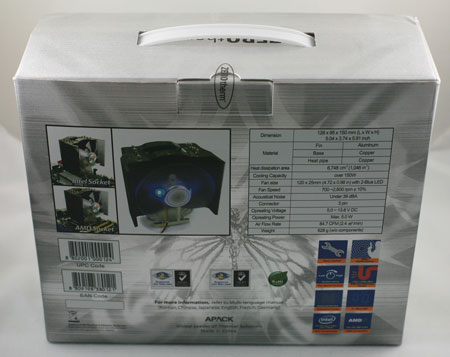
The 120mm fan is pre-mounted and is not interchangeable with other 120mm fans. That makes specifications and performance of the Nirvana fan particularly important. The NV120 can be mounted on either AMD 754/939/940/AM2 or Intel Socket 775.
| ZEROtherm Nirvana NV120 | |
| Dimensions | 128(W) x 95(D) x 150mm(H) |
| Weight | 628g (18.7 ounces) |
| Matepial | Nickel-plated copper heatpipes and base, aluminum cooling fins |
| Heat Dissipation Area | 6728 cm^2 (1046 in^2) |
| Cooling Capacity | >150W |
| Configuration | Four nickel-plated copper heatpipes in U loops |
| Nirvana 120mm Integrated Fan | |
| Fan Size | 120mm x 120mm x 25mm |
| Fan Speed | 700-2600 rpm (+/- 10%) |
| Connector | 3-pin |
| Operating Voltage | 5.0 - 13,8V DC |
| Noise Level | Under 39 dB(A) |
| Maximum Airflow | 84.7 CFM |
| Operating Power | Max 5.0W |
The included 120mm fan is rated at a high 84.7 CFM output at 39 dB(A) noise level. These specifications appear in line with the output specifications. The clear fan is backlit by two blue LEDs, which may matter to you if you display the guts of your computer in a side window case.
Installation
The Nirvana comes fully assembled, including the fan. You just need to install the mounting plate for either Intel or AMD before attaching the cooler to your motherboard. That involves just four small screws to install either the Intel or AMD adapter to the base plate.
For Intel you must remove the motherboard to attach the cooler. On Intel 775 the spring-loaded mount screws pass through the four motherboard holes and they are secured to the motherboard with a back plate with threaded holes to receive the mount plate screws. The NV120 is a heavy cooler and the secure mounting system is definitely appreciated. However, for an Intel CPU there is no option but to remove the motherboard before installation. This will be trivial to some, and a big deal to others.
Overall, the cooler installation is pretty easy - much easier than many competing products that also provide the security of a bolt-through installation. It is obvious the engineers at ZEROtherm actually examined and used the cooler mount system. This is particularly noticeable when you see the spacing of the fan in relation to the cooler body; it allows a screwdriver to fit right through to the spring-loaded screws to mount the cooler. It is in thoughtful little touches like this that the Nirvana stands out from most of the cooler crowd. Those worried about a heavy heatsink popping out of holes with the Intel push clips will be much happier with this installation method.
Nirvana attaches to AMD with a clip that snaps onto the lugs of the existing CPU cage. The motherboard does not need to be removed from an AMD system to install this cooler, but the entire weight is basically resting on two plastic lugs. This should not really present a problem, but it is not a mount solution that can take a lot of moving. If your LAN party system is AMD-based, you will want to look elsewhere for a cooler that can handle the demands of being carried from one LAN party to the next.
Originally published at https://www.anandtech.com/show/2421 (Wayback Machine).