
Exclusive: WidowPC Sting 517D2: GeForce 8800M GTX Benchmarks
- Posted in
- Laptops
Battery Life and Power Use
Given our limited time with the laptop so far, we decided to forego testing with MobileMark 2007 and SYSMark 2007 for now. Given the components in the Sting 517D2, it's safe to say that application performance is more than acceptable in everything we threw at it. If you actually need quad-core computational performance, you might need to look elsewhere, but for everything else this notebook is as fast as a good midrange to high-end desktop system.
For battery life testing, we did take the time to perform our standard three in-house tests. The first consists of surfing the internet until the batter runs down. We set Internet Explorer to load three web pages (including AnandTech.com) pause for 60 seconds, exit and then reload those pages. The second test simply plays a DVD until the battery runs dead. For the third test, we loop the four gaming tests in 3DMark06. In all cases, we set the power profile to "Balanced" and leave the display brightness at maximum. If you're willing to turn down the brightness level, you should be able to increase battery life by another 10 to 15 minutes.
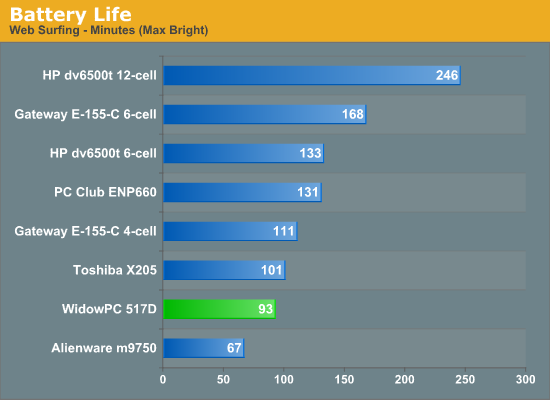
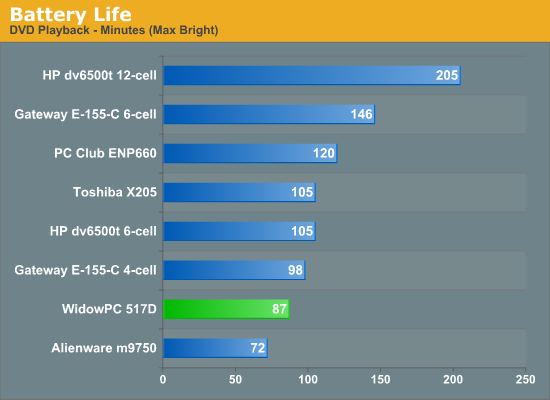
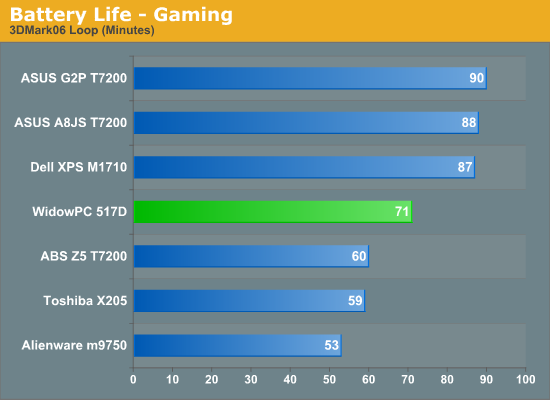
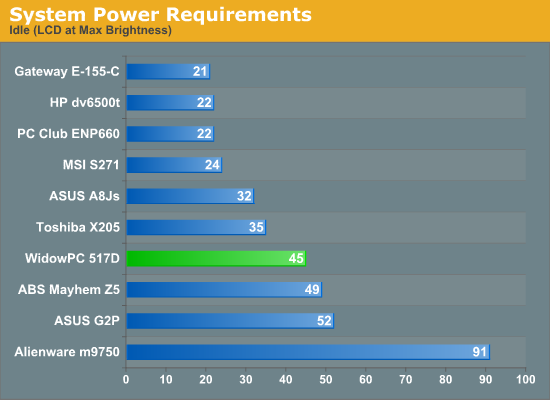
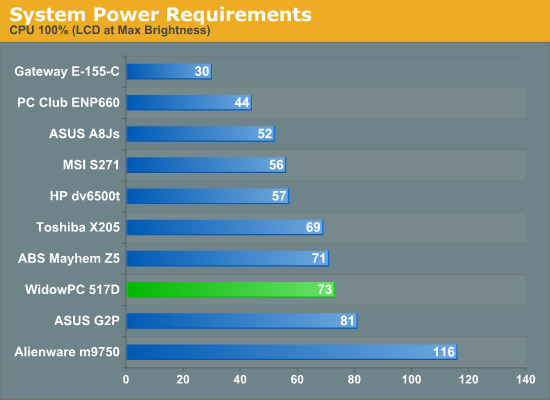
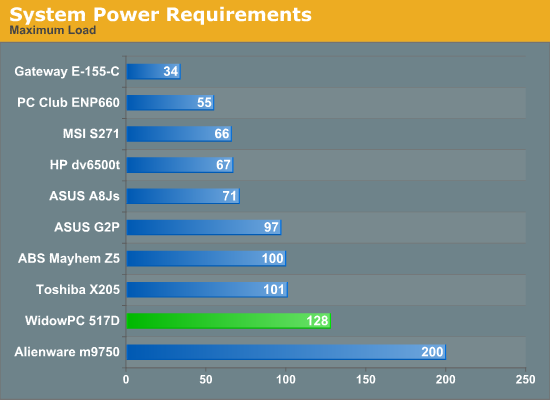
The 8800M GTX ends up using slightly less power than the last-gen Go 7950 GTX, but neither one is even remotely battery friendly. SLI platforms obviously suffer even more, making them unfit for anything but short-term battery use. They work great as a system that you can take to your friend's house to play games, but at under 90 minutes of battery life even with the 8700M GT we're definitely not talking about something that can take the place of a Nintendo DS on road trips.
One other interesting item to note is that on the higher-end GPUs (G0 7950 GTX and 8800M), maximum performance is throttled in battery mode - presumably to prevent overloading the battery. Performance in 3DMark06 for example is roughly half as fast in battery mode. Even if you're not worried about playing games on battery, the mere presence of a discrete GPU has a significant impact on batter life. What we really need is an option to completely disable the discrete GPU when it's not needed. NVIDIA has just finished briefing us at CES on their Hybrid SLI technology that will allow them to disable discrete GPUs, provided they are paired with an NVIDIA IGP chipset.
We are aware that other notebooks already provide an alternative to Hybrid SLI that consists of a manual switch that you flip while the system is powered off. That's a nice stopgap solution, but long-term users want more hands-off power management. Hybrid SLI will move the switch to software initially, allowing the user to turn off/on the discrete GPU depending on needs. While that sounds great, there's a big catch: Hybrid SLI will require new chipsets (which are not yet available) as well as new graphics cards. These will both become available in the coming weeks, but it appears NVIDIA plans to target the enthusiast desktop users first and only later will we see Hybrid SLI begin to show up in notebooks.
Regardless of where it shows up first, the potential power savings make Hybrid SLI something we can't wait to see. Imagine being able to get a gaming notebook that can actually function perfectly well as a mobile computer, provided you shut off the discrete graphics. In the not-too-distant future, we may actually be able to have our cake and eat it too! [Ed: Too bad the cake is a lie!]
Originally published at https://www.anandtech.com/show/2415 (Wayback Machine).