
Shuttle SG33G5: Black Beauty or Black Sheep?
- Posted in
- Systems
Gaming/3D Performance
Shuttle systems often fill the role of gaming systems, especially as their portability makes for a great LAN party box. However, there are inherent limitations when it comes to gaming. The first and most obvious is that the case can physically only support a single-slot PCI-E solution.
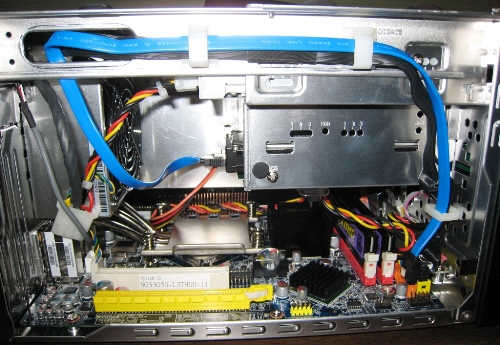
This goes hand in hand with the second: the diminutive power supply, which lacks the capacity to support power-hungry high-end graphics cards. If you plan on gaming with the SG33G5, what you need is a high performance single slot video card that doesn't consume a lot of power. Enter NVIDIA's 8800 GT.
It's well known that the GMA 3100 is no graphics powerhouse (despite its "powerful 400MHz core"), but exactly what kind of performance can one expect from it as a gaming device? Before jumping into the 8800 GT results, let's perform a quick test with the integrated video. We will show F.E.A.R. performance later in this review, but we'll start with a test run using the GMA 3100.
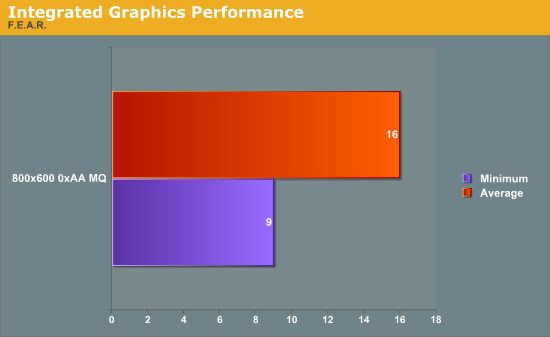
Ouch. At 800x600 with medium details, this game is not even close to playable. 88% of the run falls below 25 FPS. When it comes to games, the G33 is simply not going to hold up.
Without further ado, let's move on to the 8800 GT gaming results. One of our pet peeves is benchmarks that are not reproducible for an average user. How can users tell how their system compares to the latest and greatest (i.e., how much it will improve with an upgrade) if they can't see their 2 FPS faster result in the same configuration? The benchmarks used here are publicly available for download and are easy to test. In general, we will try to stick with this model of reproducibility and include relevant games and custom demos as required to highlight differences in performance or scalability.
3DMark 2006
We'll start with the classic synthetic 3D benchmark, run with default demo options only.

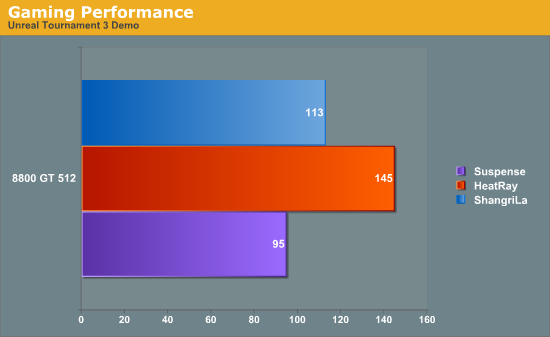
Unreal Tournament 3 Demo
We run the UT3 Demo flybys with details set to maximum (-compatscale=5 switch) in all cases. These flybys are part of the demo, run by copying the executable shortcut and modifying it with command line parameters. Here is an example of the parameters used for Shangri-La:
DM-ShangriLa?causeevent=FlyThrough?quickstart=1?nocusto
mchars=1?numplay=0 -seconds=90 -unattended -compatscale=5 -novsync -fixedseed -CaptureFPSChartInfo=1
-nomoviestartup
One other difference between these results and previous results is that we enabled bots. This aids in a comparison against an actual gaming scenario (weapons and AI active), but does decrease reproducibility.
Originally published at https://www.anandtech.com/show/2397 (Wayback Machine).