
TRENDnet TEW-633GR: 802.11n Draft 2.0 to the Rescue
- Posted in
- Networking
Feature Set and Options: TRENDnet Draft N Router
The TEW-633GR comes feature packed and offers all the goodies expected of today's leading routers. We'll cover a few of the more interesting items that make this product stand out in a crowd in greater detail on the following pages, but here's a quick overview.
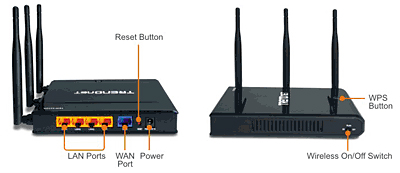
TRENDnet's offering comes in a sleek, all-black casing with the standard array of status lights - power, wide area network (WAN) connectivity and activity, local area network (LAN) connectivity and activity (for each port), wireless LAN (WLAN) activity, and Wi-Fi Protected Setup (WPS) status. This last allows the user to easily synchronize supported components at the touch of a button. A physical switch located on the side of the router allows the user to securely disable the wireless functionality for those that wish to use this router in an all-wired environment.
The package contents include the router, a 12Vdc 1A power adapter, vertical base stand, a single ~5ft. RJ-45 CAT5 network cable, a multi-language Quick Installation Guide, and a CD-ROM containing drivers, an automated router install/replacement routine, an electronic User's Guide, a 30-day fully functioning trial version of Network Magic, and a complimentary subscription to McAfee Internet Security Suite (which we couldn't get to work after several attempts).
The TEW-633GR comes feature packed and offers all the goodies expected of today's leading routers. We'll cover a few of the more interesting items that make this product stand out in a crowd in greater detail on the following pages, but here's a quick overview.
| TRENDnet TEW-633GR- Features | |||
| Chipset: | Atheros AR5416 + AR2133 | ||
| Maximum Data Transfer Rate: | 300 Mbps | ||
| Estimated Maximum Outdoor Coverage: | 400 Meters | ||
| Estimated Maximum Indoor Coverage: | 150 Meters | ||
| Output Power: | 802.11b: 18dBm (typical) 802.11g: 15dBm (typical) 802.11n (draft 2.0): 6dBm (typical) with HT20 or HT40 |
||
| Receiving Sensitivity: | 802.11b: -84dBm (typical) @ 11Mpbs 802.11g: -72dBm (typical) @ 54Mbps 802.11n (draft 2.0) : -70dBm (typical) with HT20 or HT40 |
||
| Operating Frequency: | 2.4GHz | ||
| Network Connectivity Protocol: | Gigabit Ethernet (10/100/1000) IEEE 802.11b IEEE 802.11g IEEE 802.11n draft 2.0 |
||
| Router Features: | NAT Support Stateful Packet Inspection (SPI) - Up to 24 rules MAC Address Filtering UPnP DHCP Support DMZ and VPN Passthrough Dynamic DNS QoS StreamEngine Firmware Upgradeable Browser Based Management |
||
| Network Security: | WEP 64/128 bit WPA-WPA2 WPA-PSK- WPA2-PSK Encryption: hardware AES/TKIP, 64/128-bit WEP (Hex/Passphrase, for 11b/g) |
||
| Gigabit Ethernet Connections: | 4 x 10/100/1000Mbps Auto-MDIX | ||
| WAN Connections: | 1 x 10/100/1000Mbps Auto-MDIX | ||
| Channels: | 1~11 (US), 1~13 (EU) | ||
| Operating System Support: | Windows 98SE/NT/2000/XP/Vista/Server 2003 Linux MacOS 8/9x MacOS X 10.x |
||
| Power Adapter: | External A/C | ||
| Warranty: | Limited 3 years | ||
| Matching Wireless PC Card: | TEW-621PC | ||
| Router Firmware: | 1.0 | ||
TRENDnet's offering comes in a sleek, all-black casing with the standard array of status lights - power, wide area network (WAN) connectivity and activity, local area network (LAN) connectivity and activity (for each port), wireless LAN (WLAN) activity, and Wi-Fi Protected Setup (WPS) status. This last allows the user to easily synchronize supported components at the touch of a button. A physical switch located on the side of the router allows the user to securely disable the wireless functionality for those that wish to use this router in an all-wired environment.
The package contents include the router, a 12Vdc 1A power adapter, vertical base stand, a single ~5ft. RJ-45 CAT5 network cable, a multi-language Quick Installation Guide, and a CD-ROM containing drivers, an automated router install/replacement routine, an electronic User's Guide, a 30-day fully functioning trial version of Network Magic, and a complimentary subscription to McAfee Internet Security Suite (which we couldn't get to work after several attempts).
Originally published at https://www.anandtech.com/show/2361 (Wayback Machine).