
Transcend TS16GSSD34E: SSD ExpressCard for those on the Go...
- Posted in
- Storage
WinRAR 3.70
The first of our WinRAR tests measures the time it takes to compress our test folder that contains 444 files, 10 folders, and 602MB of data from our source WD Raptor drive to the target drive. In order to preclude other components (ie. the CPU) from being a factor in this test, WinRAR was set to "store" - this mode offers no actual file compression, but instead simply puts all of our test files into a single RAR archive. The resulting benchmark therefore highlights the write performance of the device in question.
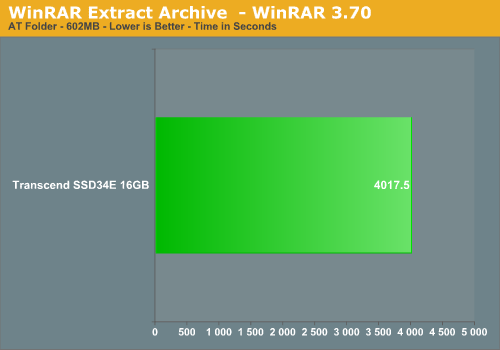
We then extract the archive to a different location on the same drive, giving a benchmark which shows not only the read and write performance, but is also influenced by the seek times of the devices, since the drive must continuously move from position to position.
WinRAR Create/Extract Archive Test
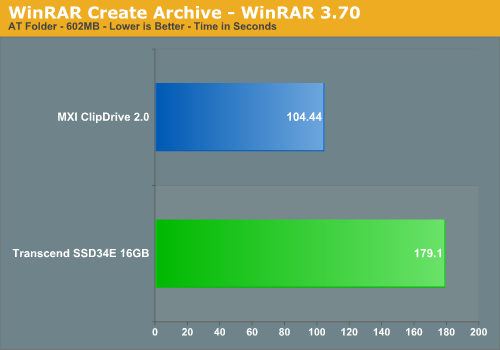
The SSD34E performs the store operation in 2 minutes and 59 seconds - not only is this far behind the Samsung T166 drive at 10.06 seconds, but even the fairly generic MXI ClipDrive used for USB 2.0 comparison turns in a substantially faster performance. Clearly, this is a disappointing result for the SSD34E.
The archive extraction portion of the benchmark truly makes the SSD drive look awful. It took over 22 times as long to perform the "extract" operation when compared to our Samsung T-166 at 10.15 seconds, which is an absolutely astonishing figure.
Since our standard test folder wouldn't fit on our smaller MXI drive, we ran a smaller 100mb extract on it. We found that this smaller operation took 12 times as long on the MXI drive. Surprised at the results, we ran this same 100mb archive on the Transcend ExpressCard, and found that the 12:1 ratio did indeed carry over to the Transcend device:
WinRAR Smaller File Create/Extract Archive Test
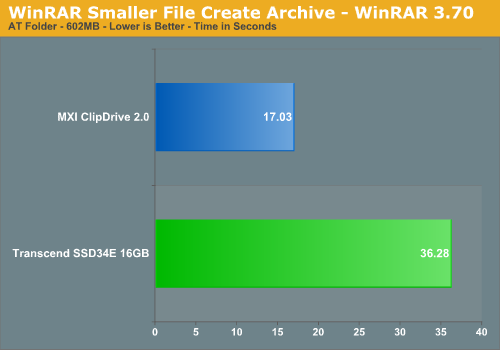
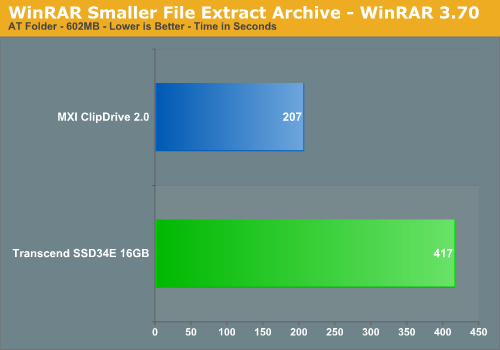
While it is somewhat reassuring that the Transcend ExpressCard isn't bested in terms of the increased extract time ratio, the reality is that it is still trounced soundly by the fairly standard MSI ClipDrive.
The first of our WinRAR tests measures the time it takes to compress our test folder that contains 444 files, 10 folders, and 602MB of data from our source WD Raptor drive to the target drive. In order to preclude other components (ie. the CPU) from being a factor in this test, WinRAR was set to "store" - this mode offers no actual file compression, but instead simply puts all of our test files into a single RAR archive. The resulting benchmark therefore highlights the write performance of the device in question.
We then extract the archive to a different location on the same drive, giving a benchmark which shows not only the read and write performance, but is also influenced by the seek times of the devices, since the drive must continuously move from position to position.
WinRAR Create/Extract Archive Test
The SSD34E performs the store operation in 2 minutes and 59 seconds - not only is this far behind the Samsung T166 drive at 10.06 seconds, but even the fairly generic MXI ClipDrive used for USB 2.0 comparison turns in a substantially faster performance. Clearly, this is a disappointing result for the SSD34E.
The archive extraction portion of the benchmark truly makes the SSD drive look awful. It took over 22 times as long to perform the "extract" operation when compared to our Samsung T-166 at 10.15 seconds, which is an absolutely astonishing figure.
Since our standard test folder wouldn't fit on our smaller MXI drive, we ran a smaller 100mb extract on it. We found that this smaller operation took 12 times as long on the MXI drive. Surprised at the results, we ran this same 100mb archive on the Transcend ExpressCard, and found that the 12:1 ratio did indeed carry over to the Transcend device:
WinRAR Smaller File Create/Extract Archive Test
While it is somewhat reassuring that the Transcend ExpressCard isn't bested in terms of the increased extract time ratio, the reality is that it is still trounced soundly by the fairly standard MSI ClipDrive.
Originally published at https://www.anandtech.com/show/2360 (Wayback Machine).