
Transcend TS16GSSD34E: SSD ExpressCard for those on the Go...
- Posted in
- Storage
ExpressCard Specifications
The maximum performance of ExpressCard devices depends on which interface the manufacturer has chosen to use:
PCI Express: 2.5Gbit/sec/direction
USB 2.0: 480 Mbit/sec
Providing hardware manufacturers the ability to choose between the USB 2.0 interface (which is fairly easy to implement) and a dedicated PCI-Express x1 interface (which is somewhat more complex, but offers obvious performance benefits) gives ExpressCard flexibility which had not been seen in laptops up to that point. It also allows for high performance applications which were unheard of during the PC Card era - for example, Magma offers an external adapter which allows for the connection of a single wide PCI-Express graphics card to a laptop.
Laptop manufacturers have been adding ExpressCard support recently, though most are continuing support for their existing PC Card interfaces to allow users to gradually wind down their investment in legacy PC Card hardware. As the two slots are physically incompatible, this is a trend which is likely to continue for some time.
The Transcend TS16GSSD34E
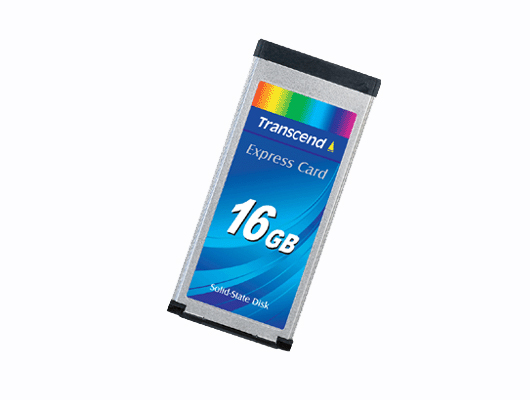
Transcend introduced their ExpressCard SSD line in March of 2007, with capacity options varying from 2GB to 16GB in size. They have since refined this offering to three choices: 8GB, 16GB, and 32GB. For this, they are using the ExpressCard/34 packaging, and opted to interface with the USB 2.0 host.
Specifications
While the transfer rate is nothing exceptional, the solid state memory found in the TS16GSSD34E provides access times of less than 1ms, and the ExpressCard packaging means that the device will not stick out of your existing laptop. The low power requirements of the unit, minimal heat dissipation, and light weight of the module all make it a potential option for users with low storage requirements who may wish to replace the internal hard drive in their laptop. (Note: Check your laptop's BIOS for boot options - not all laptops will allow booting from an ExpressCard device).
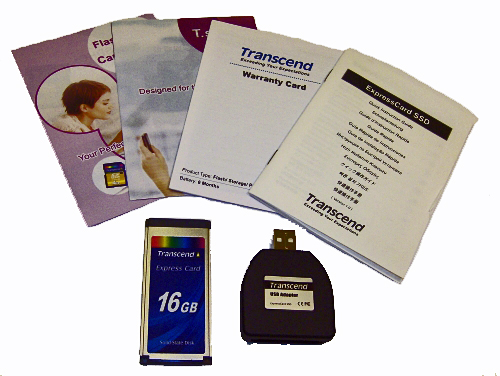
The Transcend TS16GSSD34E comes packaged with the ExpressCard module itself, a USB-ExpressCard adapter which allows the device to be connected to a standard USB 2.0 port, the product manual, warranty card, and an assortment of Transcend product advertisements. The manual is laughably short, providing nuggets of information such as "Once you have completed installing the SSD34E, you can see that the installation was successful". The USB adapter for the SSD34E seems somewhat bulkier than it needs to be, though the ExpressCard fits nicely into the slot. No incompatibilities were observed either in our test bed system or a Lenovo T60 laptop in our labs while using the USB adapter.
The maximum performance of ExpressCard devices depends on which interface the manufacturer has chosen to use:
PCI Express: 2.5Gbit/sec/direction
USB 2.0: 480 Mbit/sec
Providing hardware manufacturers the ability to choose between the USB 2.0 interface (which is fairly easy to implement) and a dedicated PCI-Express x1 interface (which is somewhat more complex, but offers obvious performance benefits) gives ExpressCard flexibility which had not been seen in laptops up to that point. It also allows for high performance applications which were unheard of during the PC Card era - for example, Magma offers an external adapter which allows for the connection of a single wide PCI-Express graphics card to a laptop.
Laptop manufacturers have been adding ExpressCard support recently, though most are continuing support for their existing PC Card interfaces to allow users to gradually wind down their investment in legacy PC Card hardware. As the two slots are physically incompatible, this is a trend which is likely to continue for some time.
The Transcend TS16GSSD34E
Transcend introduced their ExpressCard SSD line in March of 2007, with capacity options varying from 2GB to 16GB in size. They have since refined this offering to three choices: 8GB, 16GB, and 32GB. For this, they are using the ExpressCard/34 packaging, and opted to interface with the USB 2.0 host.
Specifications
| Drive Specifications - Transcend TS16GSSD34E | |||
| Manufacturer's Stated Capacity | 16GB | ||
| Operating System Stated Capacity | 15.5 GB | ||
| Interface | USB 2.0 | ||
| Operating Voltage | 3.3V | ||
| Operating Temperature | 0°C(32°F) to 70°C(158°F) | ||
| Weight | 19g | ||
| Read Performance | 18MB/s | ||
| Write Performance | 8MB/s | ||
| Power Draw Idle / Load | .46W / 1.08W | ||
| Acoustics Idle / Load | 0 dB(A) / 0 dB(A) | ||
| Thermals Idle / Load | 25C / 26C | ||
| MTBF Rating | 2,000,000 hours | ||
| Data Retention | 10 years | ||
| Warranty | 2 Years | ||
While the transfer rate is nothing exceptional, the solid state memory found in the TS16GSSD34E provides access times of less than 1ms, and the ExpressCard packaging means that the device will not stick out of your existing laptop. The low power requirements of the unit, minimal heat dissipation, and light weight of the module all make it a potential option for users with low storage requirements who may wish to replace the internal hard drive in their laptop. (Note: Check your laptop's BIOS for boot options - not all laptops will allow booting from an ExpressCard device).
The Transcend TS16GSSD34E comes packaged with the ExpressCard module itself, a USB-ExpressCard adapter which allows the device to be connected to a standard USB 2.0 port, the product manual, warranty card, and an assortment of Transcend product advertisements. The manual is laughably short, providing nuggets of information such as "Once you have completed installing the SSD34E, you can see that the installation was successful". The USB adapter for the SSD34E seems somewhat bulkier than it needs to be, though the ExpressCard fits nicely into the slot. No incompatibilities were observed either in our test bed system or a Lenovo T60 laptop in our labs while using the USB adapter.
Originally published at https://www.anandtech.com/show/2360 (Wayback Machine).