
Intel X38: Overclocking Update
- Posted in
- CPUs
ASUS P5E3 Deluxe Overclocking
Q6600 8x475 2GB
Q6600 9x400 4GB
E6550 6x550 2GB
We were able to reach a stable 8x475 setting with the Q6600 and the 2GB memory configuration at DDR3-1900 8-8-8-24 1N. Stability was superb with the CPU requiring just 1.4500V and memory set to 1.95V. Memory Timings were set fairly aggressive at this speed considering the front side bus and strap settings, although we were still able to tune performance levels (tRD) to 6 with Memset and complete our test suite.
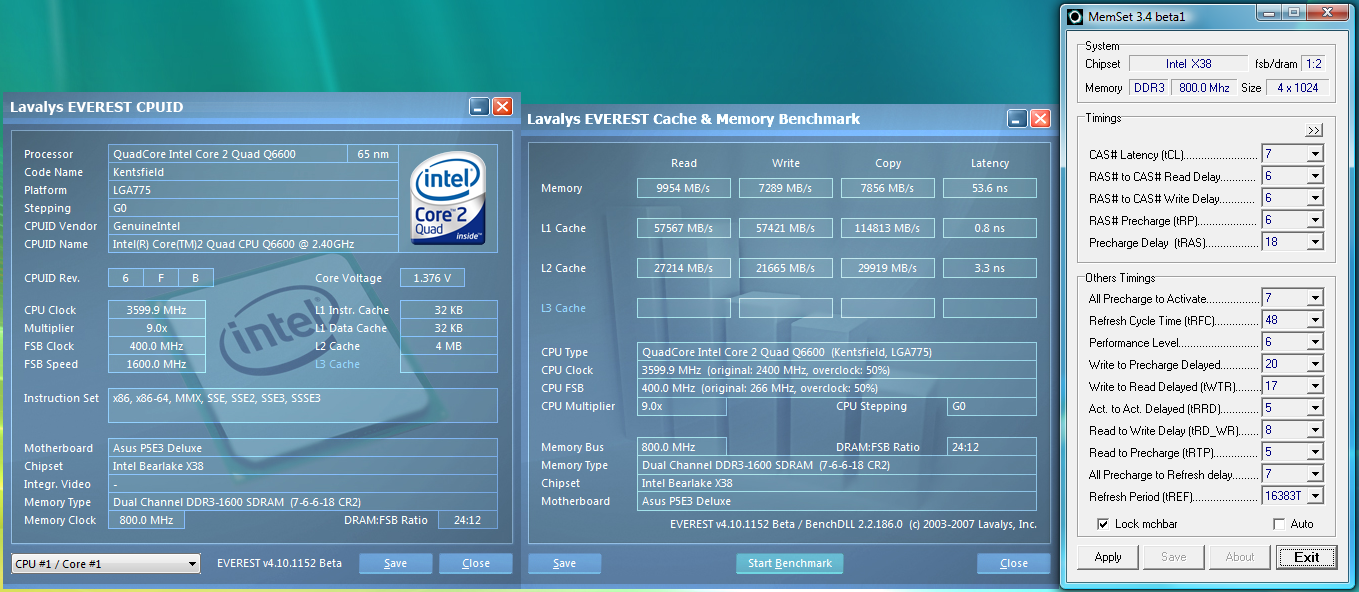
Once we moved to a 4GB configuration, the board would not POST with the memory set to DDR3-1680 or higher. In fact, we had a choice of running at 8-7-7-24 2N at DDR3-1640 or dropping down to DDR3-1600 but with timings set to 7-6-6-18 2N. We chose the slightly slower memory/CPU speeds as the benefit in improved timings made up for the differences in speed. Our full range of testing with 4GB was quite disappointing, especially when overclocking.
The most serious problems occurred at the 9x333 setting with the memory at DDR3-1333. The timings had to be set to 8-7-7-18 2N for any type of stability. We were able to run at 7-7-7-15 2N at DDR3-1333 but had to increase memory voltage to 2.10V and MCH to 1.8V, both settings being unacceptable for at this speed. However, ASUS has delivered a new BIOS that in preliminary testing has solved most of the problems, although we still have not gone above DDR3-1760 at this time.
Our E6550 reached an impressive 550FSB on this board. However, we had to run our memory at a 1:1 ratio for system stability. This was with 2GB or 4GB configurations and our best settings were at 6-6-6-15 1N but with performance level (tRD) set to 12. The other two memory ratios available with the 400 strap resulted in constant lockups when running our test suite. Hopefully, this problem has been addressed in the latest BIOS release.
Gigabyte GA-X38T-DQ6 Overclocking
Q6600 8x480 2GB
Q6600 8x450 4GB
E6550 6x550 2GB
We were able to reach a stable 8x480 setting with the Q6600 and the 2GB memory configuration at DDR3-1536 7-7-7-18 1N. Stability was excellent with the CPU requiring 1.4625V and memory set to 1.95V. Unlike the ASUS board, we could not run our memory higher than DDR3-1800 with 2GB on this board without really loose timings. In fact, the DDR3-1920 settings at this FSB speed had to be set at 10-10-10-30 2N with tRD set to 10 for stability. We found the DDR3-1536 timings offered better performance. Gigabyte is currently addressing this problem and the latest BIOS update has allowed our timings to improve to 9-9-9-24 but with tRD (performance level) increased to 11.
After installing a 4GB configuration, the board actually reversed course and allowed us to run at DDR3-1800 settings with 8-8-8-18 at 1N which greatly improved memory performance over the ASUS board. However, our maximum FSB dropped to 450, although in application testing the board performed similarly to the 2GB configuration in most cases. We also did not notice any of the problems at DDR3-1066 or 1333 that the ASUS board exhibited with the 4GB memory configuration. In fact, our timings at DDR3-1333 with 4GB were 6-6-6-15 1N and performance level (tRD) set to 4 which matched the 2GB timings.
Our E6550 reached the same 550FSB level as the ASUS board, but we were able to run our 2GB memory configuration at DDR3-1467 7-7-7-18 1N compared to DDR3-1110 6-6-6-15 1N on the ASUS board. Our application results are showing a slight advantage for the Gigabyte board, although the effort to tune the board properly was significantly more involved than the ASUS board. The one advantage we had with the Gigabyte board was that our CPU was set to 1.425V to reach the 3330MHz rating and the ASUS board required 1.475V for the same stability.
Q6600 8x475 2GB
 |
Q6600 9x400 4GB
 |
E6550 6x550 2GB
 |
We were able to reach a stable 8x475 setting with the Q6600 and the 2GB memory configuration at DDR3-1900 8-8-8-24 1N. Stability was superb with the CPU requiring just 1.4500V and memory set to 1.95V. Memory Timings were set fairly aggressive at this speed considering the front side bus and strap settings, although we were still able to tune performance levels (tRD) to 6 with Memset and complete our test suite.
Once we moved to a 4GB configuration, the board would not POST with the memory set to DDR3-1680 or higher. In fact, we had a choice of running at 8-7-7-24 2N at DDR3-1640 or dropping down to DDR3-1600 but with timings set to 7-6-6-18 2N. We chose the slightly slower memory/CPU speeds as the benefit in improved timings made up for the differences in speed. Our full range of testing with 4GB was quite disappointing, especially when overclocking.
The most serious problems occurred at the 9x333 setting with the memory at DDR3-1333. The timings had to be set to 8-7-7-18 2N for any type of stability. We were able to run at 7-7-7-15 2N at DDR3-1333 but had to increase memory voltage to 2.10V and MCH to 1.8V, both settings being unacceptable for at this speed. However, ASUS has delivered a new BIOS that in preliminary testing has solved most of the problems, although we still have not gone above DDR3-1760 at this time.
Our E6550 reached an impressive 550FSB on this board. However, we had to run our memory at a 1:1 ratio for system stability. This was with 2GB or 4GB configurations and our best settings were at 6-6-6-15 1N but with performance level (tRD) set to 12. The other two memory ratios available with the 400 strap resulted in constant lockups when running our test suite. Hopefully, this problem has been addressed in the latest BIOS release.
Gigabyte GA-X38T-DQ6 Overclocking
Q6600 8x480 2GB
 |
Q6600 8x450 4GB
 |
E6550 6x550 2GB
 |
We were able to reach a stable 8x480 setting with the Q6600 and the 2GB memory configuration at DDR3-1536 7-7-7-18 1N. Stability was excellent with the CPU requiring 1.4625V and memory set to 1.95V. Unlike the ASUS board, we could not run our memory higher than DDR3-1800 with 2GB on this board without really loose timings. In fact, the DDR3-1920 settings at this FSB speed had to be set at 10-10-10-30 2N with tRD set to 10 for stability. We found the DDR3-1536 timings offered better performance. Gigabyte is currently addressing this problem and the latest BIOS update has allowed our timings to improve to 9-9-9-24 but with tRD (performance level) increased to 11.
After installing a 4GB configuration, the board actually reversed course and allowed us to run at DDR3-1800 settings with 8-8-8-18 at 1N which greatly improved memory performance over the ASUS board. However, our maximum FSB dropped to 450, although in application testing the board performed similarly to the 2GB configuration in most cases. We also did not notice any of the problems at DDR3-1066 or 1333 that the ASUS board exhibited with the 4GB memory configuration. In fact, our timings at DDR3-1333 with 4GB were 6-6-6-15 1N and performance level (tRD) set to 4 which matched the 2GB timings.
Our E6550 reached the same 550FSB level as the ASUS board, but we were able to run our 2GB memory configuration at DDR3-1467 7-7-7-18 1N compared to DDR3-1110 6-6-6-15 1N on the ASUS board. Our application results are showing a slight advantage for the Gigabyte board, although the effort to tune the board properly was significantly more involved than the ASUS board. The one advantage we had with the Gigabyte board was that our CPU was set to 1.425V to reach the 3330MHz rating and the ASUS board required 1.475V for the same stability.
Originally published at https://www.anandtech.com/show/2359 (Wayback Machine).