
DFI UT P35-T2R: Tweakers Rejoice!
- Posted in
- Motherboards
Gearing up for Overclocking
Before we continue further, users are encouraged to check that standard BIOS settings with stock (AUTO) parameters for all overclocking functions are working as they should be. This primarily includes eliminating default DRAM setting issues, and/or OS driver level conflicts. The following software is of use for these tasks: Prime95, OCCT, MemTest, Dual Super PI 32M, Folding@Home, and the Futuremark 3DMark applications.
In terms of CPU stress testing software, always search for the latest version of software and make sure that the test itself does not have known bugs on newer hardware or software - there is always the possibility of incompatibility! A few hours of basic groundwork can save countless hours of uncertainty later on when the system is overclocked and random failures are experienced. Hardware selection can be crucial to ensuring success; again basic research can often eliminate poor component choices.
Important Performance Related BIOS Options (9/13 BIOS)
Please note that we have decided to work on explanations of BIOS settings we deem worthy of user adjustment when overclocking. Settings we have left out were found to function adequately at the default or AUTO setting.
Genie BIOS Setting
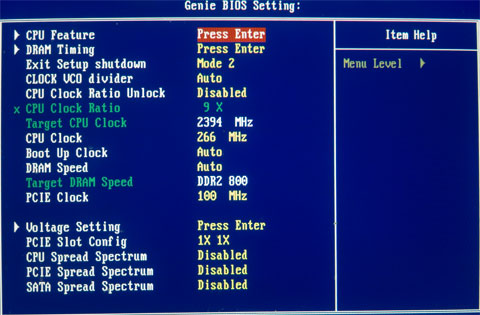
Boot Up Clock: Sets a safe user selected FSB speed for the system to revert to when an overzealous overclock fails.
PCIE Clock: Overclocking the PCIE bus can be useful for benchmarking, bringing small gains to overall scores. Unfortunately the P35/ICH9R combo does not have the potential for overall MHz we find with NVIDIA's 680i chipset which could run PCIE frequencies in excess of 150MHz for benchmarking. We also found that overclocking the PCIE bus frequency within the limits of the board exhibited a peculiar issue: the BIOS would revert the bus to x1 PCIE mode for the graphics card between reboots. We managed to get around this by loading optimized defaults every time it occurred and then reloading the overclocked profile we were working on, from a saved CMOS bank. Using the Intel SATA ports, expect around 115MHz to be the maximum. Those wishing to explore PCIE frequencies in excess of 115MHz for benchmarking are advised to use the JMicron controller; we have seen examples of up to 125MHz using this method.
DRAM Speed
Available options are for this function can be seen in the following images:
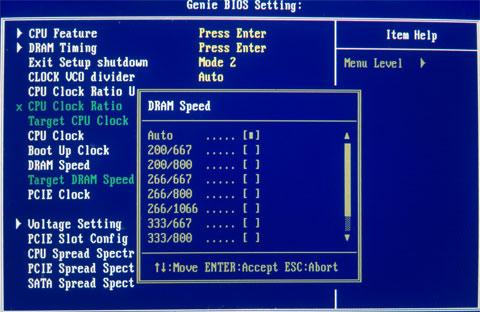
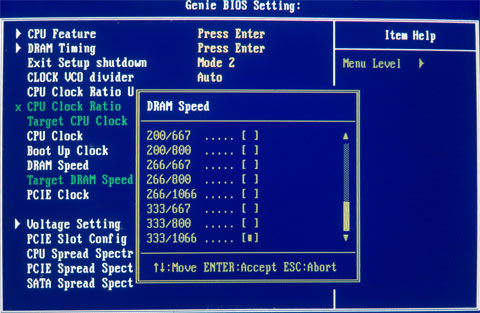
We will concentrate on the following 266/667 and 333/800 strap/dividers. The 266/667 represents a 1066FSB chipset strap with 4:5 memory ratio and the 333/800 represents a 1333FSB chipset strap with a 5:6 memory ratio.
Why Choose the 266/667 and 333/800 Ratios?
Both of these Northbridge strap/divider combinations offer the best balance between performance level and FSB capabilities within sensible voltage ranges. We are interested in five key attributes to provide an intelligent overclock for all-around performance in games and workstation software, these are:
Herein lies the potential advantage of the P35 chipset. Having been designed from the ground up with quad-core CPUs in mind, we have at our mercy increased FSB and performance level margins over previous chipsets. It is mandatory to explore these advantages in order to satisfy the justification of an "upgrade" from older hardware.
This brings us to the 266/667 strap. We found this strap allowed for 2GB RAM overclocks between 450/475FSB. The maximum the board will hold absolutely stable for most users is around 475FSB with the 266/667 or 1333/800 NB setting (with judicious GTL tuning if one is not to succumb to a brute force approach of using excessive voltages without tuning the BIOS with finesse), using a performance level (read delay) of 6 for 266 or 7 for 333.
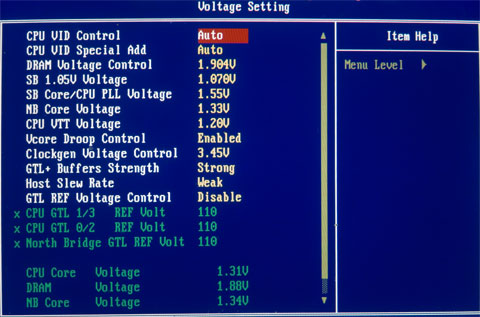
CPU VID Control: This function sets the current CPU Vcore (range from 0.8v to 1.6v), this function can be used in conjunction with "CPU VID Special Add", for overvolting past 1.6v if required.
CPU VIDD Special Add: Used in conjuction with "CPU VID Control", sets a percentage of VCore over the applied voltage using the "CPU VID Control" function, maximum is 125% over 1.6V.
VCore Droop Control: Set this function to DISABLED for overclocking; counter-intuitively, the ENABLED setting causes the CPU core voltage to sag when the CPU is placed under load.
Before we continue further, users are encouraged to check that standard BIOS settings with stock (AUTO) parameters for all overclocking functions are working as they should be. This primarily includes eliminating default DRAM setting issues, and/or OS driver level conflicts. The following software is of use for these tasks: Prime95, OCCT, MemTest, Dual Super PI 32M, Folding@Home, and the Futuremark 3DMark applications.
In terms of CPU stress testing software, always search for the latest version of software and make sure that the test itself does not have known bugs on newer hardware or software - there is always the possibility of incompatibility! A few hours of basic groundwork can save countless hours of uncertainty later on when the system is overclocked and random failures are experienced. Hardware selection can be crucial to ensuring success; again basic research can often eliminate poor component choices.
Important Performance Related BIOS Options (9/13 BIOS)
Please note that we have decided to work on explanations of BIOS settings we deem worthy of user adjustment when overclocking. Settings we have left out were found to function adequately at the default or AUTO setting.
Genie BIOS Setting
Boot Up Clock: Sets a safe user selected FSB speed for the system to revert to when an overzealous overclock fails.
PCIE Clock: Overclocking the PCIE bus can be useful for benchmarking, bringing small gains to overall scores. Unfortunately the P35/ICH9R combo does not have the potential for overall MHz we find with NVIDIA's 680i chipset which could run PCIE frequencies in excess of 150MHz for benchmarking. We also found that overclocking the PCIE bus frequency within the limits of the board exhibited a peculiar issue: the BIOS would revert the bus to x1 PCIE mode for the graphics card between reboots. We managed to get around this by loading optimized defaults every time it occurred and then reloading the overclocked profile we were working on, from a saved CMOS bank. Using the Intel SATA ports, expect around 115MHz to be the maximum. Those wishing to explore PCIE frequencies in excess of 115MHz for benchmarking are advised to use the JMicron controller; we have seen examples of up to 125MHz using this method.
DRAM Speed
Available options are for this function can be seen in the following images:
We will concentrate on the following 266/667 and 333/800 strap/dividers. The 266/667 represents a 1066FSB chipset strap with 4:5 memory ratio and the 333/800 represents a 1333FSB chipset strap with a 5:6 memory ratio.
Why Choose the 266/667 and 333/800 Ratios?
Both of these Northbridge strap/divider combinations offer the best balance between performance level and FSB capabilities within sensible voltage ranges. We are interested in five key attributes to provide an intelligent overclock for all-around performance in games and workstation software, these are:
- Raw CPU MHz per volt
- Memory bandwidth
- Memory/chipset latency
- Memory copy speeds
- Memory write speeds
Herein lies the potential advantage of the P35 chipset. Having been designed from the ground up with quad-core CPUs in mind, we have at our mercy increased FSB and performance level margins over previous chipsets. It is mandatory to explore these advantages in order to satisfy the justification of an "upgrade" from older hardware.
This brings us to the 266/667 strap. We found this strap allowed for 2GB RAM overclocks between 450/475FSB. The maximum the board will hold absolutely stable for most users is around 475FSB with the 266/667 or 1333/800 NB setting (with judicious GTL tuning if one is not to succumb to a brute force approach of using excessive voltages without tuning the BIOS with finesse), using a performance level (read delay) of 6 for 266 or 7 for 333.
CPU VID Control: This function sets the current CPU Vcore (range from 0.8v to 1.6v), this function can be used in conjunction with "CPU VID Special Add", for overvolting past 1.6v if required.
CPU VIDD Special Add: Used in conjuction with "CPU VID Control", sets a percentage of VCore over the applied voltage using the "CPU VID Control" function, maximum is 125% over 1.6V.
VCore Droop Control: Set this function to DISABLED for overclocking; counter-intuitively, the ENABLED setting causes the CPU core voltage to sag when the CPU is placed under load.
Originally published at https://www.anandtech.com/show/2354 (Wayback Machine).