
DFI UT P35-T2R: Tweakers Rejoice!
- Posted in
- Motherboards
Quad-Core Overclocking, continued
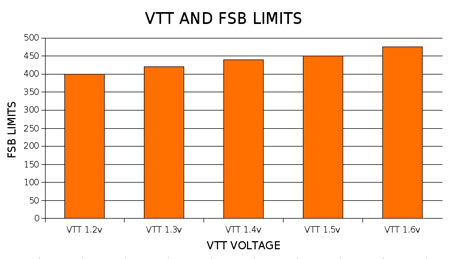
Approximate VTT values and FSB ranges
VTT = 1.2V - 1.3V = Up to 400 FSB
VTT= 1.4V - 1.55V = 420-440FSB
VTT=1.6V (~1.58 actual) = 440-475FSB
A few notes on applying values from the VTT/GTL table
1) Fig 1. The first column shows BIOS and actual measured voltages for VTT (first value is measured VTT), the value in brackets is the voltage that must be applied in the BIOS to obtain the measured value. As can be seen, there is a small offset between the BIOS setting of VTT and the actual DMM measured onboard voltage. An average representative figure has been used for the tables. We have found a general variance on boards either 0.1V above or below these figures. Each motherboard will have different sweet spots for GTL values due to this small offset.
2) GTLs set to 66%-70% of VTT seem to be at the most effective point for "stable overclocking" of quad-core CPUs. The highlighted color bar in each VTT/GTL table shows the approximate 67% point of VTT and the corresponding numerical value that needs to be set in the BIOS. We recommend you choose a target FSB range (see the FSB/VTT ranges above) and use the according VTT/GTL scale starting with GTLs @ the 67% values of the applied VTT (the highlighted values in the tables).
The GTL scale voltage values themselves are changed as VTT voltages are raised or lowered by the user in the BIOS. It is necessary to follow the corresponding scale for the set VTT voltage, as looking at the scales above we can see that a level of offset is also applied to the numerical BIOS setting scale.
The 1.2 VTT GTL scale sets 80 GTL digits to a value of 0.80V; however, once VTT is increased to 1.3V the value of 80 GTL digits represents 0.855V. This shows the importance of having the above scales on hand so that we can pick the right values to use when we change VTT.
3) While there is not a universally applicable methodology for tuning GTLs to reach 450FSB+, please note the following:
Approximate VTT values and FSB ranges
VTT = 1.2V - 1.3V = Up to 400 FSB
VTT= 1.4V - 1.55V = 420-440FSB
VTT=1.6V (~1.58 actual) = 440-475FSB
A few notes on applying values from the VTT/GTL table
1) Fig 1. The first column shows BIOS and actual measured voltages for VTT (first value is measured VTT), the value in brackets is the voltage that must be applied in the BIOS to obtain the measured value. As can be seen, there is a small offset between the BIOS setting of VTT and the actual DMM measured onboard voltage. An average representative figure has been used for the tables. We have found a general variance on boards either 0.1V above or below these figures. Each motherboard will have different sweet spots for GTL values due to this small offset.
2) GTLs set to 66%-70% of VTT seem to be at the most effective point for "stable overclocking" of quad-core CPUs. The highlighted color bar in each VTT/GTL table shows the approximate 67% point of VTT and the corresponding numerical value that needs to be set in the BIOS. We recommend you choose a target FSB range (see the FSB/VTT ranges above) and use the according VTT/GTL scale starting with GTLs @ the 67% values of the applied VTT (the highlighted values in the tables).
The GTL scale voltage values themselves are changed as VTT voltages are raised or lowered by the user in the BIOS. It is necessary to follow the corresponding scale for the set VTT voltage, as looking at the scales above we can see that a level of offset is also applied to the numerical BIOS setting scale.
The 1.2 VTT GTL scale sets 80 GTL digits to a value of 0.80V; however, once VTT is increased to 1.3V the value of 80 GTL digits represents 0.855V. This shows the importance of having the above scales on hand so that we can pick the right values to use when we change VTT.
3) While there is not a universally applicable methodology for tuning GTLs to reach 450FSB+, please note the following:
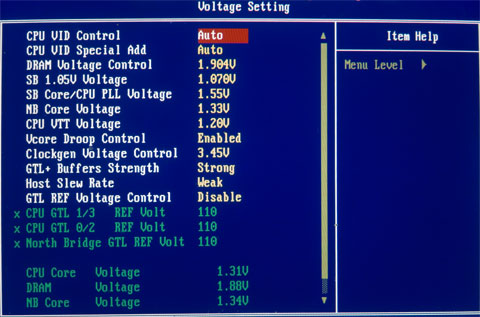
- The default BIOS VTT value is 1.2V and the GTL controls are "DISABLED" in the BIOS by default. Once "ENABLED" is selected the GTL values will automatically default to 110/110/110. These values DO NOT represent a 67% level of 1.2V VTT. Furthermore it is important not to leave this control disabled at any time while tweaking VTT/GTL settings, even if the 67% mark happens to fall at 110/110/110. (Set them manually!) You will need to readjust the GTLs to represent the correct percentage by using the appropriate scale.
- Our tests revealed that CPU load testing failures generally occurred when CPU temperatures exceeded 65C or so. Over 65C it becomes ever more difficult to tune GTL voltages as there is always some uncertainty pertaining to the cause of a CPU core failure: Was it temperature or VTT/GTL related?
- Use active cooling on the Northbridge. Load temps need to remain under 45C to ensure stability in Prime type tests.
- VNB needs to be around 1.61V to 1.65V for 450FSB upwards if using the 266 strap with a Performance Level of 6, which is recommended as memory speed performance per volt is at its best for 2GB. Using 4GB configurations, the 1333/800 strap/divider with a Performance level of 7 works very well.
Originally published at https://www.anandtech.com/show/2354 (Wayback Machine).