
ICY DOCK MB664US-1S: eSATA with a twist
- Posted in
- Storage
ICY DOCK MB664US-1S
The ICY DOCK MB664US-1S is a relatively small, single-drive enclosure comprised of aluminum and plastic. Remaining true to ICY DOCK's unspoken product mantra of "attractive, but not flashy" hardware, the unassuming MB664US-1S has a brushed silver outer shell, with the modest ICY DOCK logo. The middle of the enclosure is ringed by a white strip, providing drive access, ventilation, and the external ports. The front panel is plastic, while all other outwardly facing surfaces are metal.
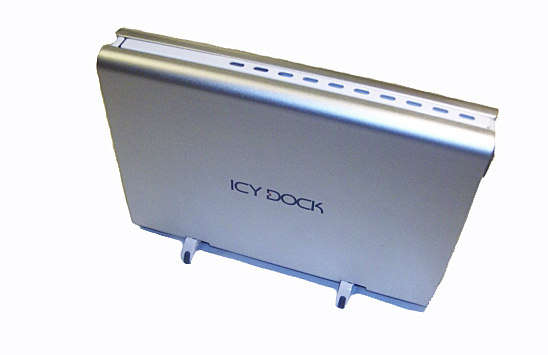
The ICY DOCK MB664 has no active cooling solution, instead relying on the aluminum exterior shell and a small series of ventilation holes along one side of the enclosure to dissipate the heat emitted by modern hard drives.
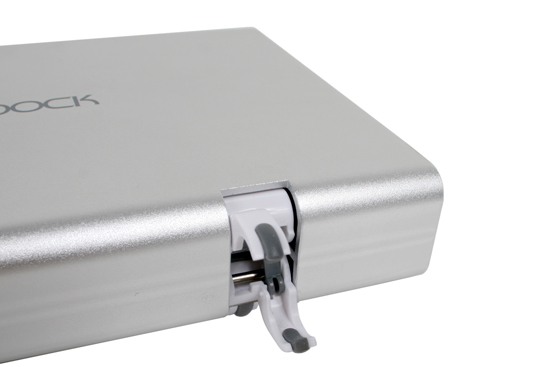
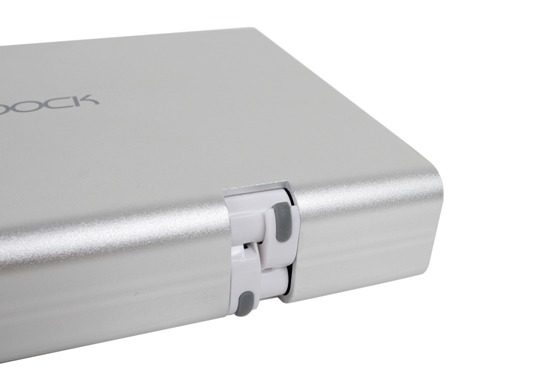
Rather than providing a snap-in stand for the MB664US, ICY DOCK has come up with a clever open/close scissor configuration. With the mount in the closed position, the unit can rest on its side, with the edge of the pad protruding only a couple of millimeters from the main shell. With the mounts opened, the unit stands on its side, seated on small rubber feet. Drive cooling proved to be slightly better with the unit resting on its side in the "open scissor" configuration, though no issues were encountered in either configuration.
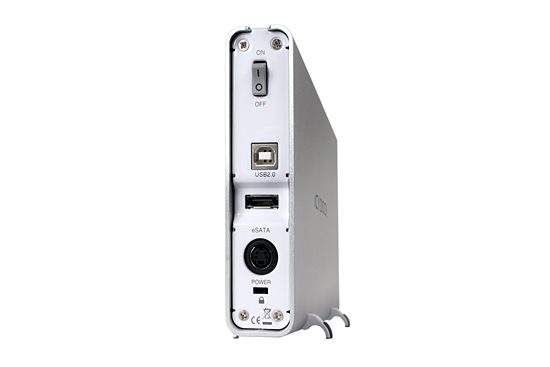
As previously mentioned, the MB664US-1S is configured to support both USB2.0 and eSATA drives. Interestingly, ICY DOCK has chosen to include a security cable slot on the MB664US line of enclosures, providing a basic level of security for users. A power switch and connector are the only other items on the MB664's back panel.
The most interesting feature of the MB664US-1S is its "tool-less" design. The front of the enclosure has a lock/unlock switch and a push button which provides access to the slide-in caddy for hard drive installation.
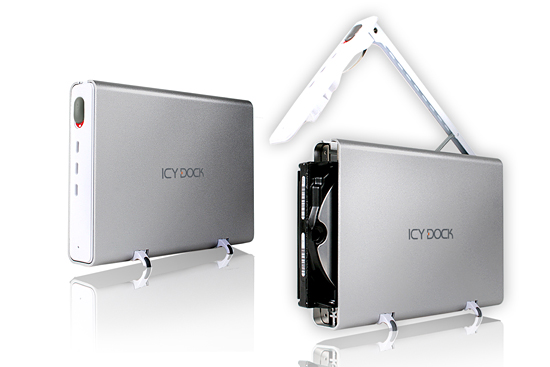
No tools are required to mount (or dismount) the hard drive, and there is no detachable drive caddy to worry about at all. This proved to be a mixed blessing, however, as drive installation and removal did take a little bit of practice before things went smoothly. While it is unclear that a user would ever have a need to open the front of the enclosure during drive operation, this was nevertheless an impossible task, as the drive eject arm is part of the same mechanism as the front panel cover.
The backplane itself is minimal (as in the MB559US), and is held in by four screws. ICY DOCK does provide a single LED in the front of the enclosure to indicate drive operation status, though the LED has only a pinhole cutout in the front panel, limiting the effectiveness of the LED somewhat.
The word "PUSH" shown in the drive pictures is actually a sticker, and can be removed with ease (and without leaving residue on the front panel). It was left on to show the means to open the enclosure, as there is otherwise no indication on the unit.
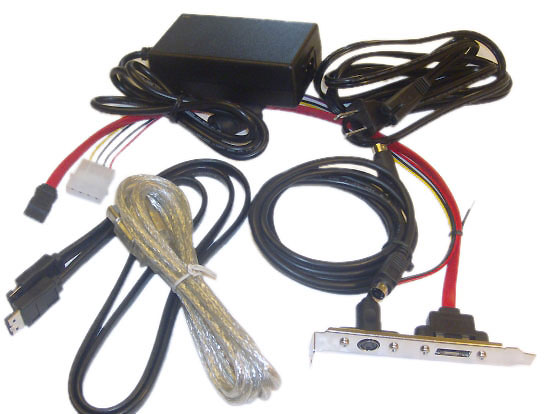
True to form for ICY DOCK, the included accessory kit has everything required to operate the drive either in USB or eSATA mode, including both external cables. For users who want additional flexibility, ICY DOCK offers a "Hybrid" bracket housing both an external SATA connector (converting from an internal SATA port) as well as a connector going from an internal 4-pin Molex plug to the external power adapter required by the enclosure. This gives the user the ability to either power the enclosure using their internal PC power supply, or using the standard power brick included in the packaging. Please note that this bracket is sold separately, and is not included in the base package (as was originally written in this space - our apologies for the error).
As we noted in our earlier review of the ICY DOCK MB559US, proper chipset support of eSATA is strongly recommended in order to use this enclosure with the internal-external SATA connector adapter. Modern SATA chipsets should be fine, but exercise caution particularly with early VIA chipsets or the Intel ICH6.
| ICY DOCK MB664US-1S Specifications | |
| Host Interface | eSATA + USB 2.0 Combination |
| Drive Type | 3.5" SATA 1.5Gb/s or 3Gb/s Interface |
| Drive Position | Vertical or Horizontal |
| Transfer Rates | Up to 3Gb/s per eSATA specs Up to 480Mb/s per USB 2.0 specs |
| Connection Type | SATA |
| Structure Type | Aluminum Body with Plastic Trim |
| Drive Cooling | Passive via Aluminum frame heat dispersion with ventilation ports |
| Activity Indicators | Device Power and Drive Activity via LED |
| OS Support | Windows 98/SE/ME/2000/XP/Vista, Mac OS 9.0 or higher |
| Power Draw | 2W |
| Dimensions (LxWxH) | 194 x 142.6 x 42.6 mm |
| Weight | 1.10 lbs. |
The ICY DOCK MB664US-1S is a relatively small, single-drive enclosure comprised of aluminum and plastic. Remaining true to ICY DOCK's unspoken product mantra of "attractive, but not flashy" hardware, the unassuming MB664US-1S has a brushed silver outer shell, with the modest ICY DOCK logo. The middle of the enclosure is ringed by a white strip, providing drive access, ventilation, and the external ports. The front panel is plastic, while all other outwardly facing surfaces are metal.
The ICY DOCK MB664 has no active cooling solution, instead relying on the aluminum exterior shell and a small series of ventilation holes along one side of the enclosure to dissipate the heat emitted by modern hard drives.
Rather than providing a snap-in stand for the MB664US, ICY DOCK has come up with a clever open/close scissor configuration. With the mount in the closed position, the unit can rest on its side, with the edge of the pad protruding only a couple of millimeters from the main shell. With the mounts opened, the unit stands on its side, seated on small rubber feet. Drive cooling proved to be slightly better with the unit resting on its side in the "open scissor" configuration, though no issues were encountered in either configuration.
As previously mentioned, the MB664US-1S is configured to support both USB2.0 and eSATA drives. Interestingly, ICY DOCK has chosen to include a security cable slot on the MB664US line of enclosures, providing a basic level of security for users. A power switch and connector are the only other items on the MB664's back panel.
The most interesting feature of the MB664US-1S is its "tool-less" design. The front of the enclosure has a lock/unlock switch and a push button which provides access to the slide-in caddy for hard drive installation.
No tools are required to mount (or dismount) the hard drive, and there is no detachable drive caddy to worry about at all. This proved to be a mixed blessing, however, as drive installation and removal did take a little bit of practice before things went smoothly. While it is unclear that a user would ever have a need to open the front of the enclosure during drive operation, this was nevertheless an impossible task, as the drive eject arm is part of the same mechanism as the front panel cover.
The backplane itself is minimal (as in the MB559US), and is held in by four screws. ICY DOCK does provide a single LED in the front of the enclosure to indicate drive operation status, though the LED has only a pinhole cutout in the front panel, limiting the effectiveness of the LED somewhat.
The word "PUSH" shown in the drive pictures is actually a sticker, and can be removed with ease (and without leaving residue on the front panel). It was left on to show the means to open the enclosure, as there is otherwise no indication on the unit.
True to form for ICY DOCK, the included accessory kit has everything required to operate the drive either in USB or eSATA mode, including both external cables. For users who want additional flexibility, ICY DOCK offers a "Hybrid" bracket housing both an external SATA connector (converting from an internal SATA port) as well as a connector going from an internal 4-pin Molex plug to the external power adapter required by the enclosure. This gives the user the ability to either power the enclosure using their internal PC power supply, or using the standard power brick included in the packaging. Please note that this bracket is sold separately, and is not included in the base package (as was originally written in this space - our apologies for the error).
As we noted in our earlier review of the ICY DOCK MB559US, proper chipset support of eSATA is strongly recommended in order to use this enclosure with the internal-external SATA connector adapter. Modern SATA chipsets should be fine, but exercise caution particularly with early VIA chipsets or the Intel ICH6.
Originally published at https://www.anandtech.com/show/2346 (Wayback Machine).