
µATX Part 2: Intel G33 Performance Review
- Posted in
- Motherboards
MSI G33M: Board Layout and Features
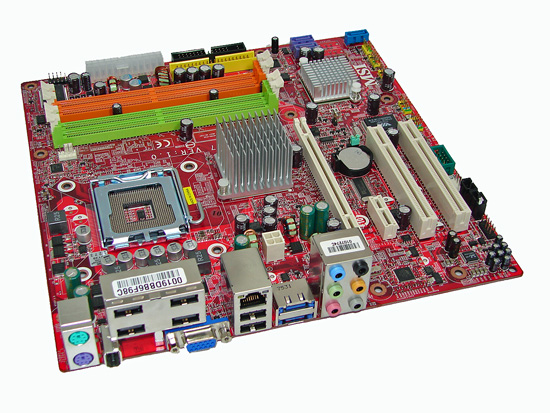
MSI includes most of the same features as Gigabyte and ASUS, but the location of some of these features is different. The color scheme is also different, coming in MSI's typical red PCB with a few colorful additions. MSI does save a bit of money by using standard electrolyte capacitors in some areas rather than 100% "solid" conductive polymer aluminum capacitors. We really don't have a problem with this approach, as none of the three boards we're looking at today really target the high-end market.
MSI's rear panel is definitely unique in terms of layout, with four of the USB ports coming on a block that sits above the VGA and Firewire ports. MSI also offers two eSATA ports, at the cost of providing two internal SATA connectors. They use a Marvell chip to power the IDE port as well as an additional SATA port. The remainder of the rear panel consists of the typical PS/2, Firewire, network, and audio connections.
The location and layout of the connectors is generally fine, but the ATX12V is located below the CPU socket, and in most cases it will require looping the cable above the CPU heatsink which is less than ideal. You can also see the blank area on the bottom of the board where two additional SATA ports could have been installed. A single eSATA port would have been sufficient, we think, but perhaps there are people out there that make more use of eSATA than us.
One final concern worth pointing out on the MSI design is that the DIMM slots are not properly color coordinated, at least not relative to the rest of the industry. We generally feel that users like to install DIMMs into the same colored slots for dual channel operation, but MSI chooses to color channel A orange and channel B green. This makes it a lot more difficult to explain which slots should be used for dual channel operation, as you actually have to use the first orange and the first green slot (or the second slots on both channels) to get dual channel memory support. It seems like it would be a lot easier to simply say "install memory into the same colored slots" -- and considering the rest of the industry has taken that approach, we feel MSI should join the club.
MSI chose to include a PCI-E x1 slot in place of the x4 slots on the Gigabyte and ASUS boards, and they have the slot located next to the main x16 connector. That means if users happen to install a dual slot GPU they will not have access to any other PCI-E slots. Whether or not that's a serious problem is up to the individual to decide, but PCI ports are becoming less and less used as time goes on so long term this may not be the best design decision. Clearance between the PEG slot in the memory clips continues to be very tight, and use of a smaller graphics card might be advisable on all three of these motherboards. Anyone looking at an HTPC setup would probably use one of the fanless GeForce 8500/8600 or Radeon 2400/2600 cards, but gamers might find it difficult to install a GeForce 8800 or Radeon HD 2900.
Both chipsets are passively cooled, just like the other two boards. That's a really good design decision for anyone looking at creating a silent HTPC, but then we have to return to the video output options and end up scratching our heads. If it isn't clear yet, we really aren't all that impressed with the G33 chipset. MSI also includes two fan headers, both 4-pin: one for the CPU and one for the chassis. The chassis connector is located at the very bottom, just below the last PCI slot. Fan speeds for both connectors can be individually controlled within the BIOS or via software.
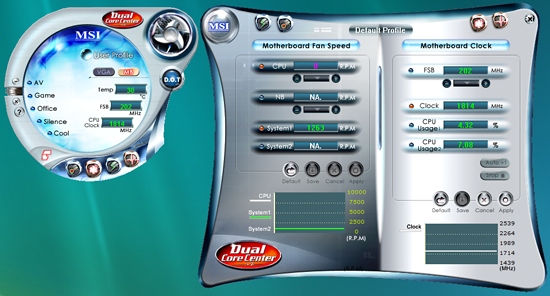
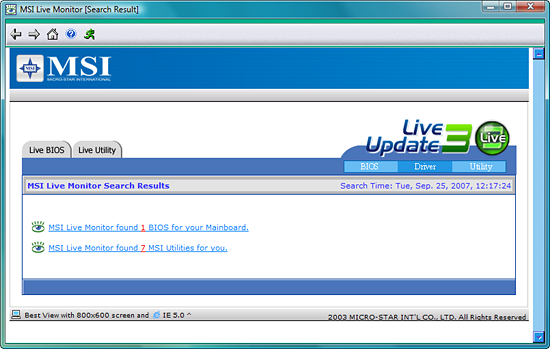
Naturally, MSI also includes a set of software utilities. Other than the MSI Live Monitor, these utilities of course have to have unique appearances with funky shaped windows and odd button locations. Call us old-fashioned, but we really don't have a problem with rectangular application windows that follow the standard Windows look and feel.
MSI includes most of the same features as Gigabyte and ASUS, but the location of some of these features is different. The color scheme is also different, coming in MSI's typical red PCB with a few colorful additions. MSI does save a bit of money by using standard electrolyte capacitors in some areas rather than 100% "solid" conductive polymer aluminum capacitors. We really don't have a problem with this approach, as none of the three boards we're looking at today really target the high-end market.
MSI's rear panel is definitely unique in terms of layout, with four of the USB ports coming on a block that sits above the VGA and Firewire ports. MSI also offers two eSATA ports, at the cost of providing two internal SATA connectors. They use a Marvell chip to power the IDE port as well as an additional SATA port. The remainder of the rear panel consists of the typical PS/2, Firewire, network, and audio connections.
The location and layout of the connectors is generally fine, but the ATX12V is located below the CPU socket, and in most cases it will require looping the cable above the CPU heatsink which is less than ideal. You can also see the blank area on the bottom of the board where two additional SATA ports could have been installed. A single eSATA port would have been sufficient, we think, but perhaps there are people out there that make more use of eSATA than us.
One final concern worth pointing out on the MSI design is that the DIMM slots are not properly color coordinated, at least not relative to the rest of the industry. We generally feel that users like to install DIMMs into the same colored slots for dual channel operation, but MSI chooses to color channel A orange and channel B green. This makes it a lot more difficult to explain which slots should be used for dual channel operation, as you actually have to use the first orange and the first green slot (or the second slots on both channels) to get dual channel memory support. It seems like it would be a lot easier to simply say "install memory into the same colored slots" -- and considering the rest of the industry has taken that approach, we feel MSI should join the club.
 |
| Click to enlarge |
MSI chose to include a PCI-E x1 slot in place of the x4 slots on the Gigabyte and ASUS boards, and they have the slot located next to the main x16 connector. That means if users happen to install a dual slot GPU they will not have access to any other PCI-E slots. Whether or not that's a serious problem is up to the individual to decide, but PCI ports are becoming less and less used as time goes on so long term this may not be the best design decision. Clearance between the PEG slot in the memory clips continues to be very tight, and use of a smaller graphics card might be advisable on all three of these motherboards. Anyone looking at an HTPC setup would probably use one of the fanless GeForce 8500/8600 or Radeon 2400/2600 cards, but gamers might find it difficult to install a GeForce 8800 or Radeon HD 2900.
Both chipsets are passively cooled, just like the other two boards. That's a really good design decision for anyone looking at creating a silent HTPC, but then we have to return to the video output options and end up scratching our heads. If it isn't clear yet, we really aren't all that impressed with the G33 chipset. MSI also includes two fan headers, both 4-pin: one for the CPU and one for the chassis. The chassis connector is located at the very bottom, just below the last PCI slot. Fan speeds for both connectors can be individually controlled within the BIOS or via software.
Naturally, MSI also includes a set of software utilities. Other than the MSI Live Monitor, these utilities of course have to have unique appearances with funky shaped windows and odd button locations. Call us old-fashioned, but we really don't have a problem with rectangular application windows that follow the standard Windows look and feel.
Originally published at https://www.anandtech.com/show/2339 (Wayback Machine).