
µATX Part 2: Intel G33 Performance Review
- Posted in
- Motherboards
Gigabyte GA-G33M-DS2R: Board Layout and Features
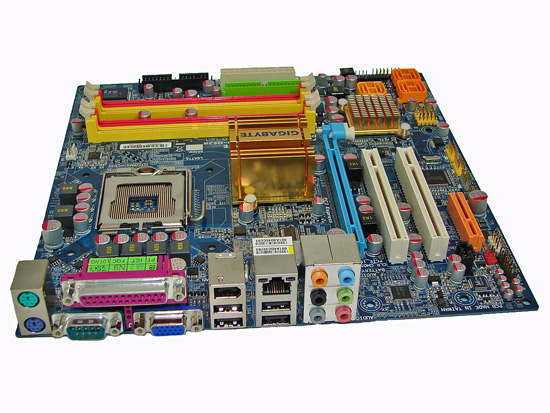
The layout and design of the Gigabyte GA-G33M-DS2R are nearly identical to the ASUS offering, with a few minor changes. First of course is that you get the technicolor appearance, which depending on your perspective is either garish, awesome, or meaningless. Gigabyte also uses Conductive Polymer Aluminum Solid Capacitors, which may account for the high price. Again, this does help to create a very clean layout with no capacitors interfering with the installation of aftermarket CPU coolers.
The rear panel of the Gigabyte board apparently caters to users that actually require legacy support, as it includes not only a parallel port but a serial port as well. We can't recall the last time we used a serial device, but of course there are other users out there that still require the interface, and it's always good to have different choices. You also get PS/2 mouse and keyboard inputs, four USB ports, a Firewire port, and six audio jacks. Gigabit Ethernet and VGA ports complete the rear panel.
Gigabyte includes six total SATA ports, as well as RAID 0/1/5 support. They also have the floppy connector in a more accessible location, although we are happy to report that the final death of the floppy drive is imminent. With support for up to 12 USB ports and three Firewire ports, we find a whopping six jumper blocks at the bottom of the board to accommodate these extra connections.
Like the ASUS motherboard, the Gigabyte board comes with (1) physical PCI-E x16 connector, (1) PCI-E x4 connector, and (2) PCI 2.2 slots. The first PCI slot will be blocked by a dual slot graphics card. Clearance between the DIMM socket clips and the x16 slot is also limited, requiring the removal of most longer GPUs in order to add or remove memory. Obviously this won't be a problem if you don't use a discrete graphics card, but without any DVI ports that may not be a safe assumption.
Again, both chipsets passively cooled, with a large heatsink on the Northbridge. Only two fan headers are available (one 4-pin and one 3-pin), which could present problems for some users. Fan speed control is present in the BIOS as well as through Gigabyte's Windows utilities.
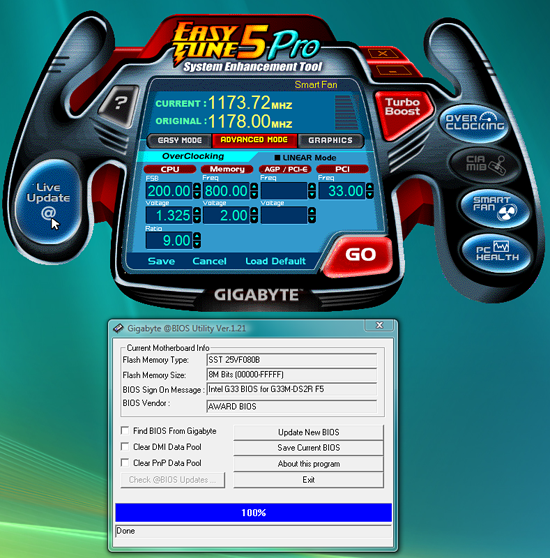
Gigabyte includes their EasyTune 5 Pro "system enhancement" utility, which provides for Windows-based overclocking, BIOS updates, temperature and fan speed monitoring, and fan controls. The utility generally works well, although we still preferred to stick with the BIOS for overclocking and avoid running any extra applications in Windows.
The layout and design of the Gigabyte GA-G33M-DS2R are nearly identical to the ASUS offering, with a few minor changes. First of course is that you get the technicolor appearance, which depending on your perspective is either garish, awesome, or meaningless. Gigabyte also uses Conductive Polymer Aluminum Solid Capacitors, which may account for the high price. Again, this does help to create a very clean layout with no capacitors interfering with the installation of aftermarket CPU coolers.
The rear panel of the Gigabyte board apparently caters to users that actually require legacy support, as it includes not only a parallel port but a serial port as well. We can't recall the last time we used a serial device, but of course there are other users out there that still require the interface, and it's always good to have different choices. You also get PS/2 mouse and keyboard inputs, four USB ports, a Firewire port, and six audio jacks. Gigabit Ethernet and VGA ports complete the rear panel.
Gigabyte includes six total SATA ports, as well as RAID 0/1/5 support. They also have the floppy connector in a more accessible location, although we are happy to report that the final death of the floppy drive is imminent. With support for up to 12 USB ports and three Firewire ports, we find a whopping six jumper blocks at the bottom of the board to accommodate these extra connections.
 |
| Click to enlarge |
Like the ASUS motherboard, the Gigabyte board comes with (1) physical PCI-E x16 connector, (1) PCI-E x4 connector, and (2) PCI 2.2 slots. The first PCI slot will be blocked by a dual slot graphics card. Clearance between the DIMM socket clips and the x16 slot is also limited, requiring the removal of most longer GPUs in order to add or remove memory. Obviously this won't be a problem if you don't use a discrete graphics card, but without any DVI ports that may not be a safe assumption.
Again, both chipsets passively cooled, with a large heatsink on the Northbridge. Only two fan headers are available (one 4-pin and one 3-pin), which could present problems for some users. Fan speed control is present in the BIOS as well as through Gigabyte's Windows utilities.
Gigabyte includes their EasyTune 5 Pro "system enhancement" utility, which provides for Windows-based overclocking, BIOS updates, temperature and fan speed monitoring, and fan controls. The utility generally works well, although we still preferred to stick with the BIOS for overclocking and avoid running any extra applications in Windows.
Originally published at https://www.anandtech.com/show/2339 (Wayback Machine).