
µATX Part 2: Intel G33 Performance Review
- Posted in
- Motherboards
ASUS P5K-VM: Board Layout and Features
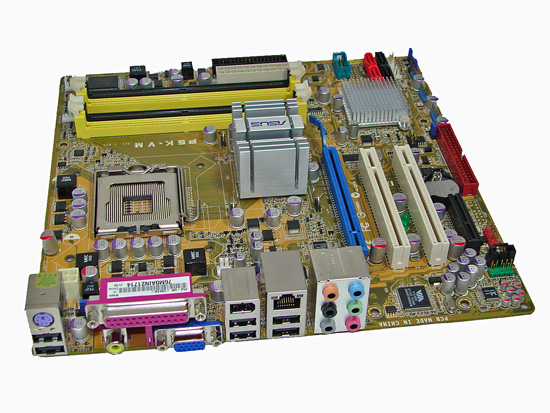
The appearance of the P5K-VM is pretty dull in comparison to other ASUS products, but its in line with their previous uATX boards. We can't say outward appearances are all that important for this market, so we'll leave it at that. Like most of their boards, ASUS now uses Conductive Polymer Aluminum Solid Capacitors on the P5K-VM. We're not sure if there's really any need for using such capacitors, given the target audience, but the board did prove to be quite stable and is one of the better uATX overclockers presently available.
The capacitor design does have the advantage of making the board very clean, and there's plenty of room around the CPU socket for a variety of cooling solutions. Whether that's even necessary for uATX boards is a question we'll leave to the philosophers. (Anyone out there planning on using a uATX board with a Tuniq 120 or Thermalright Ultra-120?)
The rear panel is somewhat interesting in that it skips the PS/2 mouse port but includes a PS/2 keyboard connection. The panel also includes a parallel port, for those still running older printers or peripherals. Six USB ports, a LAN port, a coaxial S/PDIF out port, Firewire, and six audio jack (supporting 2, 4, 6, and 8-channel audio) are available.
One of the more questionable layout decisions on the part of the ASUS is their location of the IDE port. At the very bottom edge of the board, it will be very difficult to reach this location, especially if it's used with an optical drive. Luckily, SATA optical drives are becoming increasingly common, and we would recommend users purchase an appropriate SATA optical drive if possible. A floppy connector is also present, in case anyone actually needs one.
The board comes with (1) physical PCI-E x16 connector, (1) PCI-E x4 connector, and (2) PCI 2.2 slots. The first PCI slot will be blocked by a dual slot graphics card. Clearance between the DIMM socket clips and the x16 slot is also limited, requiring the removal of most longer GPUs in order to add or remove memory.
The chipsets are both passively cooled, with a large heatsink on the Northbridge. Three fan headers are available (one 4-pin and two 3-pin), which is pretty good for a uATX setup. Fan speed and monitoring control is present in the BIOS and can also be accessed by ASUS' Windows utilities.
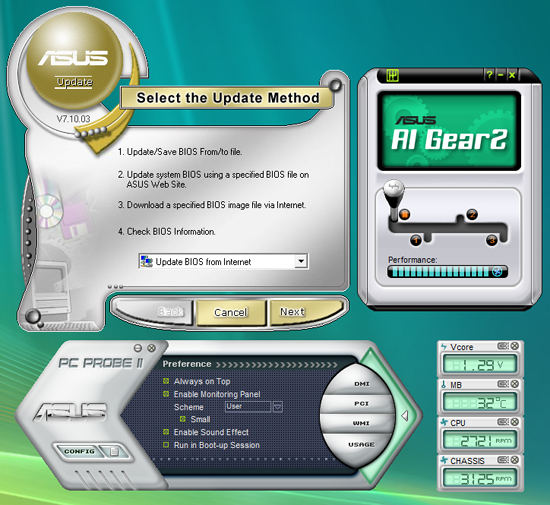
ASUS provides their usual selection of software utilities for Windows although for this board, some of the more advanced features are not available. ASUS update can be used to update the BIOS as well as other ASUS utilities. AI Gear has profiles that allow the system to dynamically controlling the FSB and CPU voltages for power saving or performance conditions, and PC Probe allows monitoring of certain voltages and temperatures. While we appreciate the utilities from all of the manufacturers and actually use some of them, sometimes they come across to us as bloatware that 90% of people won't use. Ummm... moving on....
The appearance of the P5K-VM is pretty dull in comparison to other ASUS products, but its in line with their previous uATX boards. We can't say outward appearances are all that important for this market, so we'll leave it at that. Like most of their boards, ASUS now uses Conductive Polymer Aluminum Solid Capacitors on the P5K-VM. We're not sure if there's really any need for using such capacitors, given the target audience, but the board did prove to be quite stable and is one of the better uATX overclockers presently available.
The capacitor design does have the advantage of making the board very clean, and there's plenty of room around the CPU socket for a variety of cooling solutions. Whether that's even necessary for uATX boards is a question we'll leave to the philosophers. (Anyone out there planning on using a uATX board with a Tuniq 120 or Thermalright Ultra-120?)
The rear panel is somewhat interesting in that it skips the PS/2 mouse port but includes a PS/2 keyboard connection. The panel also includes a parallel port, for those still running older printers or peripherals. Six USB ports, a LAN port, a coaxial S/PDIF out port, Firewire, and six audio jack (supporting 2, 4, 6, and 8-channel audio) are available.
One of the more questionable layout decisions on the part of the ASUS is their location of the IDE port. At the very bottom edge of the board, it will be very difficult to reach this location, especially if it's used with an optical drive. Luckily, SATA optical drives are becoming increasingly common, and we would recommend users purchase an appropriate SATA optical drive if possible. A floppy connector is also present, in case anyone actually needs one.
 |
| Click to enlarge |
The board comes with (1) physical PCI-E x16 connector, (1) PCI-E x4 connector, and (2) PCI 2.2 slots. The first PCI slot will be blocked by a dual slot graphics card. Clearance between the DIMM socket clips and the x16 slot is also limited, requiring the removal of most longer GPUs in order to add or remove memory.
The chipsets are both passively cooled, with a large heatsink on the Northbridge. Three fan headers are available (one 4-pin and two 3-pin), which is pretty good for a uATX setup. Fan speed and monitoring control is present in the BIOS and can also be accessed by ASUS' Windows utilities.
ASUS provides their usual selection of software utilities for Windows although for this board, some of the more advanced features are not available. ASUS update can be used to update the BIOS as well as other ASUS utilities. AI Gear has profiles that allow the system to dynamically controlling the FSB and CPU voltages for power saving or performance conditions, and PC Probe allows monitoring of certain voltages and temperatures. While we appreciate the utilities from all of the manufacturers and actually use some of them, sometimes they come across to us as bloatware that 90% of people won't use. Ummm... moving on....
Originally published at https://www.anandtech.com/show/2339 (Wayback Machine).