
µATX Part 2: Intel G33 Performance Review
- Posted in
- Motherboards
Audio Performance
Vista has brought about major changes in the audio stack and as such we will have a dedicated article next month on this subject along with a performance/quality comparison of the latest sound cards. The excellent Rightmark Audio Analyzer is not fully compatible with Vista yet, so objective benchmarks are not available with this tool. We are working with 6.0.6 release now and will have an update shortly. In the meantime, we will only present a single game result today as the general performance, or lack thereof, of the Intel GMA3100 leads us with one current game in our test suite that can be accurately tested.
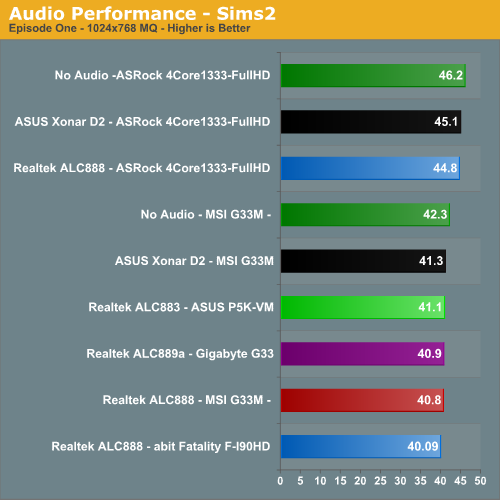
The audio performance numbers remain consistent between the Realtek ALC888 and ASUS Xonar D2 solutions with either the on-board or add in GPU. The CPU utilization rates and effects on our game benchmarks are minimal since 3D audio positioning (DirectSound 3D/EAX 2) is not available under Vista for these host-based audio solutions. This is a positive from a performance viewpoint when considering frame rate hits under XP in such games as Battlefield 2 reflect an average loss of 22%, Half Life 2- Episode One at 6%, and Company of Heroes at 5%.
After comparing the ASUS Xonar D2 to the Realtek offerings in each of our games it was difficult to hear any substantial differences in Half Life Two - Episode One while there was a clear difference in Battlefield 2 and Company of Heroes. Even though 3D audio positioning is not available, the general ambient sounds and especially weapon sounds definitely sounded better on the Xonar D2 with explosions actually having an impact instead of sounding like a nail dropping on a tin roof. For those wondering about results with the Creative X-FI, we will have those in the upcoming audio comparison article as the latest drivers have left us with screeching sounds in BF2 and Company of Heroes.
There was no comparison in our music and video playback tests where the Xonar D2 just annihilated the Realtek ALC888/883 implementation. The Realtek ALC889a offering on the Gigabyte board certainly sounded better than the other Realtek codecs but was still outclassed by the Xonar. This is not surprising and should be expected but during the intense action sequence on the bridge in Mission Impossible III, the Realtek ALC888/883 output during the drone's flyby sequences sounded something like a beached whale when the missiles were fired and then again upon impact. We did make some adjustments with the Realtek control panel and fine tuned our speaker locations/receiver settings which did improve the audio output quality when utilizing the analog connections. These problems were somewhat mitigated when using the S/PDIF output on the ASUS board.
We have to wonder what Gigabyte was thinking by not offering an coaxial or optical output on a board with the Realtek ALC889a considering the improvements over the previous codec families. Overall we suggest buying a decent audio card if you plan on using your computer as a media or gaming station.
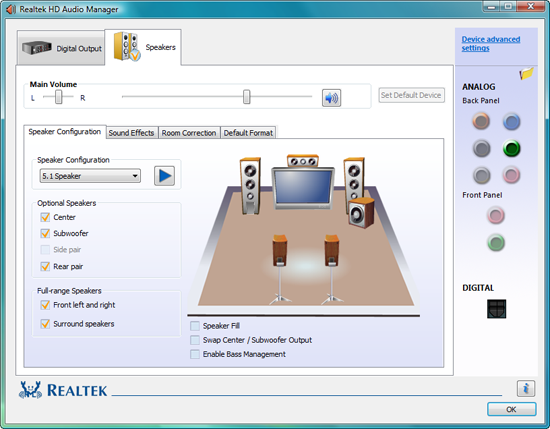
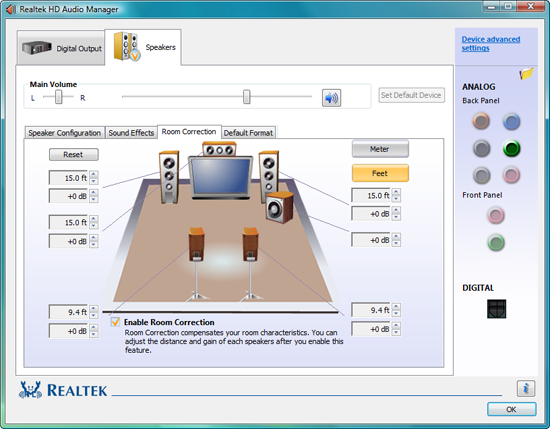
The Vista audio control panel for the Realtek HD codec offers a wide range of options to setup your speakers although a headphone setting and equalizer are not available. For those on a budget, the out of box experience with the Realtek solution is acceptable enough for everyday usage until one can afford a better solution.
Vista has brought about major changes in the audio stack and as such we will have a dedicated article next month on this subject along with a performance/quality comparison of the latest sound cards. The excellent Rightmark Audio Analyzer is not fully compatible with Vista yet, so objective benchmarks are not available with this tool. We are working with 6.0.6 release now and will have an update shortly. In the meantime, we will only present a single game result today as the general performance, or lack thereof, of the Intel GMA3100 leads us with one current game in our test suite that can be accurately tested.
The audio performance numbers remain consistent between the Realtek ALC888 and ASUS Xonar D2 solutions with either the on-board or add in GPU. The CPU utilization rates and effects on our game benchmarks are minimal since 3D audio positioning (DirectSound 3D/EAX 2) is not available under Vista for these host-based audio solutions. This is a positive from a performance viewpoint when considering frame rate hits under XP in such games as Battlefield 2 reflect an average loss of 22%, Half Life 2- Episode One at 6%, and Company of Heroes at 5%.
After comparing the ASUS Xonar D2 to the Realtek offerings in each of our games it was difficult to hear any substantial differences in Half Life Two - Episode One while there was a clear difference in Battlefield 2 and Company of Heroes. Even though 3D audio positioning is not available, the general ambient sounds and especially weapon sounds definitely sounded better on the Xonar D2 with explosions actually having an impact instead of sounding like a nail dropping on a tin roof. For those wondering about results with the Creative X-FI, we will have those in the upcoming audio comparison article as the latest drivers have left us with screeching sounds in BF2 and Company of Heroes.
There was no comparison in our music and video playback tests where the Xonar D2 just annihilated the Realtek ALC888/883 implementation. The Realtek ALC889a offering on the Gigabyte board certainly sounded better than the other Realtek codecs but was still outclassed by the Xonar. This is not surprising and should be expected but during the intense action sequence on the bridge in Mission Impossible III, the Realtek ALC888/883 output during the drone's flyby sequences sounded something like a beached whale when the missiles were fired and then again upon impact. We did make some adjustments with the Realtek control panel and fine tuned our speaker locations/receiver settings which did improve the audio output quality when utilizing the analog connections. These problems were somewhat mitigated when using the S/PDIF output on the ASUS board.
We have to wonder what Gigabyte was thinking by not offering an coaxial or optical output on a board with the Realtek ALC889a considering the improvements over the previous codec families. Overall we suggest buying a decent audio card if you plan on using your computer as a media or gaming station.
The Vista audio control panel for the Realtek HD codec offers a wide range of options to setup your speakers although a headphone setting and equalizer are not available. For those on a budget, the out of box experience with the Realtek solution is acceptable enough for everyday usage until one can afford a better solution.
Originally published at https://www.anandtech.com/show/2339 (Wayback Machine).