
Low Power Server CPU Redux: Quad-Core Comes to Play
- Posted in
- IT Computing
Benchmarking Low Voltage
Since this article is focused on low power parts and that market is mostly focused on Performance/Watt, we decided we would only report results with all power management features enabled. To configure our servers with all power management features on, we perform the following:
On Intel
In the BIOS ensure that Thermal Management is On/Enabled, C1 Enhanced Mode is On/Enabled, and EIST Support is On/Enabled.
On AMD
In the BIOS ensure that PowerNow is On/Enabled. Additionally, you must install the Processor Driver, from AMD, in your OS.
For both platforms you must also set the Power Options in Control Panel to "Server Balanced Processor Power and Performance".
For details about the impact that the Power Management features had on a system at idle please see our previous article. With all Power Management features turned on we recorded idle power usage for all three systems.
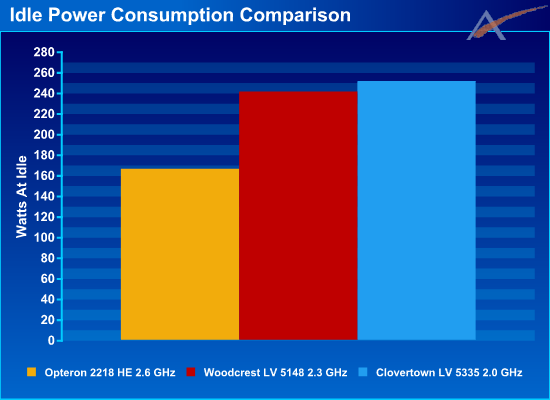
We see that AMD has the lowest idle power consumption. Intel's Woodcrest system uses approximately 41% more power at idle, and the Clovertown system uses approximately 51% more power at idle. The Clovertown system only uses approximately 4% more power at idle than the Woodcrest system, which is not bad considering it has twice as many CPU cores.
During the testing, we often speculate about where all the power goes. We attempted to find out by measuring power consumption of the entire system at idle, then removing a component and re-measuring the power consumption. The difference in power can be attributed to the removed component. This is not a perfect way to determine component power requirements, but it does provide some general guidance as to where all of the power goes. The results are very interesting:
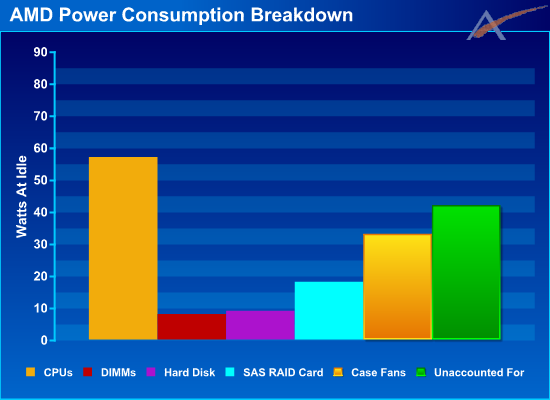
In the AMD system we see that the bulk of the power is consumed by the idle CPUs. Overlooking the "Unaccounted For", the next biggest consumer is the five case fans, followed by the SAS RAID Card. The "Unaccounted For" is everything which is not listed, including the inefficiency of the power supply and the motherboard and chipset.
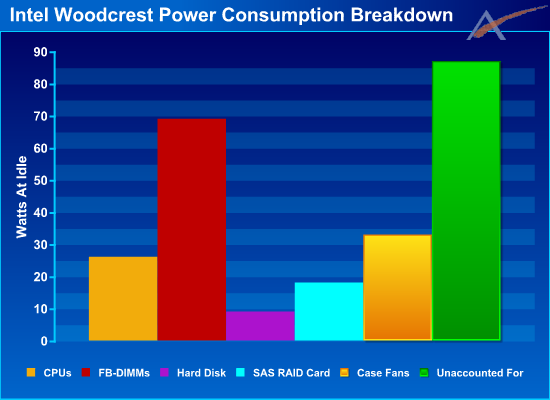
In the Intel Woodcrest system we see that the CPUs require significantly less power than the AMD CPUs, 54% less to be exact. On the other hand the FB-DIMMs require 862% more power than the AMD DIMMs. (Yikes!) Also, the "Unaccounted For" is twice as high on the Intel system as the AMD system. Keep in mind both of these systems have identical power supplies, so the efficiency is roughly the same.
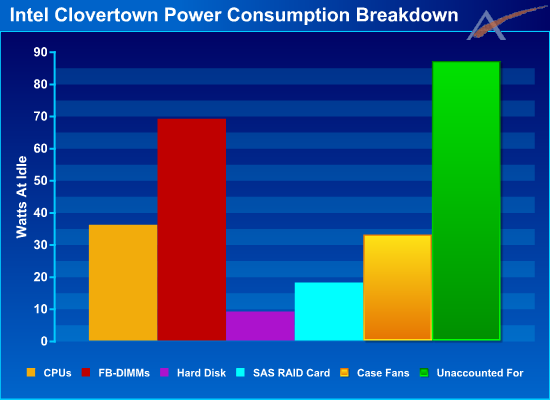
The Intel Clovertown system is identical to the Woodcrest system except for the CPUs, which require approximately 4% more power at idle.
Choosing the contenders
In previous articles, we've been asked to explain why we chose the parts we did for an article. For this article we used the latest low voltage quad-core parts from Intel and the latest low power dual-core parts from AMD. The first question that may come to mind is, "Why are you comparing a quad-core part with a dual-core part?". The answer is quite simple: for Intel the two quad-core / dual-core parts we're comparing cost about the same, so while the parts we are comparing aren't equal in terms of the number of Cores, they are equal in terms of price. On the AMD side of things, the CPU price is once again similar, but other than the just-released Barcelona there are no quad-core AMD offerings. Since testing for this article began over a month ago, including Barcelona wasn't an option at the time.
Since this article is focused on low power parts and that market is mostly focused on Performance/Watt, we decided we would only report results with all power management features enabled. To configure our servers with all power management features on, we perform the following:
On Intel
In the BIOS ensure that Thermal Management is On/Enabled, C1 Enhanced Mode is On/Enabled, and EIST Support is On/Enabled.
On AMD
In the BIOS ensure that PowerNow is On/Enabled. Additionally, you must install the Processor Driver, from AMD, in your OS.
For both platforms you must also set the Power Options in Control Panel to "Server Balanced Processor Power and Performance".
For details about the impact that the Power Management features had on a system at idle please see our previous article. With all Power Management features turned on we recorded idle power usage for all three systems.
We see that AMD has the lowest idle power consumption. Intel's Woodcrest system uses approximately 41% more power at idle, and the Clovertown system uses approximately 51% more power at idle. The Clovertown system only uses approximately 4% more power at idle than the Woodcrest system, which is not bad considering it has twice as many CPU cores.
During the testing, we often speculate about where all the power goes. We attempted to find out by measuring power consumption of the entire system at idle, then removing a component and re-measuring the power consumption. The difference in power can be attributed to the removed component. This is not a perfect way to determine component power requirements, but it does provide some general guidance as to where all of the power goes. The results are very interesting:
In the AMD system we see that the bulk of the power is consumed by the idle CPUs. Overlooking the "Unaccounted For", the next biggest consumer is the five case fans, followed by the SAS RAID Card. The "Unaccounted For" is everything which is not listed, including the inefficiency of the power supply and the motherboard and chipset.
In the Intel Woodcrest system we see that the CPUs require significantly less power than the AMD CPUs, 54% less to be exact. On the other hand the FB-DIMMs require 862% more power than the AMD DIMMs. (Yikes!) Also, the "Unaccounted For" is twice as high on the Intel system as the AMD system. Keep in mind both of these systems have identical power supplies, so the efficiency is roughly the same.
The Intel Clovertown system is identical to the Woodcrest system except for the CPUs, which require approximately 4% more power at idle.
Choosing the contenders
In previous articles, we've been asked to explain why we chose the parts we did for an article. For this article we used the latest low voltage quad-core parts from Intel and the latest low power dual-core parts from AMD. The first question that may come to mind is, "Why are you comparing a quad-core part with a dual-core part?". The answer is quite simple: for Intel the two quad-core / dual-core parts we're comparing cost about the same, so while the parts we are comparing aren't equal in terms of the number of Cores, they are equal in terms of price. On the AMD side of things, the CPU price is once again similar, but other than the just-released Barcelona there are no quad-core AMD offerings. Since testing for this article began over a month ago, including Barcelona wasn't an option at the time.
Originally published at https://www.anandtech.com/show/2326 (Wayback Machine).