
CEDIA 2007 - Day 2: 1080p Projector Roundup, High Def Players & Ferrari Sound
- Posted in
- Trade Shows
The 1080p CEDIA Projector Roundup
There were 1080p projectors everywhere at the show and we, of course, had a look at all of them. How did they stack up against one another in our informal eyeball comparisons? That's what we're here to convey, as best as possible.
While we'll have to wait for actual reviews, tests and user experiences to truly evaluate these projectors, we can provide a little seat of the pants feel for those who couldn't make it out to CEDIA this year.
2.35:1 Everywhere
You've probably seen us mention 2.35:1 support in our projector coverage multiple times this week already, and it's not just that we're obsessed with it - the manufacturers at CEDIA seem to be too.
Many modern day movies aren't filmed in a 16:9 (or 1.78:1) aspect ratio, in fact they are filmed a little wider (2.35:1, 2.37:1 or 2.40:1 are common). They still play just fine on your 16:9 TV, but you get those little black bars across the top and bottom of the screen.
When building a home theater, many users want to feel like they're sitting in a theater and not simply staring at a very large TV, thus they opt for a 2.35:1 aspect ratio screen instead of 16:9. While the effect is cool, finding a 2.35:1 projector is virtually impossible, so we have to use some clever trickery to fill the screen.
You start with a 2.35:1(ish) image projected through a 16:9 projector, but you tell the projector to stretch the image vertically to get rid of the black bars. Now you've got no bars on the top/bottom, but you've got a vertically stretched image - you need something to stretch the image horizontally. You do this last part by putting an anamorphic 2.35:1 lens in front of your projector that stretches the image horizontally, thus giving you a perfect 2.35:1 image from your 16:9 projector.
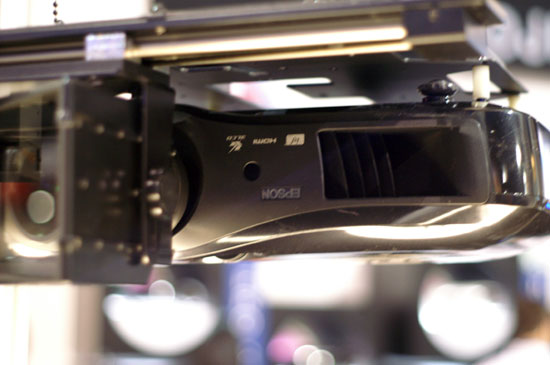
Epson 16:9 projector with 2.35:1 lens in the way
The problem is that not all material is 2.35:1, so you need the ability to move the lens in/out of the path of your projector - generally in an automated fashion. So to complete the setup you need a projector capable of doing the vertical stretch, a 2.35:1 lens, and a slide or other mechanism for getting it out of the way when viewing native 16:9 (or 4:3) material.
You've heard many projector manufacturers talk about 2.35:1 scaling support with their projectors, that's the vertical stretch option we mentioned above. Without the integrated scaling you'd have to use an external video processor, which is what JVC DLA-RS1 owners have to do for example.
What really stood out at the show was that virtually all projector manufacturers either talked about support for 2.35:1 or actually demonstrated their projectors with a 2.35:1 setup. Epson, Sony, JVC, Runco, and Sim2 all had live 2.35:1 demos at their booths/meeting rooms, but none of the companies make their own 2.35:1 lenses so they all relied on 3rd party makers.
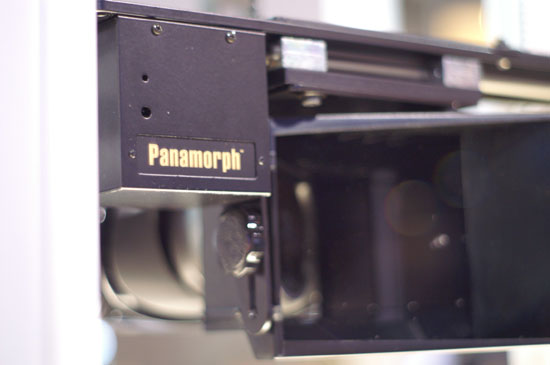
By far the most common lens at CEDIA was the Panamorph UH380, a prism based lens system made by, you guessed it, Panamorph. Some companies offered rebranded UH380s with their projectors, while others didn't even attempt to disguise the Panamorph name. Higher end models sported even more expensive lenses from Schnieder Optics and ISCO; for example, the Sony VW60 was demoed with a UH380 while the VW200 used a Schneider Optics lens. The Sim2 C3X1080, a $30,000 projector, was demoed using an ISCO III 2.35:1 lens.
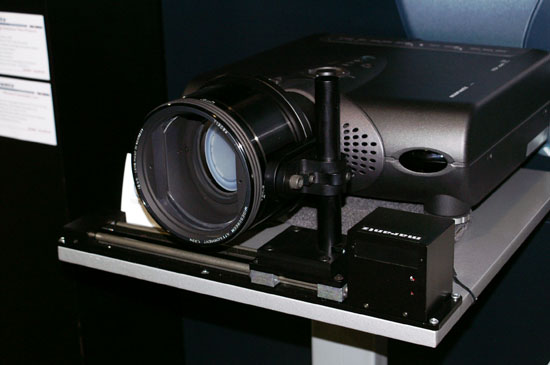
The ISCO III
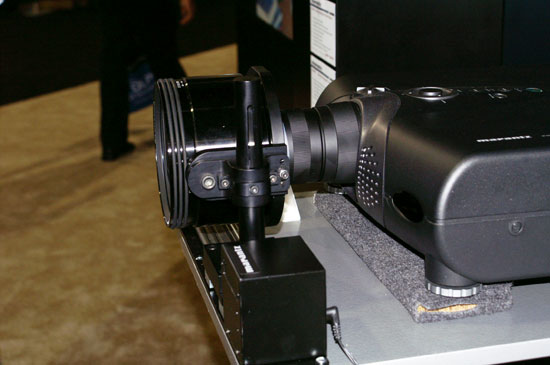
That's one deep lens
The other thing we noticed about these lenses is that they were often way overpriced when ordered from the projector makers. The Panamorph UH380 retails for $2995, with its motorized sled going for an additional $2995, however we were quoted prices around $7K - $8K for the system. The same is true for the ISCO III, a lens that retails for $6K, we were quoted as much as $12K for the lens and sled. If you're thinking about a 2.35:1 setup, we'd strongly suggest ordering your lens/sled directly from the lens maker and not from your projector maker. None of these companies are using their own lenses, so you're not any better off ordering through them.
LCD vs. DLP/LCoS
The other common trend at CEDIA was the dramatic difference between picture quality of LCD projectors and DLP/LCoS based units. While there were some impressive demonstrations at CEDIA, the best LCD projectors we saw couldn't hold a candle to the DLP/LCoS models at the show. Although it's true that none of the demos were under the same conditions, it was very easy to pick out whether or not a projector used LCD technology or one of the newer microdisplay techs.
LCD technology has been evolving for quite a while and it's not going to disappear overnight, but it's clear that some of these companies relying on LCD technology will have their work cut out for them in the coming years.
Originally published at https://www.anandtech.com/show/2320 (Wayback Machine).