
Toshiba Satellite X205-S9359 Take Two: Displays and Drivers
- Posted in
- Laptops
LCD Color Accuracy
Poor viewing angles are usually a bigger problem with LCDs on laptops than color accuracy, especially since the color accuracy results we've recorded so far have at best been decent but certainly not up to the level of desktop LCDs. The LCD panel on the X205 doesn't break any new ground here either.
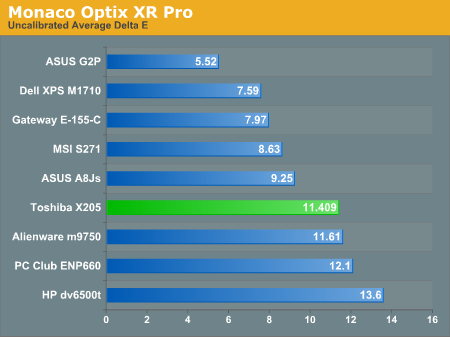
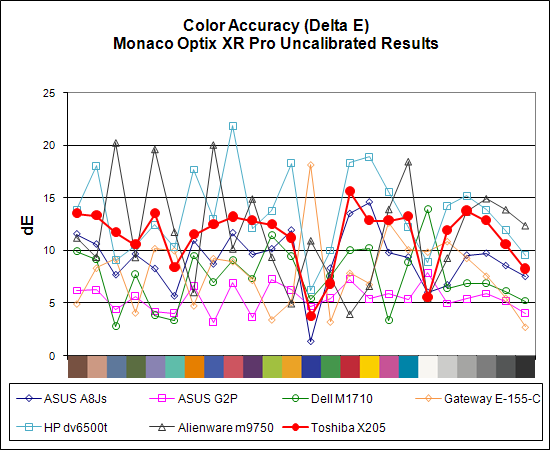
Uncalibrated Delta E ranks towards the bottom of our charts, although subjectively we would rate it a little higher. It's not perfect by any stretch of the imagination, but we were generally okay with viewing movies or playing games on the laptop. That might be because frame rates have a lot more of an impact on games, but the dark blacks in movies were definitely pleasing.
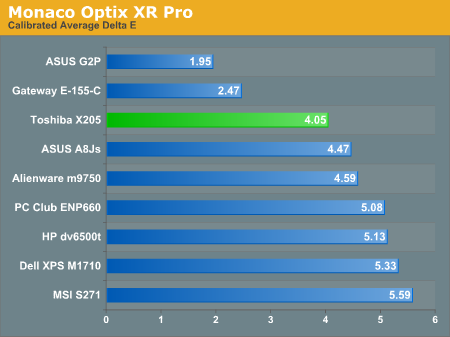
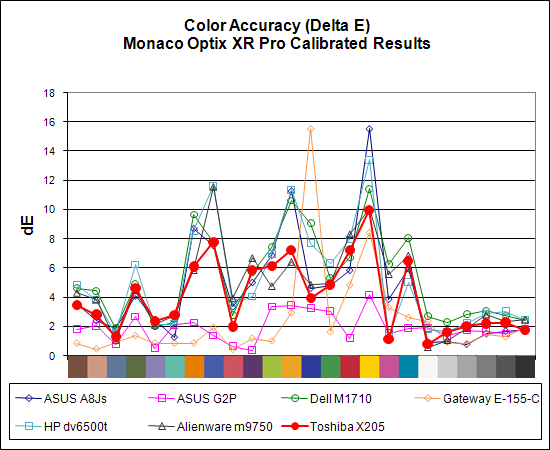
Calibration helps out quite a bit, moving the Toshiba X205 into a solid third place when using Monaco Optix XR.
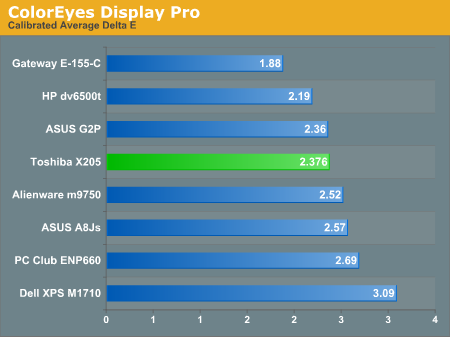
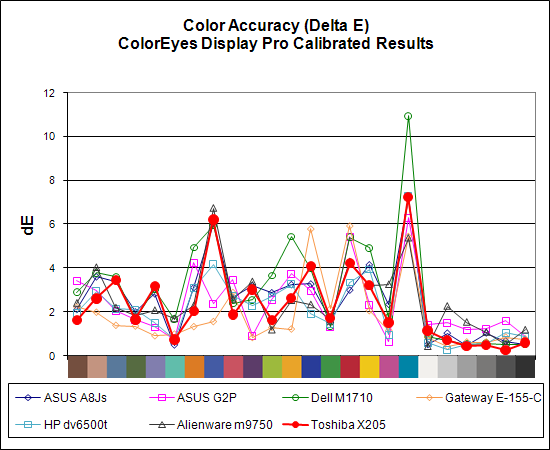
ColorEyes Display Pro improves on the numerical results, and although in terms of absolute ranking the X205 drops one position to fourth place it's basically still tied for third.
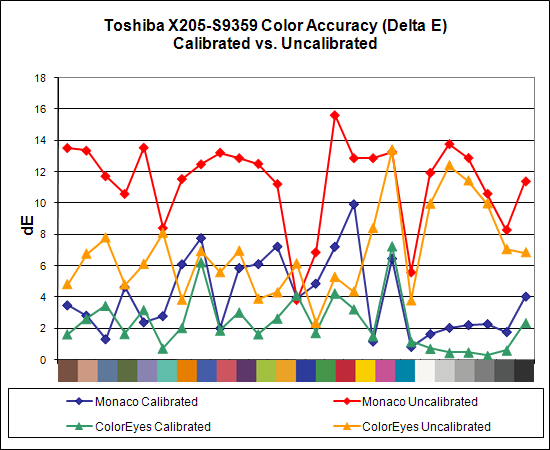
As a final look at the X205 LCD panel, here's a chart showing calibrated versus uncalibrated Delta E with both Monaco Optix XR Pro and ColorEyes Display Pro. ColorEyes also reports a lower Delta E prior to calibration (6.9 vs. 11.4). As always, calibration can help out a lot if you need more accurate colors, but even the best laptops are unable to match the majority of the desktop LCDs we've looked at when it comes to color accuracy. We're still waiting to get any IPS based laptops in for testing, unfortunately. Very likely, however, users will have to make other compromises in terms of overall configurations in order to get one of those laptops.
Poor viewing angles are usually a bigger problem with LCDs on laptops than color accuracy, especially since the color accuracy results we've recorded so far have at best been decent but certainly not up to the level of desktop LCDs. The LCD panel on the X205 doesn't break any new ground here either.
Uncalibrated Delta E ranks towards the bottom of our charts, although subjectively we would rate it a little higher. It's not perfect by any stretch of the imagination, but we were generally okay with viewing movies or playing games on the laptop. That might be because frame rates have a lot more of an impact on games, but the dark blacks in movies were definitely pleasing.
Calibration helps out quite a bit, moving the Toshiba X205 into a solid third place when using Monaco Optix XR.
ColorEyes Display Pro improves on the numerical results, and although in terms of absolute ranking the X205 drops one position to fourth place it's basically still tied for third.
As a final look at the X205 LCD panel, here's a chart showing calibrated versus uncalibrated Delta E with both Monaco Optix XR Pro and ColorEyes Display Pro. ColorEyes also reports a lower Delta E prior to calibration (6.9 vs. 11.4). As always, calibration can help out a lot if you need more accurate colors, but even the best laptops are unable to match the majority of the desktop LCDs we've looked at when it comes to color accuracy. We're still waiting to get any IPS based laptops in for testing, unfortunately. Very likely, however, users will have to make other compromises in terms of overall configurations in order to get one of those laptops.
Originally published at https://www.anandtech.com/show/2317 (Wayback Machine).