
A New Kind of Home Computer: Windows Home Server Preview
- Posted in
- Systems
WHS As A File and Media Server, Cont
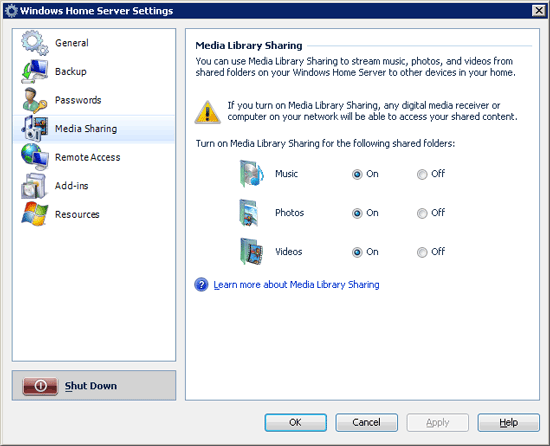
Besides SMB, WHS also offers additional ways for smart devices that aren't full-fledged computers to connect. Windows Media Connect is supported, so devices and software implementing that can use the server as a source of media, the prime example being the Xbox 360 and numerous home audio receivers. However users with very new devices will be disappointed to find that it only supports the older version 2.0 of this standard, which means some devices won't work.
New to this specific version of Windows is support for the Digital Living Network Alliance's self-named DLNA standard, a competitor for Windows Media Connect. Smart home audio receivers that don't implement WMC support usually implement this standard instead, and by offering DLNA support in WHS they will be similarly able to read media off of a WHS server. In an amusing note, by far the most widespread DLNA receiver right now is the Playstation 3, which got support for DLNA in the 1.80 firmware. So not only can the Xbox read media off of a WHS server, but so can the PS3.
So with all of this praise for the file serving features of WHS so far, why did we call this feature hit and miss overall? The answer is integration with Microsoft's existing home entertainment package, Windows Media Center Edition (MCE).
Simply put, there is no integration between the two. By default WHS and MCE are completely oblivious to each other, and furthermore if WHS is used to backup an MCE box it will purposely avoid backing up recorded shows (which makes sense, but only highlights the disconnect). Even accessing media on a WHS server from Vista MCE is more trouble than it needs to be; Vista Windows Media Player can use WMC to find media, but Vista MCE can't, it must log into a server's shared folders and be told specifically where to look for media. This is a one-time setup issue, but it still shouldn't be occurring.
All of these issues are just greater symptoms of the bigger issue though, and that is all of the space that both MCE and WHS both cover. An MCE box needs to be on 24/7 to record shows; a WHS box needs to be on 24/7 to backup and offer data. The obvious question quickly arises: why isn't the WHS box also doing the TV recording since it needs to be on anyhow, and we let the MCE box sleep? Microsoft has for some time now offered the Media Center Extender feature for other devices on a network to integrate with and control a Media Center Edition computer, but ultimately we run into the problem of a Media Center Edition computer being unable to act as an Extender itself; it's really a server. Even the Xbox has troubles in this regard, as it functions a heck of a lot better as an Extender than a WMC device.
The fact that Microsoft doesn't have a clear solution to deciding which device is really supposed to be the server is the representation of the disconnect that existed between the Vista and WHS teams. WHS really, really, really should have been an MCE-server box along with being a file server, so that it could hold several TV tuners and serve up TV to Extenders in a house.
In Microsoft's defense, Windows Server 2003 is a poor choice as a TV tuner; it's a file server and doesn't even offer the kind of driver compatibility required to work with the slew of tuners on the market. Microsoft has been aware of this oversight for quite some time and there's a lot of talk about making sure WHS 2.0 includes this kind of functionality, but that will be at least 2 years away. In the meantime anyone owning a WHS box and an MCE box will be on their own in finding a way to best split media serving abilities.
Originally published at https://www.anandtech.com/show/2312 (Wayback Machine).