
Alienware Area-51 m9750: Power Gaming on the Go
- Posted in
- Laptops
Battery Life
As mentioned earlier, we had some difficulty getting a clean install of Windows XP onto the m9750, so we had to skip the BAPCo benchmarks, including MobileMark 2005. Obviously, we don't expect a lot in terms of battery life for this particular notebook, but we were curious to see exactly how fast we could run the battery dead. We turned to the battery scripts that we developed for Windows Vista along with our gaming battery benchmark where we loop 3DMark06. Let's see how the Area-51 manages to run without its tether.
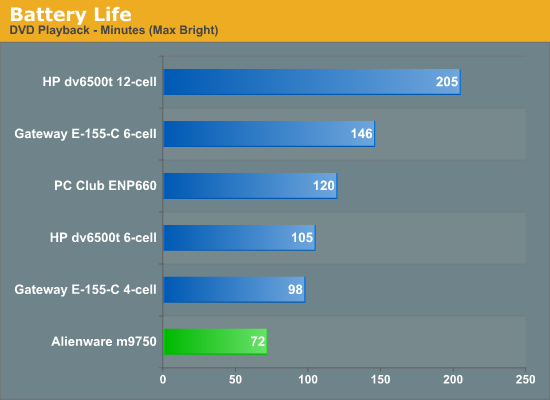
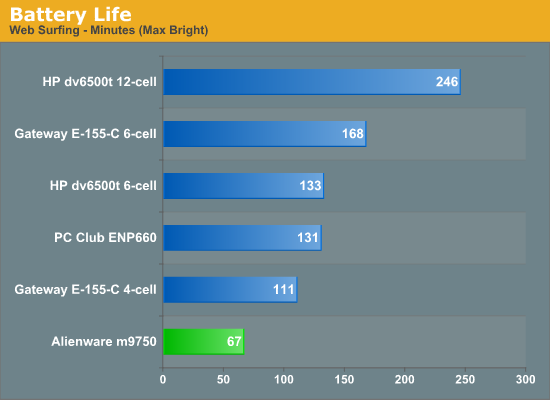
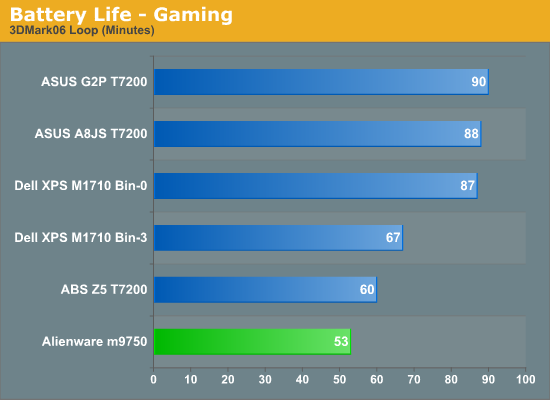
Despite having a rather large 12-cell battery, best case the m9750 provides just over an hour of battery life. That's with all of the power saving features turned on. Gaming performance can't even make it up to one hour, but it's also important to mention that NVIDIA's PowerMizer settings are in effect, reducing the GPU clock speeds and most likely disabling (or at least tampering) SLI performance. We did try to run 3DMark06 with PowerMizer disabled, but the laptop would shut down after a few minutes and it appears that clock speeds were still reduced. Not surprisingly, the only conclusion is that battery life certainly isn't a priority with the m9750.
Power Consumption
Related to the battery life discussions, we also have power results. To measure power requirements, we remove the battery from the laptop and measure system power draw at the wall outlet using a Kill-A-Watt device. We test several different scenarios to try to isolate the power draw of the various components. First, we have the baseline measurement when the system is idle and sitting at the desktop. No applications are running for 10 minutes or more but the screensaver and hard drive sleep mode are disabled. As a CPU load test, we run the SMP version of Folding@Home at 100%. Finally, for maximum power load we leave Folding@Home running and start 3DMark05. In this way, we can see roughly how much power the GPU is using in 3D mode versus 2D mode.
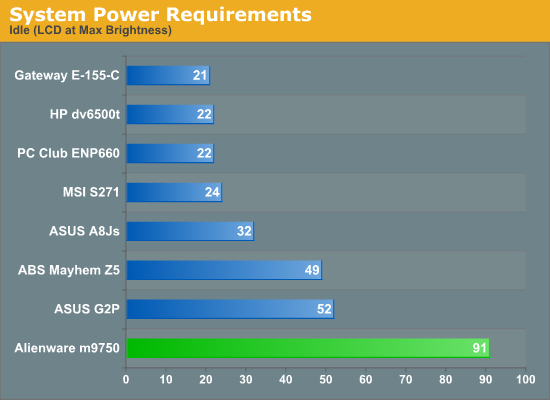
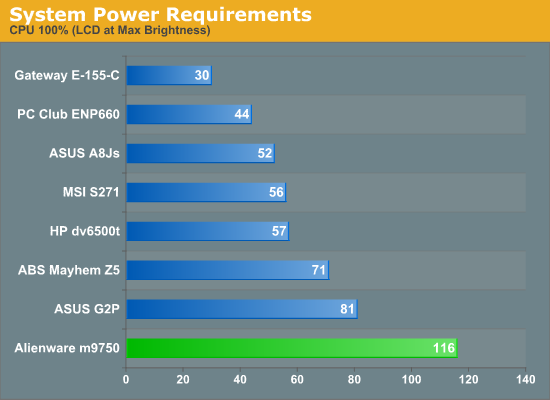
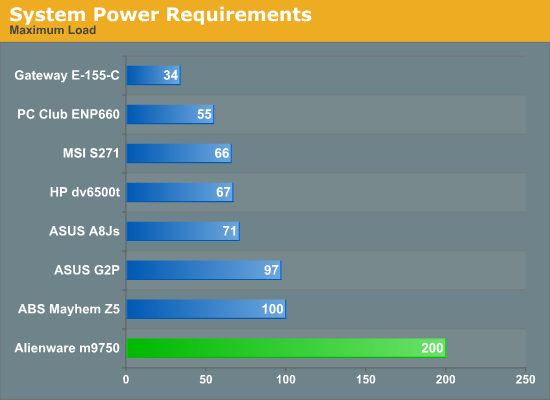
The power requirements are off the hizzy indeed! At maximum load, the m9750 consumes twice as much power as the nearest competitor. The 100% CPU test load however shows that the graphics cards are a major factor, as the m9750 "only" requires 45-75% more power under those situations. The good news is that even with such high power requirements, the large power brick is able to provide enough power that you can start gaming with a dead battery and still charge the battery. Then again, do you really need a battery for this type of notebook?
Temperatures
Given the amount of power that the m9750 can use, it's no surprise that the bottom can get pretty hot. While we tend to use the terms "laptop" and "notebook" interchangeably, the m9750 is definitely more at home sitting on the desk rather than in your lap - though it might come in handy during the winter months.
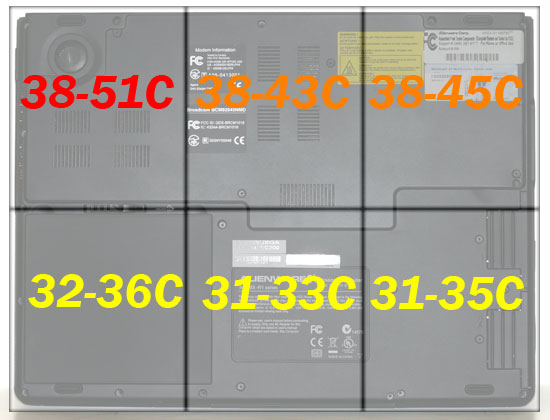
Here's another shot of the bottom of the notebook with temperatures superimposed (the rear of the notebook is at top and the front is at the bottom). Temperatures were measured after playing a game for 30 minutes. At idle, the laptop is cooler, but much of the bottom still gets above 35°C.
At the back of the notebook, the right exhaust port reaches 60°C at full load, and the left (center) exhaust reaches 55°C. Despite all that heat, however, the keyboard and palm rest remain generally cool. The palm rest stays a pretty consistent 31°C over the entire surface. The keyboard is a bit warmer, ranging from 33 to 36°C.
As mentioned earlier, we had some difficulty getting a clean install of Windows XP onto the m9750, so we had to skip the BAPCo benchmarks, including MobileMark 2005. Obviously, we don't expect a lot in terms of battery life for this particular notebook, but we were curious to see exactly how fast we could run the battery dead. We turned to the battery scripts that we developed for Windows Vista along with our gaming battery benchmark where we loop 3DMark06. Let's see how the Area-51 manages to run without its tether.
Despite having a rather large 12-cell battery, best case the m9750 provides just over an hour of battery life. That's with all of the power saving features turned on. Gaming performance can't even make it up to one hour, but it's also important to mention that NVIDIA's PowerMizer settings are in effect, reducing the GPU clock speeds and most likely disabling (or at least tampering) SLI performance. We did try to run 3DMark06 with PowerMizer disabled, but the laptop would shut down after a few minutes and it appears that clock speeds were still reduced. Not surprisingly, the only conclusion is that battery life certainly isn't a priority with the m9750.
Power Consumption
Related to the battery life discussions, we also have power results. To measure power requirements, we remove the battery from the laptop and measure system power draw at the wall outlet using a Kill-A-Watt device. We test several different scenarios to try to isolate the power draw of the various components. First, we have the baseline measurement when the system is idle and sitting at the desktop. No applications are running for 10 minutes or more but the screensaver and hard drive sleep mode are disabled. As a CPU load test, we run the SMP version of Folding@Home at 100%. Finally, for maximum power load we leave Folding@Home running and start 3DMark05. In this way, we can see roughly how much power the GPU is using in 3D mode versus 2D mode.
The power requirements are off the hizzy indeed! At maximum load, the m9750 consumes twice as much power as the nearest competitor. The 100% CPU test load however shows that the graphics cards are a major factor, as the m9750 "only" requires 45-75% more power under those situations. The good news is that even with such high power requirements, the large power brick is able to provide enough power that you can start gaming with a dead battery and still charge the battery. Then again, do you really need a battery for this type of notebook?
Temperatures
Given the amount of power that the m9750 can use, it's no surprise that the bottom can get pretty hot. While we tend to use the terms "laptop" and "notebook" interchangeably, the m9750 is definitely more at home sitting on the desk rather than in your lap - though it might come in handy during the winter months.
Here's another shot of the bottom of the notebook with temperatures superimposed (the rear of the notebook is at top and the front is at the bottom). Temperatures were measured after playing a game for 30 minutes. At idle, the laptop is cooler, but much of the bottom still gets above 35°C.
At the back of the notebook, the right exhaust port reaches 60°C at full load, and the left (center) exhaust reaches 55°C. Despite all that heat, however, the keyboard and palm rest remain generally cool. The palm rest stays a pretty consistent 31°C over the entire surface. The keyboard is a bit warmer, ranging from 33 to 36°C.
Originally published at https://www.anandtech.com/show/2307 (Wayback Machine).