
HP w2207: Shiny 22" Perfection?
- Posted in
- Displays
Brightness and Contrast Ratio
For those that need accurate colors, hardware color calibration is basically a given. Here, we report scores for the same areas as we did on the previous page, only this time the results are taken after we have used Monaco Optix XR Pro to calibrate the display.
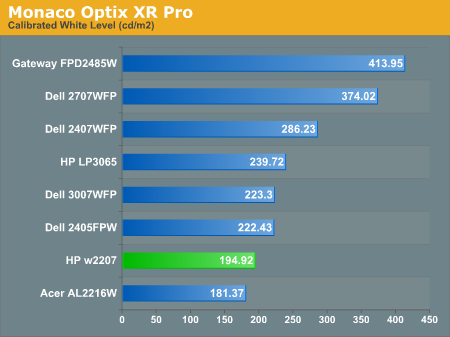
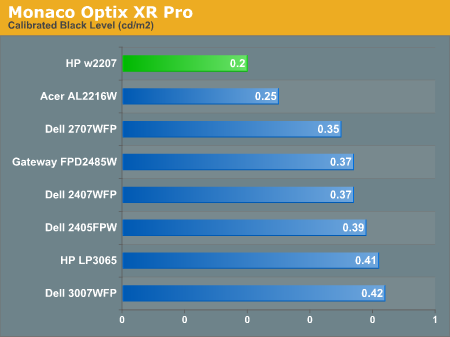
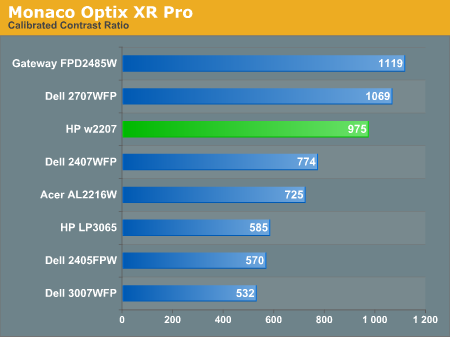
Calibration almost always results in the use of decreased brightness levels, and all of the displays end up running at less than their maximum brightness. You can of course choose to run a display at a higher than recommended brightness level, and the ambient lighting in a room will also determine what brightness setting is best. Our testing was performed indoors with a moderate amount of lighting, and the displays were adjusted according to directions. We also found that manually reducing the brightness level to something more reasonable (like 200-300 nits) did not significantly affect the results on any of these displays, so consider the above charts as more of a maximum recommended brightness for each particular LCD. The HP w2207 continues to generate very good contrast ratios, thanks to the very dark blacks it produces.
Color Accuracy
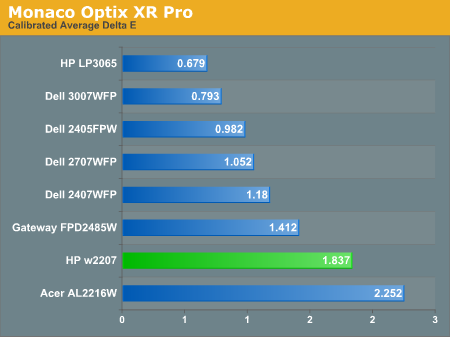
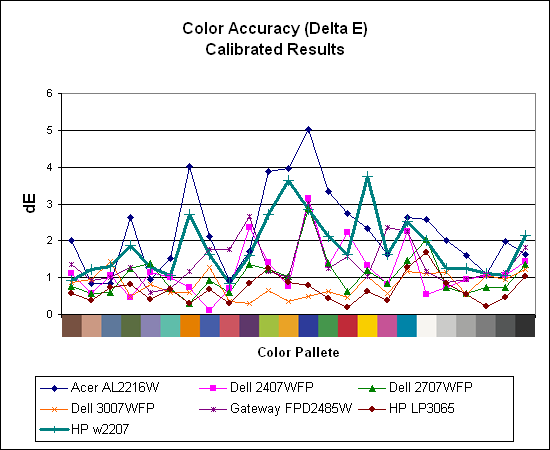
Calibration improves the color accuracy results significantly on all of the displays, although the HP w2207 remains in second to last place. Where the Acer was the best uncalibrated display, it becomes the worst scoring display after calibration. However, outside of professional image editing virtually any of the displays provide acceptable colors once calibrated.
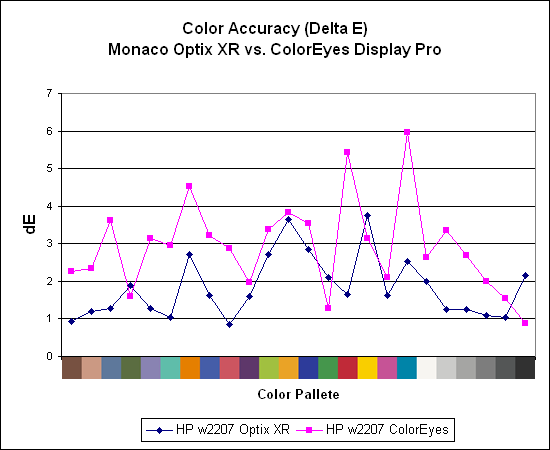
After discovering during our laptop display tests that certain displays appear to respond better to different calibration software, we decided to use ColorEyes Display Pro to test desktop LCDs as well. So far, we have yet to encounter a desktop LCD that scores better using ColorEyes Display Pro, which is actually surprising to us. Monaco Optix XR is an older software package that hasn't been updated since 2004, but it continues to work very well. Both packages also run under Windows Vista, though installation of the colorimeter drivers requires quite a bit more jumping through hoops and even after calibration we're still not entirely sure that Vista is using the color profiles properly. The testing and evaluation process works with the correct color profiles, but outside of the applications Vista seems to change color profiles at times.
For those that need accurate colors, hardware color calibration is basically a given. Here, we report scores for the same areas as we did on the previous page, only this time the results are taken after we have used Monaco Optix XR Pro to calibrate the display.
Calibration almost always results in the use of decreased brightness levels, and all of the displays end up running at less than their maximum brightness. You can of course choose to run a display at a higher than recommended brightness level, and the ambient lighting in a room will also determine what brightness setting is best. Our testing was performed indoors with a moderate amount of lighting, and the displays were adjusted according to directions. We also found that manually reducing the brightness level to something more reasonable (like 200-300 nits) did not significantly affect the results on any of these displays, so consider the above charts as more of a maximum recommended brightness for each particular LCD. The HP w2207 continues to generate very good contrast ratios, thanks to the very dark blacks it produces.
Color Accuracy
Calibration improves the color accuracy results significantly on all of the displays, although the HP w2207 remains in second to last place. Where the Acer was the best uncalibrated display, it becomes the worst scoring display after calibration. However, outside of professional image editing virtually any of the displays provide acceptable colors once calibrated.
After discovering during our laptop display tests that certain displays appear to respond better to different calibration software, we decided to use ColorEyes Display Pro to test desktop LCDs as well. So far, we have yet to encounter a desktop LCD that scores better using ColorEyes Display Pro, which is actually surprising to us. Monaco Optix XR is an older software package that hasn't been updated since 2004, but it continues to work very well. Both packages also run under Windows Vista, though installation of the colorimeter drivers requires quite a bit more jumping through hoops and even after calibration we're still not entirely sure that Vista is using the color profiles properly. The testing and evaluation process works with the correct color profiles, but outside of the applications Vista seems to change color profiles at times.
Originally published at https://www.anandtech.com/show/2291 (Wayback Machine).