
Logitech G5 Laser Mouse: When an update is not worthy of a new name
- Posted in
- Peripherals
Design
One of the most noticeable changes from the original design is the new color scheme. Instead of having a faded metallic color scheme like previous Logitech urban design motifs, the main body now consists of black-on-blue color scheme that mimics dry and cracked earth. The sides retain the flat black look that features a unique textured grip surface, which is very good. The other main feature, is of course, a second thumb button on the side that returns this layout design to that of the MX500 series. A change that we wholeheartedly welcome and are glad to finally see.
While the number of buttons first appears to be minimal, the layout design conceals the fact that there are seven available button/wheel choices. The horizontal capable scroll wheel can be configured as three buttons (left, center, right). An additional two buttons are located below the scroll wheel (DPI adjustable) along with the two side buttons, all of which are configurable via the Logitech SetPoint software.
There are a set of 4 LEDs just on the left side of the top of the mouse that are used to indicate power on and the choice of three DPI settings. We found their placement to either be near perfect for taking a quick glance at the current DPI setting or they were completely blocked during usage depending upon your hand size. DPI switching is supported in hardware and features the default 400/800/2000 settings. You only need to install the SetPoint software if you want to customize the DPI settings from the default levels.
The right side of the mouse has a slight indentation that allows the third finger to rest comfortably and allows for precise movements with the mouse. Each side of the mouse is coated with a textured grip surface that allows for a very comfortable feel. On the left side of the G5 we found the thumb grip design gives you a slightly curved surface to rest your thumb on. It feels very comfortable and natural while resting your hand or during quick movements. The top of the mouse has a non-slip texture design as well. Overall, this is one of the most comfortable mice we have used but it is basically a right hand design only.
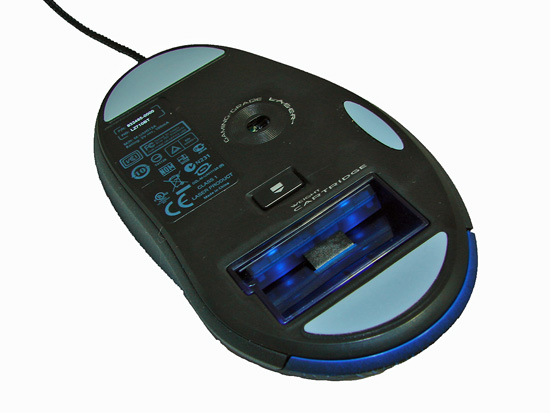
The bottom of the G5 is fairly ordinary. There are three low-friction polytetrafluoroethylene (Teflon based) feet designed to reduce resistance and improve gliding across most surfaces. We found the material on the feet allowed the G5 to glide better across our various mouse pads or desktop surface a lot easier than previous Logitech offerings. In fact, the difference was noticeable the first time we used the mouse when compared to the MX518. The other feature on the bottom of this mouse is a slot for the adjustable weight system that we will discuss next.
 |
 |
| Click to enlarge | |
One of the most noticeable changes from the original design is the new color scheme. Instead of having a faded metallic color scheme like previous Logitech urban design motifs, the main body now consists of black-on-blue color scheme that mimics dry and cracked earth. The sides retain the flat black look that features a unique textured grip surface, which is very good. The other main feature, is of course, a second thumb button on the side that returns this layout design to that of the MX500 series. A change that we wholeheartedly welcome and are glad to finally see.
While the number of buttons first appears to be minimal, the layout design conceals the fact that there are seven available button/wheel choices. The horizontal capable scroll wheel can be configured as three buttons (left, center, right). An additional two buttons are located below the scroll wheel (DPI adjustable) along with the two side buttons, all of which are configurable via the Logitech SetPoint software.
There are a set of 4 LEDs just on the left side of the top of the mouse that are used to indicate power on and the choice of three DPI settings. We found their placement to either be near perfect for taking a quick glance at the current DPI setting or they were completely blocked during usage depending upon your hand size. DPI switching is supported in hardware and features the default 400/800/2000 settings. You only need to install the SetPoint software if you want to customize the DPI settings from the default levels.
 |
 |
| Click to enlarge | |
The right side of the mouse has a slight indentation that allows the third finger to rest comfortably and allows for precise movements with the mouse. Each side of the mouse is coated with a textured grip surface that allows for a very comfortable feel. On the left side of the G5 we found the thumb grip design gives you a slightly curved surface to rest your thumb on. It feels very comfortable and natural while resting your hand or during quick movements. The top of the mouse has a non-slip texture design as well. Overall, this is one of the most comfortable mice we have used but it is basically a right hand design only.
The bottom of the G5 is fairly ordinary. There are three low-friction polytetrafluoroethylene (Teflon based) feet designed to reduce resistance and improve gliding across most surfaces. We found the material on the feet allowed the G5 to glide better across our various mouse pads or desktop surface a lot easier than previous Logitech offerings. In fact, the difference was noticeable the first time we used the mouse when compared to the MX518. The other feature on the bottom of this mouse is a slot for the adjustable weight system that we will discuss next.
Originally published at https://www.anandtech.com/show/2286 (Wayback Machine).