
NVIDIA 680i SLI: Official 1333MHz FSB CPU Support Arrives
- Posted in
- CPUs
Media Encoding Performance:
Our first series of tests is quite easy - we take our original Office Space DVD and use AnyDVD and Nero Recode 2 to copy the full DVD to the hard drive without compression, thus providing an almost exact duplicate of the DVD. We then fired up Nero Recode 2, selected our Office Space copy on the hard drive, and performed a shrink operation to allow the entire movie along with extras to fit on a single 4.5GB DVD disc. We left all options on their defaults except we checked off the advanced analysis option. The scores reported include the full encoding process and is represented in seconds, with lower numbers providing better performance.
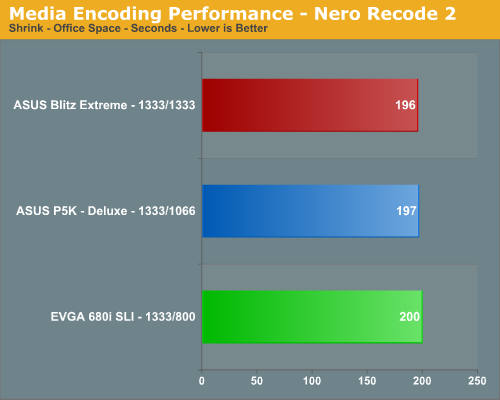
The Nero Recode Shrink results show the improved CPU throughput speeds of the Intel P35 boards resulting in a 2% advantage over the EVGA 680i SLI board.
Rendering Performance:
We are using the Cinebench 9.5 benchmark as it tends to heavily stress the CPU subsystem while performing graphics modeling and rendering. Cinebench 9.5 features two different benchmarks with one test utilizing a single core and the second test showcasing the power of multiple cores in rendering the benchmark image. We utilize the standard multiple core benchmark demo and default settings.
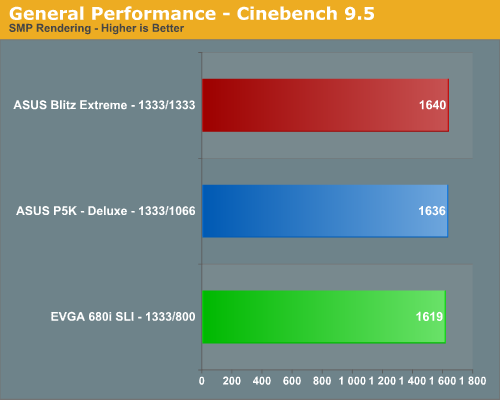
Once again, we notice the advantage of an Intel chipset in a CPU throughput test with the P35 placing 1% ahead of the EVGA 680i SLI board. In the grand scheme of things, this difference and the one in our Nero test is actually very minor.
File Compression Performance:
In order to save space on our hard drives and ensure we had another CPU crunching utility, we will be reporting our file compression results with the latest version of WinRAR that fully supports multithreaded operations and should be of particular interest for those users with dual core or multi-processor systems. Our series of file compression tests utilizes WinRAR 3.62 to compress our test folder that contains 444 files, ten subfolders, and 602MB worth of data. All default settings are utilized in WinRAR along with our hard drive being defragmented before each test.
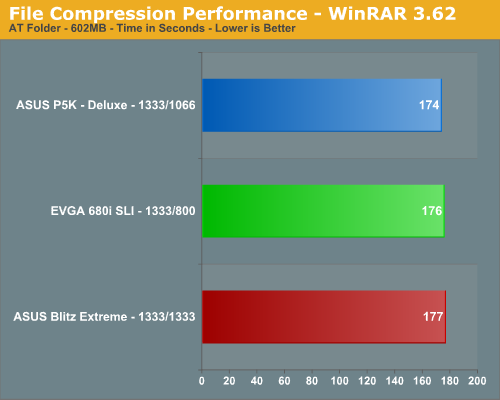
In this test that stresses overall memory latencies and CPU/Memory throughput we see the DDR3 configuration finishing last. The nature of file compression is such that memory is accessed almost constantly in a very random fashion, so page misses requiring additional time as memory banks are swapped is common. The 680i did not perform as bad as we originally thought it would in this test considering its memory speed although latencies are decent.
Our first series of tests is quite easy - we take our original Office Space DVD and use AnyDVD and Nero Recode 2 to copy the full DVD to the hard drive without compression, thus providing an almost exact duplicate of the DVD. We then fired up Nero Recode 2, selected our Office Space copy on the hard drive, and performed a shrink operation to allow the entire movie along with extras to fit on a single 4.5GB DVD disc. We left all options on their defaults except we checked off the advanced analysis option. The scores reported include the full encoding process and is represented in seconds, with lower numbers providing better performance.
The Nero Recode Shrink results show the improved CPU throughput speeds of the Intel P35 boards resulting in a 2% advantage over the EVGA 680i SLI board.
Rendering Performance:
We are using the Cinebench 9.5 benchmark as it tends to heavily stress the CPU subsystem while performing graphics modeling and rendering. Cinebench 9.5 features two different benchmarks with one test utilizing a single core and the second test showcasing the power of multiple cores in rendering the benchmark image. We utilize the standard multiple core benchmark demo and default settings.
Once again, we notice the advantage of an Intel chipset in a CPU throughput test with the P35 placing 1% ahead of the EVGA 680i SLI board. In the grand scheme of things, this difference and the one in our Nero test is actually very minor.
File Compression Performance:
In order to save space on our hard drives and ensure we had another CPU crunching utility, we will be reporting our file compression results with the latest version of WinRAR that fully supports multithreaded operations and should be of particular interest for those users with dual core or multi-processor systems. Our series of file compression tests utilizes WinRAR 3.62 to compress our test folder that contains 444 files, ten subfolders, and 602MB worth of data. All default settings are utilized in WinRAR along with our hard drive being defragmented before each test.
In this test that stresses overall memory latencies and CPU/Memory throughput we see the DDR3 configuration finishing last. The nature of file compression is such that memory is accessed almost constantly in a very random fashion, so page misses requiring additional time as memory banks are swapped is common. The 680i did not perform as bad as we originally thought it would in this test considering its memory speed although latencies are decent.
Originally published at https://www.anandtech.com/show/2280 (Wayback Machine).