
Killing the Business Desktop PC Softly
- Posted in
- IT Computing
The Rise of Thin Clients
Every IT professional has heard the various reasons why desktop PCs are not very efficient devices in a professional environment. It's pretty simple: there's nothing "personal" about the data that you process on your PC at your work. In many cases the data represents a lot of work and is worth a lot of money, so it should never be saved on a local hard disk that could crash or be wiped out. Also, as users try to personalize their PCs, they sometimes configure software badly, introduce malware, perhaps crack open the case on occasion, and so on. All this means that PCs require quite a bit of repair and maintenance time from the helpdesk people. As desktops have become more powerful, power requirements have also increase quite a lot. There is nothing new with these complaints: as early as 1987 the Gartner group drew the attention to the Total Cost of Ownership (TCO) associated with (badly) managed business desktops.
That is the reason SBC is becoming so popular, whether in the form of Windows Terminal Server or Citrix Metaframe. 50 to 100 users can connect via thin clients to one central server that runs one instance of Windows Server 2003. That means that you only need to manage one copy of Windows Server instead of all those copies of Windows 2000/XP, which all need to be configured and updated on a regular basis. The thin client has no moving parts: hard disks are absent and the 6W to 9W CPUs require only passive cooling. All user profile information is stored on a central server, making it possible to quickly replace a faulty client.
However, the number of applications that will run properly on a thin client with SBC are limited. If you need to develop a new application or report to your management using heavy data mining, the typical VIA Eden 800 MHz or AMD Geode NX 1 GHz processors that are found in most thin clients won't go very far. If you need to perform some heavy CAD or 3D animation work, you are definitely out of luck. That is where the business desktop still makes a lot of sense.
So what is the alternative that HP and IBM are proposing? As IBM and HP account for 80% of the very profitable blade market, it's no surprise that the new PC alternative has taken the shape of a blade. HP and IBM came up with two solutions: the blade PC and the workstation blade. IBM only offers the workstation blade, and for the blade PC you have to go to Lenovo. HP offers everything, and calls this solution CCI or Consolidated Client Infrastructure. Before we discuss these solutions in more detail, we need to investigate the hardware that is the foundation of this concept.
Both HP and IBM use the same basic configuration as you can see below.
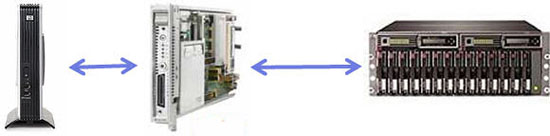
A thin client and blade PC should replace the business desktop PC, according to HP and IBM
The basic idea is that a thin stateless client will access a blade PC and that all valuable data is stored on shared storage device.
The advantages are:
Every IT professional has heard the various reasons why desktop PCs are not very efficient devices in a professional environment. It's pretty simple: there's nothing "personal" about the data that you process on your PC at your work. In many cases the data represents a lot of work and is worth a lot of money, so it should never be saved on a local hard disk that could crash or be wiped out. Also, as users try to personalize their PCs, they sometimes configure software badly, introduce malware, perhaps crack open the case on occasion, and so on. All this means that PCs require quite a bit of repair and maintenance time from the helpdesk people. As desktops have become more powerful, power requirements have also increase quite a lot. There is nothing new with these complaints: as early as 1987 the Gartner group drew the attention to the Total Cost of Ownership (TCO) associated with (badly) managed business desktops.
That is the reason SBC is becoming so popular, whether in the form of Windows Terminal Server or Citrix Metaframe. 50 to 100 users can connect via thin clients to one central server that runs one instance of Windows Server 2003. That means that you only need to manage one copy of Windows Server instead of all those copies of Windows 2000/XP, which all need to be configured and updated on a regular basis. The thin client has no moving parts: hard disks are absent and the 6W to 9W CPUs require only passive cooling. All user profile information is stored on a central server, making it possible to quickly replace a faulty client.
However, the number of applications that will run properly on a thin client with SBC are limited. If you need to develop a new application or report to your management using heavy data mining, the typical VIA Eden 800 MHz or AMD Geode NX 1 GHz processors that are found in most thin clients won't go very far. If you need to perform some heavy CAD or 3D animation work, you are definitely out of luck. That is where the business desktop still makes a lot of sense.
So what is the alternative that HP and IBM are proposing? As IBM and HP account for 80% of the very profitable blade market, it's no surprise that the new PC alternative has taken the shape of a blade. HP and IBM came up with two solutions: the blade PC and the workstation blade. IBM only offers the workstation blade, and for the blade PC you have to go to Lenovo. HP offers everything, and calls this solution CCI or Consolidated Client Infrastructure. Before we discuss these solutions in more detail, we need to investigate the hardware that is the foundation of this concept.
Both HP and IBM use the same basic configuration as you can see below.
A thin client and blade PC should replace the business desktop PC, according to HP and IBM
The basic idea is that a thin stateless client will access a blade PC and that all valuable data is stored on shared storage device.
The advantages are:
- The PC user cannot store any valuable documents on the client, thus data is kept central and is always backed up
- A thin client can be replaced in matter of minutes instead of hours
- There is less heat generated in the office: a thin client needs about 15 to 30W instead of the 50W to 200W typical of a business desktop PC
- The electricity bill should be lower as even a blade + thin PC consumes less than a typical desktop PC (according to HP)
Originally published at https://www.anandtech.com/show/2279 (Wayback Machine).