
Galaxy Metal Gear Box 3500SASP - SATA/USB 2.0 Enclosure on a Budget
- Posted in
- Storage
Galaxy Metal Gear Box Specifications:
The Galaxy Metal Gear Box 3500SASP supports current SATA and USB 2.0 specifications. The unit does not provide support for eSATA connections and instead relies upon the standard SATA interface for operation. Galaxy does provide an adapter bracket to utilize an internal SATA header on the motherboard. A USB 2.0 connection is also included for near universal compatibility between personal computer systems.
Galaxy Metal Gear Feature Set
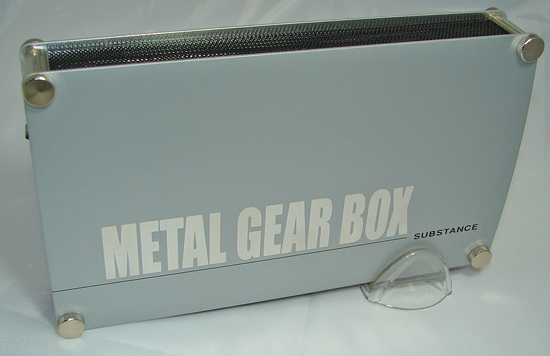
The Galaxy Metal Gear Box SATA/USB 2.0 series is available in a brushed Silver, deep red, or a flat black color scheme. The graphics scheme and included blue LED strips that have a tendency to light up a small room target an audience who like for their product to be noticed. Nothing wrong with that, but the unit might look out of place on desktops with traditional component designs.
GMG Inc. has recently introduced the Metal Gear Box II series that features a revised design and five different color schemes. Both designs feature the same electronics and layout so performance will be similar.
The 3500SASP enclosure does not include a cooling fan and instead relies on a combination of convection cooling and chassis conduction to cool the enclosed hard drive. It can be positioned either horizontally or vertically, but we found the vertical position reduced noise, vibration, and heat. Our only problem with this design was the flimsy mesh inserts that had a bad habit of bending with only a light touch of the fingers. We suggest handing the unit so your fingers stay on the front and back of the main covers.
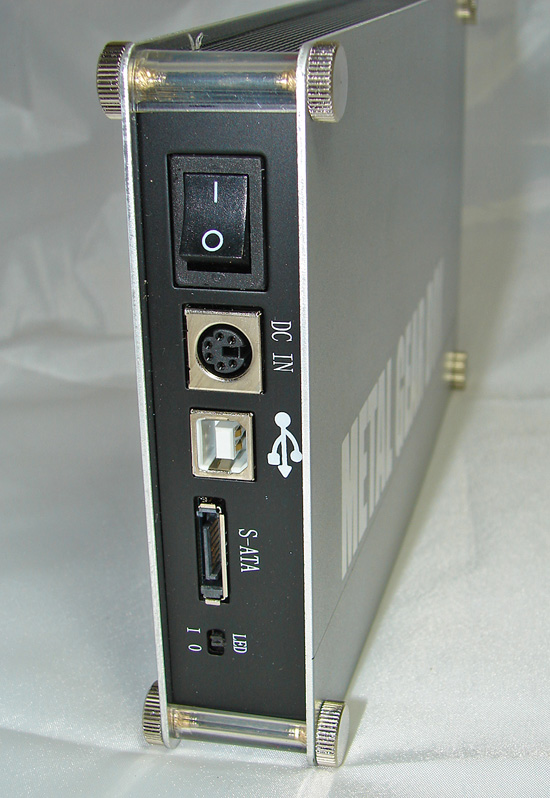
The connections on the back panel are standard issue for this type of enclosure: a power plug that attaches to the external power brick, USB 2.0 and SATA connections, a switch to enable or disable the disco lights, er, blue LEDs, and a power switch. The unit does not allow simultaneous operation of the USB and SATA connections.
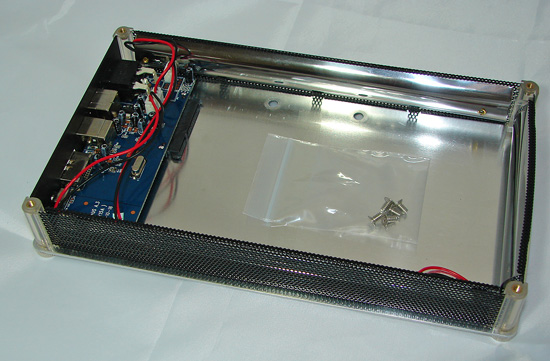
The process of installing the drive is straightforward. All it takes is the removal of the top cover that is accomplished by unscrewing the four thumb screws. Once the top cover is off, drop the drive into the bay, slide the drive forward so the connections are set, replace the top cover, and reinstall the thumb screws. Our only problem was needing a small screw driver to move and hold the LED power cables at the bottom right of the case while installing the drive.
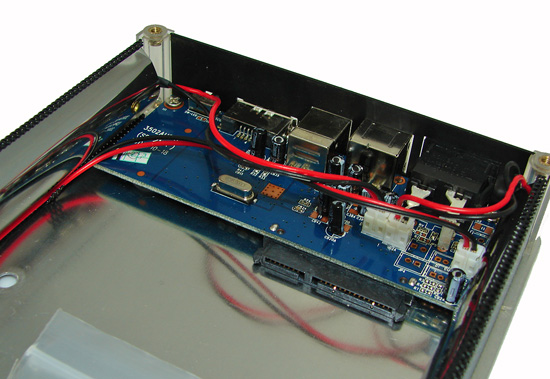
A quick review of the PCB layout shows standard SATA data and power connectors, external ports, and the LED power cable setup.
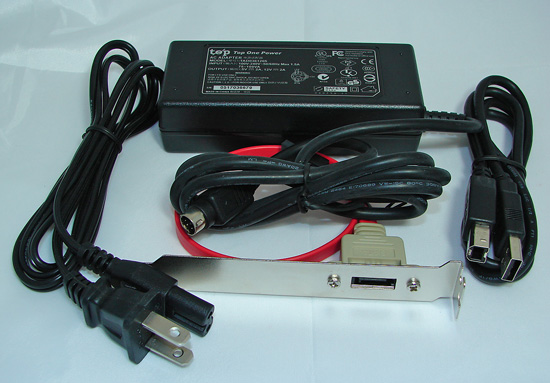
The accessory kit has everything you need to attach the unit to a system with SATA or high-speed USB 2.0 ports. The included SATA connection bracket connects to an internal SATA port and is required to utilize the unit as an standalone external device. Of course, you could run a SATA cable directly from the unit to one of these ports if required.
We found the quality of the SATA cables to be lacking when compared to cables provided by the motherboard or storage companies but did not have any issues with them during testing. Although the specifications at the website state SATA 1.5Gb/s compatibility and a limit to 500GB drives, we had no issues with our SATA 3Gb/s drives operating at full speed or capacities up to 1TB.
| Galaxy Metal Gear Box 3500SASP | |
| Host Interface | SATA + USB 2.0 Combination |
| Drive Type | 3.5" SATA 1.5Gb/s or 3Gb/s Interface |
| Drive Position | Vertical or Horizontal |
| Transfer Rates | Up to 3Gb/s per SATA specs Up to 480Mb/s per USB 2.0 specs |
| Connection Type | SATA |
| Structure Type | Aluminum Body |
| Drive Cooling | Passive via Aluminum frame heat dispersion with ventilation ports |
| Activity Indicators | None, Blue LED strip around the case for lighting purposes |
| OS Support | Windows 98/SE/ME/2000/XP/Vista, Mac OS 9.0 or higher |
| Power Draw | 1.9W |
| Dimensions (LxWxH) | 196.2 x 142.4 x 41.2 mm |
| Weight | 1.18 lbs. |
The Galaxy Metal Gear Box 3500SASP supports current SATA and USB 2.0 specifications. The unit does not provide support for eSATA connections and instead relies upon the standard SATA interface for operation. Galaxy does provide an adapter bracket to utilize an internal SATA header on the motherboard. A USB 2.0 connection is also included for near universal compatibility between personal computer systems.
Galaxy Metal Gear Feature Set
The Galaxy Metal Gear Box SATA/USB 2.0 series is available in a brushed Silver, deep red, or a flat black color scheme. The graphics scheme and included blue LED strips that have a tendency to light up a small room target an audience who like for their product to be noticed. Nothing wrong with that, but the unit might look out of place on desktops with traditional component designs.
GMG Inc. has recently introduced the Metal Gear Box II series that features a revised design and five different color schemes. Both designs feature the same electronics and layout so performance will be similar.
The 3500SASP enclosure does not include a cooling fan and instead relies on a combination of convection cooling and chassis conduction to cool the enclosed hard drive. It can be positioned either horizontally or vertically, but we found the vertical position reduced noise, vibration, and heat. Our only problem with this design was the flimsy mesh inserts that had a bad habit of bending with only a light touch of the fingers. We suggest handing the unit so your fingers stay on the front and back of the main covers.
The connections on the back panel are standard issue for this type of enclosure: a power plug that attaches to the external power brick, USB 2.0 and SATA connections, a switch to enable or disable the disco lights, er, blue LEDs, and a power switch. The unit does not allow simultaneous operation of the USB and SATA connections.
The process of installing the drive is straightforward. All it takes is the removal of the top cover that is accomplished by unscrewing the four thumb screws. Once the top cover is off, drop the drive into the bay, slide the drive forward so the connections are set, replace the top cover, and reinstall the thumb screws. Our only problem was needing a small screw driver to move and hold the LED power cables at the bottom right of the case while installing the drive.
A quick review of the PCB layout shows standard SATA data and power connectors, external ports, and the LED power cable setup.
The accessory kit has everything you need to attach the unit to a system with SATA or high-speed USB 2.0 ports. The included SATA connection bracket connects to an internal SATA port and is required to utilize the unit as an standalone external device. Of course, you could run a SATA cable directly from the unit to one of these ports if required.
We found the quality of the SATA cables to be lacking when compared to cables provided by the motherboard or storage companies but did not have any issues with them during testing. Although the specifications at the website state SATA 1.5Gb/s compatibility and a limit to 500GB drives, we had no issues with our SATA 3Gb/s drives operating at full speed or capacities up to 1TB.
Originally published at https://www.anandtech.com/show/2273 (Wayback Machine).