
ICY DOCK MB559US-1SMB: eSATA Enclosure with Pizzazz
- Posted in
- Storage
HD Tach
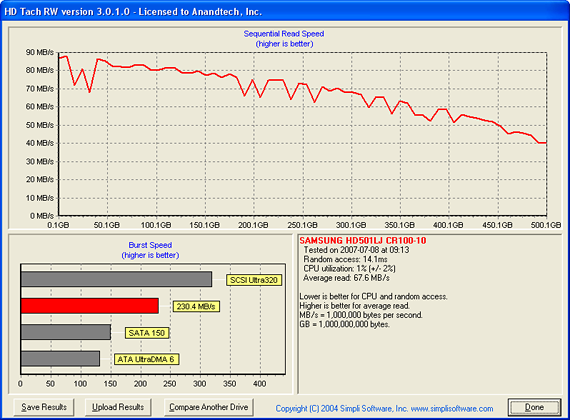
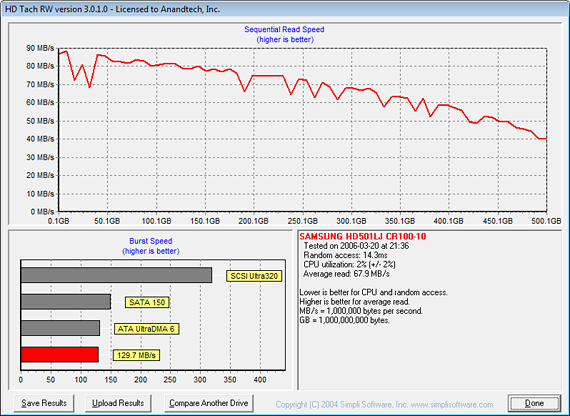
In our HD Tach tests the sequential read speed of the eSATA configuration is 67.9 MB/s compared to 67.6 with our internal SATA connection. Random access time is 14.3ms for eSATA compared to 14.1ms for internal SATA. Both results are within the normal test variances for this program. Our burst speed with the eSATA setup averaged 129.7 MB/s compared to 230.4 MB/s with the internal SATA system. We tried several different 3Gb/s SATA drives with the same results and at this time it "appears" the ICY DOCK unit is limited to SATA 150 specifications. We are working with ICY DOCK currently and will update the article shortly. However, this is not a performance issue currently as the capabilities of current SATA drives are far from having the ability to sustain read/write rates above this specification.
Update- We discovered an issue with the Intel Matrix Storage driver version 7.0.0.1020 and our ICY DOCK review sample that prevented true SATA 3Gb/s operation. An update to version 7.5.0.1017 did not work. However, after reinstalling Windows XP-SP2 and installing driver 7.5.0.1017, the unit performed as advertised. We will publish updated HDTach results shortly. There were not any differences in our actual benchmarks other than the normal variance between benchmark runs that is typically +/- .05%.
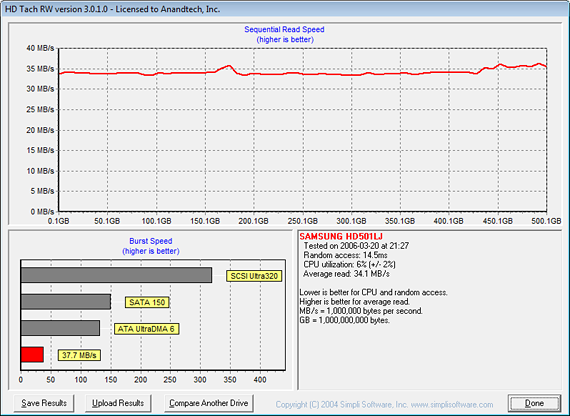
In our USB 2.0 configuration we see an average sequential read speed of 34.1 MB/s and an random access speed of 14.5ms. The burst speed is 37.7 MB/s which is quite good for this particular setup. Of course the reduction in write and read speeds will affect large file transfers the most as we will see in our benchmarks.
It is important to note that access times, average read rates, and burst rate measurements are basically synthetic measurements, and while important these are not "true" application measurements. There is a great deal of potential bottlenecks elsewhere in the system that can and will affect the true performance of a drive. Although these "benchmarks" are a good indicator of a drive's SATA performance, it is the total make-up of components in the PC that will determine the drive's actual performance.
In our HD Tach tests the sequential read speed of the eSATA configuration is 67.9 MB/s compared to 67.6 with our internal SATA connection. Random access time is 14.3ms for eSATA compared to 14.1ms for internal SATA. Both results are within the normal test variances for this program. Our burst speed with the eSATA setup averaged 129.7 MB/s compared to 230.4 MB/s with the internal SATA system. We tried several different 3Gb/s SATA drives with the same results and at this time it "appears" the ICY DOCK unit is limited to SATA 150 specifications. We are working with ICY DOCK currently and will update the article shortly. However, this is not a performance issue currently as the capabilities of current SATA drives are far from having the ability to sustain read/write rates above this specification.
Update- We discovered an issue with the Intel Matrix Storage driver version 7.0.0.1020 and our ICY DOCK review sample that prevented true SATA 3Gb/s operation. An update to version 7.5.0.1017 did not work. However, after reinstalling Windows XP-SP2 and installing driver 7.5.0.1017, the unit performed as advertised. We will publish updated HDTach results shortly. There were not any differences in our actual benchmarks other than the normal variance between benchmark runs that is typically +/- .05%.
In our USB 2.0 configuration we see an average sequential read speed of 34.1 MB/s and an random access speed of 14.5ms. The burst speed is 37.7 MB/s which is quite good for this particular setup. Of course the reduction in write and read speeds will affect large file transfers the most as we will see in our benchmarks.
It is important to note that access times, average read rates, and burst rate measurements are basically synthetic measurements, and while important these are not "true" application measurements. There is a great deal of potential bottlenecks elsewhere in the system that can and will affect the true performance of a drive. Although these "benchmarks" are a good indicator of a drive's SATA performance, it is the total make-up of components in the PC that will determine the drive's actual performance.
Originally published at https://www.anandtech.com/show/2271 (Wayback Machine).