
HP dv6500t: A "Minivan" Notebook
- Posted in
- Laptops
Design and Appearance (Cont'd)
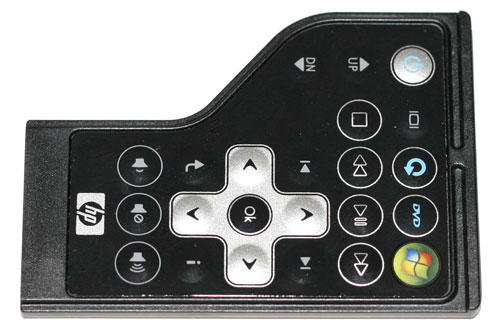
HP includes a small infrared remote that can be used to control their QuickPlay application, which is basically an alternative to Windows Media Center. The remote can be stored in the ExpressCard slot when not in use, which is sort of a cool feature even if it makes the shape of the remote somewhat awkward. If you make use of an ExpressCard device, however, you will need to find the remote a new home.
Looking at the rear of the laptop, there's not much to see besides the ventilation grille on the right. We also get a good shot of the extended capacity battery, and if its size seemed awkward from the other angles it's even more awkward when you realize that the battery isn't exactly centered. If you put the laptop on a hard surface, it's not much of a problem, but we found the extended capacity battery made the notebook less comfortable to have sitting on your lap during use. For those who need additional battery life, it's a sacrifice they're probably willing to make, but it really would have been better if HP had been able to come up with a slightly different battery design/location.
Here's another look at the notebook, this time from the bottom. Once again, you can see how the off-center location might make things awkward if you use the large 12-cell battery. The standard 6-cell battery sits flush with the bottom of the laptop, so it doesn't present any problem.
Here's a look at the basic 6-cell as well as the 12-cell battery. The difference in size isn't really visible from this angle, but you can see that the larger battery has twice the capacity of the standard 6-cell battery (95 WHr compared to 47 WHr). Twice the capacity will result in twice as much battery life, give or take a few minutes, so for lengthier trips the option to get a 12-cell battery could come in useful.
Other than removing the battery, there are only two hatches on the bottom for the laptop. The middle one provides access to the memory slots and mini-PCI card, and the other covers the hard drive. While it is possible to dismantle the laptop further, most users will not need to do so; the only other potential upgrade you could make would be to the processor, and at present there are only two officially supported processors anyway.
 |
HP includes a small infrared remote that can be used to control their QuickPlay application, which is basically an alternative to Windows Media Center. The remote can be stored in the ExpressCard slot when not in use, which is sort of a cool feature even if it makes the shape of the remote somewhat awkward. If you make use of an ExpressCard device, however, you will need to find the remote a new home.
 |
 |
Looking at the rear of the laptop, there's not much to see besides the ventilation grille on the right. We also get a good shot of the extended capacity battery, and if its size seemed awkward from the other angles it's even more awkward when you realize that the battery isn't exactly centered. If you put the laptop on a hard surface, it's not much of a problem, but we found the extended capacity battery made the notebook less comfortable to have sitting on your lap during use. For those who need additional battery life, it's a sacrifice they're probably willing to make, but it really would have been better if HP had been able to come up with a slightly different battery design/location.
 |
Here's another look at the notebook, this time from the bottom. Once again, you can see how the off-center location might make things awkward if you use the large 12-cell battery. The standard 6-cell battery sits flush with the bottom of the laptop, so it doesn't present any problem.
 |
Here's a look at the basic 6-cell as well as the 12-cell battery. The difference in size isn't really visible from this angle, but you can see that the larger battery has twice the capacity of the standard 6-cell battery (95 WHr compared to 47 WHr). Twice the capacity will result in twice as much battery life, give or take a few minutes, so for lengthier trips the option to get a 12-cell battery could come in useful.
 |
Other than removing the battery, there are only two hatches on the bottom for the laptop. The middle one provides access to the memory slots and mini-PCI card, and the other covers the hard drive. While it is possible to dismantle the laptop further, most users will not need to do so; the only other potential upgrade you could make would be to the processor, and at present there are only two officially supported processors anyway.
Originally published at https://www.anandtech.com/show/2254 (Wayback Machine).