
Super Talent SSD: 16GB of Solid State Goodness
- Posted in
- Storage
Actual Application Times - Multimedia and File Manipulation
The following tests require a fast CPU and excellent write performance of the disk drive. Our Super Talent drive will probably never run video/audio encoding applications in its target market so our tests are only meaningful for indicating the write performance of the drive in write heavy applications. These results and any conclusions about the performance of the drive need to be tempered with the commercial/industrial market this drive is designed to operate in. Again, we fully expect the new consumer SSD drives from Samsung and SanDisk to be competitive in these tests considering their improved write speeds.
Nero Recode
Our encoding test is quite easy - we take our original Office Space DVD and use AnyDVD Ripper to copy the full DVD to the hard drive without compression, thus providing an almost exact duplicate of the DVD. We then fire up Nero Recode 2, select our Office Space copy on the hard drive, and perform a shrink operation to allow the entire movie along with extras to fit on a single 4.5GB DVD disc. We leave all options on their defaults except we turn off the advanced analysis option. The scores reported include the full encoding process and are represented in seconds, with lower numbers indicating better performance.
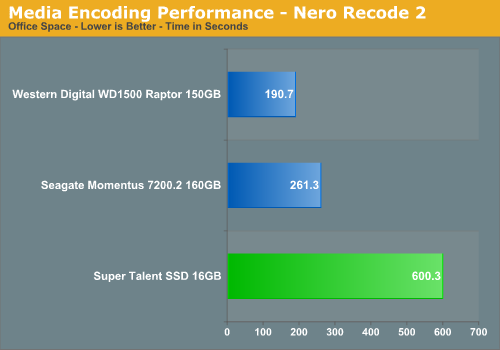
This test is dependent on CPU performance and the write performance of the drive. As in our PCMark05 tests, the write performance of the Super Talent drive does not match that of our other test drives and is a little over four times slower than our Raptor drive, but it did finish the test without any issues.
WinRAR 3.62
Our WinRAR test measures the time it takes to compress our test folder that contains 444 files, 10 folders, and 602MB of data. This is the same test folder utilized in our IPEAK test suite. While the benchmark is CPU intensive for the compression tests it still requires a fast storage system to keep pace with the CPU. A drive that offers excellent write performance can make a slight difference in this benchmark.
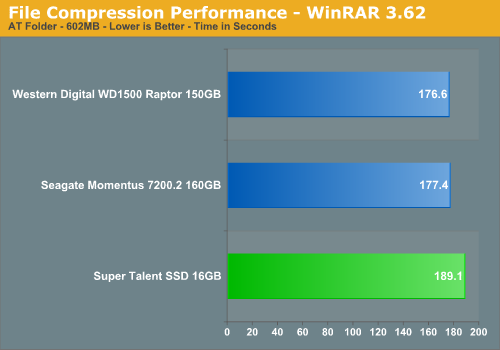
This test relies much more on the CPU and burst rates of the storage system. Even handicapped with 25 MB/sec write speed, the Super Talent drive is only about 7% slower than the Raptor.
File Copy Performance
Our first file copy test measures the time it takes to transfer our test folder that contains 29 files, 1 folder, and has 7.55GB of data from our source drive to the target test drive. This benchmark is disk write intensive and requires a fast storage system.
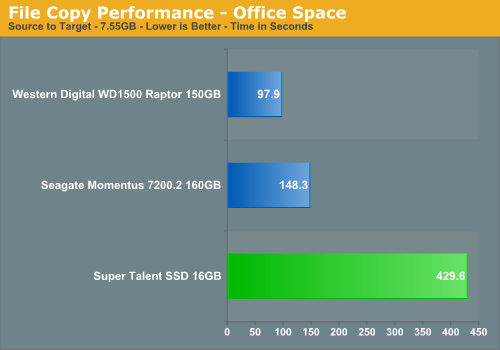
We finish our application tests with a benchmark that favors the hard disk drives due to being a pure write scenario. As in PCMark05 where the largest differences in scores were generated with the write tests, we see the SSD product being over four times slower than the Raptor. This was fully expected but not that bad when compared to the 5400rpm drives from a few years ago - especially the 2.5" laptop models.
The following tests require a fast CPU and excellent write performance of the disk drive. Our Super Talent drive will probably never run video/audio encoding applications in its target market so our tests are only meaningful for indicating the write performance of the drive in write heavy applications. These results and any conclusions about the performance of the drive need to be tempered with the commercial/industrial market this drive is designed to operate in. Again, we fully expect the new consumer SSD drives from Samsung and SanDisk to be competitive in these tests considering their improved write speeds.
Nero Recode
Our encoding test is quite easy - we take our original Office Space DVD and use AnyDVD Ripper to copy the full DVD to the hard drive without compression, thus providing an almost exact duplicate of the DVD. We then fire up Nero Recode 2, select our Office Space copy on the hard drive, and perform a shrink operation to allow the entire movie along with extras to fit on a single 4.5GB DVD disc. We leave all options on their defaults except we turn off the advanced analysis option. The scores reported include the full encoding process and are represented in seconds, with lower numbers indicating better performance.
This test is dependent on CPU performance and the write performance of the drive. As in our PCMark05 tests, the write performance of the Super Talent drive does not match that of our other test drives and is a little over four times slower than our Raptor drive, but it did finish the test without any issues.
WinRAR 3.62
Our WinRAR test measures the time it takes to compress our test folder that contains 444 files, 10 folders, and 602MB of data. This is the same test folder utilized in our IPEAK test suite. While the benchmark is CPU intensive for the compression tests it still requires a fast storage system to keep pace with the CPU. A drive that offers excellent write performance can make a slight difference in this benchmark.
This test relies much more on the CPU and burst rates of the storage system. Even handicapped with 25 MB/sec write speed, the Super Talent drive is only about 7% slower than the Raptor.
File Copy Performance
Our first file copy test measures the time it takes to transfer our test folder that contains 29 files, 1 folder, and has 7.55GB of data from our source drive to the target test drive. This benchmark is disk write intensive and requires a fast storage system.
We finish our application tests with a benchmark that favors the hard disk drives due to being a pure write scenario. As in PCMark05 where the largest differences in scores were generated with the write tests, we see the SSD product being over four times slower than the Raptor. This was fully expected but not that bad when compared to the 5400rpm drives from a few years ago - especially the 2.5" laptop models.
Originally published at https://www.anandtech.com/show/2225 (Wayback Machine).