
Scythe Ninja Plus Rev. B: Updated Cooling Legend
- Posted in
- Cases/Cooling/PSUs
Scythe Ninja Plus Rev. B
The Ninja Plus B, like the Infinity, is packaged in a very tall window box that allows the buyer to see the heatpipe tower inside.
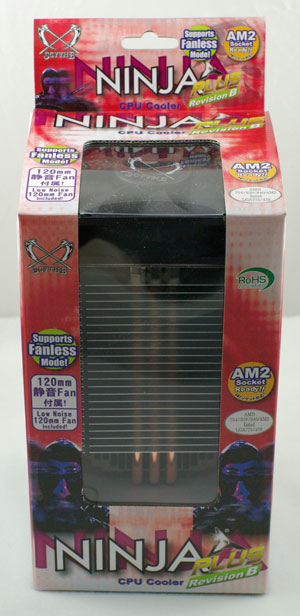
Most of the important questions are answered on the package. Included on the typical jam-packed Scythe package are specifications, pictures and a list of compatible sockets, warranty info, and details on of the included 120mm low-noise fan.
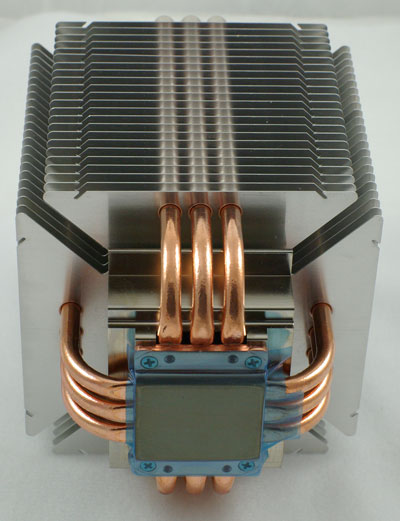
Ninja Plus B uses a different heatpipe configuration than coolers we have seen recently. Instead of staggering heatpipes, it uses six u-shaped heatpipes that are arranged three in a row on each side of the Ninja Plus B cube. This arrangement seems somewhat arbitrary as opposed to the Thermalright Ultra 120 and 120 Extreme which seem to have carefully staggered heatpipes for maximum cooling.
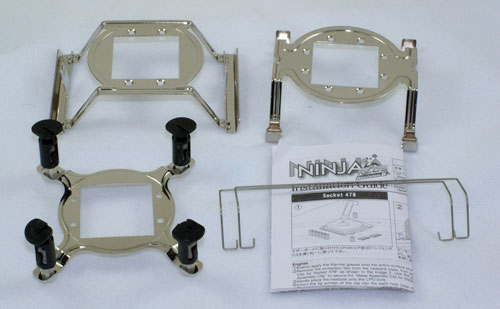
There are no mounts installed on the shipping Ninja Plus B, but the kit includes adapters for Intel 775, AMD 754/939/940/AM2, and Intel 478. Attaching the mount is very easy: just screw it onto the bottom with the four included screws and you are ready to install the heat sink. You are not required to remove the motherboard for any of the three adapters, which many users will be glad to hear. Also included is a small packet of very average white thermal paste, a pair of fan mounting wires, and a clear set of installation instructions.
Big coolers like the Ninja Plus B are a real pain to install on a motherboard mounted in a case. There just doesn't seem to be enough room between the bottom of the fin cage and the top of the push pins on the socket 775 adapter mounting to an attached motherboard. The easiest way is to remove the motherboard - particularly on socket 775 which is one of the tightest of the mounts.
If you insist on not removing the motherboard, then it is best to install the heatsink before adding the 120mm fan. This is not easy, but it is still easier to clip the fan and connect power to the fan after the heatsink install than to try to install the heatsink tower on an installed board with the fan attached.
It should also be mentioned that the fan overhangs the first DIMM socket on most boards we looked at. This is not a problem with a normal DIMM as there is enough overhang clearance for the mounted dimm. However, recent top-line DIMMs like the Corsair Dominator and OCZ Flex XLC will need to be mounted on the outer pair of dual channel slots if you want to use them with the Ninja Plus B.
Installation is pretty easy with the Ninja Plus B, but the pin connections used for Intel 775 are a concern. We had to mount a couple of times to make sure the pins were snapping into place and providing good cooler contact with the CPU surface. As with all the socket 775 push-pin connections if all pins are not fully engaged you can get less than ideal cooling.
There is also the issue of a big cooler in the typical tower case. The Ninja Plus B is a bit lighter than other big towers, but it is still a lot of weight to hang from a motherboard, with the weight supported by only 4 push-pins. It is easy to overstress the motherboard, and moving the system with the cooler attached is not recommended. In this case we would gladly give up an easy connection for a much more secure install with a reinforcing backplate.
Specifications
The Ninja Plus B will mount on all current CPU sockets, and it also supports the older Intel socket 468.
The fan included with the Ninja Plus B seems a balance between cooling efficiency and silence. The airflow is moderate and noise is rated at 20.9 dB-A. However, the fan mount will handle any 120mm fan, so you can choose from a wide variety of popular 120mm fans if the stock fan does not deliver what you are looking for.
Ninja Plus B, like the Scythe Infinity and OCZ Vindicator, also allows mounting of multiple fans if you choose, as we demonstrated in the Scythe Infinity review. The aluminum cooling fins have a pair of grooves on each side to provide flexibility in fan mounting. Using extra wires and careful positioning you should be able to mount as many as 4 fans for cooling on the heatpipe tower. You can purchase extra fan mounting wires at the Scythe website for $1.90 US for each pair of fan wires.
The Ninja Plus B, like the Infinity, is packaged in a very tall window box that allows the buyer to see the heatpipe tower inside.
Most of the important questions are answered on the package. Included on the typical jam-packed Scythe package are specifications, pictures and a list of compatible sockets, warranty info, and details on of the included 120mm low-noise fan.
Ninja Plus B uses a different heatpipe configuration than coolers we have seen recently. Instead of staggering heatpipes, it uses six u-shaped heatpipes that are arranged three in a row on each side of the Ninja Plus B cube. This arrangement seems somewhat arbitrary as opposed to the Thermalright Ultra 120 and 120 Extreme which seem to have carefully staggered heatpipes for maximum cooling.
There are no mounts installed on the shipping Ninja Plus B, but the kit includes adapters for Intel 775, AMD 754/939/940/AM2, and Intel 478. Attaching the mount is very easy: just screw it onto the bottom with the four included screws and you are ready to install the heat sink. You are not required to remove the motherboard for any of the three adapters, which many users will be glad to hear. Also included is a small packet of very average white thermal paste, a pair of fan mounting wires, and a clear set of installation instructions.
Big coolers like the Ninja Plus B are a real pain to install on a motherboard mounted in a case. There just doesn't seem to be enough room between the bottom of the fin cage and the top of the push pins on the socket 775 adapter mounting to an attached motherboard. The easiest way is to remove the motherboard - particularly on socket 775 which is one of the tightest of the mounts.
If you insist on not removing the motherboard, then it is best to install the heatsink before adding the 120mm fan. This is not easy, but it is still easier to clip the fan and connect power to the fan after the heatsink install than to try to install the heatsink tower on an installed board with the fan attached.
It should also be mentioned that the fan overhangs the first DIMM socket on most boards we looked at. This is not a problem with a normal DIMM as there is enough overhang clearance for the mounted dimm. However, recent top-line DIMMs like the Corsair Dominator and OCZ Flex XLC will need to be mounted on the outer pair of dual channel slots if you want to use them with the Ninja Plus B.
Installation is pretty easy with the Ninja Plus B, but the pin connections used for Intel 775 are a concern. We had to mount a couple of times to make sure the pins were snapping into place and providing good cooler contact with the CPU surface. As with all the socket 775 push-pin connections if all pins are not fully engaged you can get less than ideal cooling.
There is also the issue of a big cooler in the typical tower case. The Ninja Plus B is a bit lighter than other big towers, but it is still a lot of weight to hang from a motherboard, with the weight supported by only 4 push-pins. It is easy to overstress the motherboard, and moving the system with the cooler attached is not recommended. In this case we would gladly give up an easy connection for a much more secure install with a reinforcing backplate.
Specifications
The Ninja Plus B will mount on all current CPU sockets, and it also supports the older Intel socket 468.
| Scythe Ninja Plus Rev. B Specifications | |
| Heatsink | |
| Dimensions | 110(L) X 110(W) X 150(H)mm (excluding fan) |
| Weight | 640g (excluding fan) |
| Material | Copper and Aluminum |
| Fan Configuration | Supports 120mm fans (120mm fan included) Open or closed mounting posts |
| Included Fan | |
| Fan Size | 120mm x 120mm x 25mm |
| Bearing Type | Sleeve Bearing |
| Noise Level | 20.94 dB-A |
| Speed | 1200 rpm |
| Air Flow | 49.6 CFM |
| Weight | 130g (fan only) |
The fan included with the Ninja Plus B seems a balance between cooling efficiency and silence. The airflow is moderate and noise is rated at 20.9 dB-A. However, the fan mount will handle any 120mm fan, so you can choose from a wide variety of popular 120mm fans if the stock fan does not deliver what you are looking for.
Ninja Plus B, like the Scythe Infinity and OCZ Vindicator, also allows mounting of multiple fans if you choose, as we demonstrated in the Scythe Infinity review. The aluminum cooling fins have a pair of grooves on each side to provide flexibility in fan mounting. Using extra wires and careful positioning you should be able to mount as many as 4 fans for cooling on the heatpipe tower. You can purchase extra fan mounting wires at the Scythe website for $1.90 US for each pair of fan wires.
Originally published at https://www.anandtech.com/show/2208 (Wayback Machine).