
EVGA nForce 650i Ultra: Performance on a Budget
- Posted in
- Motherboards
Standard Gaming Performance
standard 1280x1024 resolution without antialiasing enabled (and generally without anisotropic filtering, though that varies by game). Given the number of users that run 19" LCDs these days, 1280x1024 represents one of the most commonly used resolutions. We could certainly increase the amount of eye candy being displayed in most of the games, but as this is a motherboard benchmark we aren't particularly interested in maxing out the graphics cards in our tests.
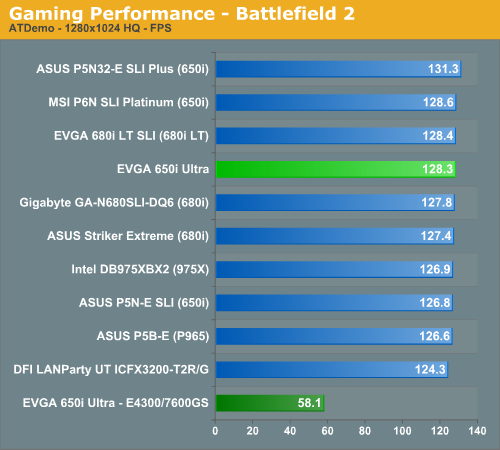
Battlefield 2
This benchmark is performed using DICE's built-in demo playback functionality with additional capture capabilities designed in house. During the benchmark, the camera switches between players and vehicles in order to capture the most action possible. There is a significant amount of smoke, explosions, and vehicle usage as this a very GPU intensive Battlefield 2 benchmark. We run Battlefield 2 using the highest quality graphics settings available in the video settings.
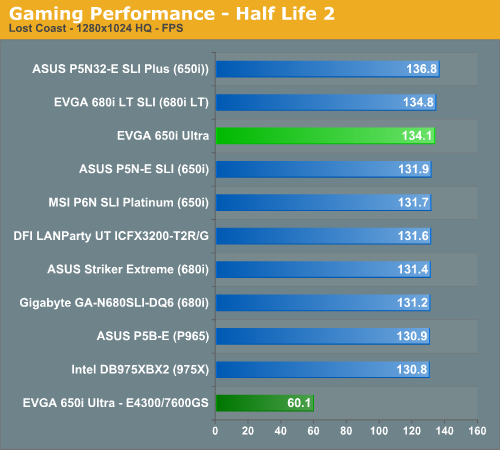
Half Life 2: Lost Coast
We use the built-in timedemo feature to benchmark the game. Our timedemo consists of starting at the bottom of the hill near the lake and ending in the old church. The Source engine timedemo feature is similar to the nettimedemo of Id's Doom 3 engine, in that it plays back more than just the graphics. The highest visual quality settings possible were used with HDR enabled for our tests.
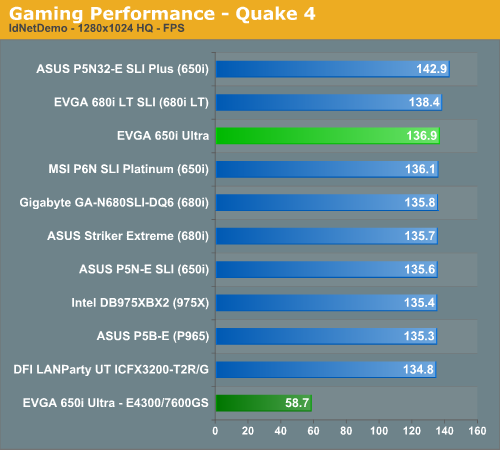
Quake 4
We utilize the nettimedemo test rather than the timedemo option for motherboard benchmarking of Quake 4. To be clear, this means our test results focus mostly on the sort of performance users will experience during actual game play. Additionally, Quake 4 limits frame rate to 60 fps during gameplay whether or not VSync is enabled. Our benchmark utilizes the IdNetDemo. This demo includes mainly outdoor areas with numerous players trying to wipe each other out. We tested the game with High Quality settings (uncompressed normal maps), and we enabled all the advanced graphics options except for VSync.
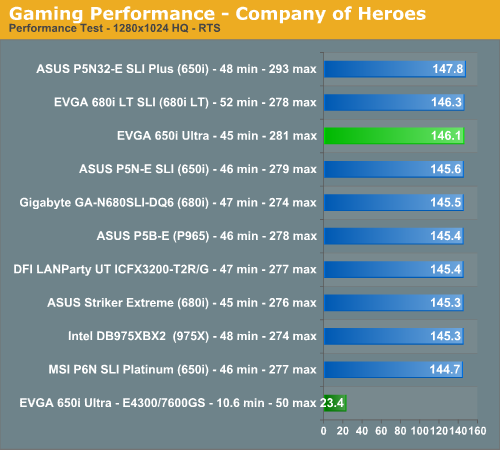
Company of Heroes
Company of Heroes is a very GPU intensive game and also requires a hefty CPU at times. The game contains a built-in performance test that utilizes the game engine to generate several different action scenes along with a coffee argument as a sideline distraction before the war starts. We found the performance test gives a good indication of how well your system will perform throughout the game. The benchmark may average slightly faster than the worst case battle scenarios, but the difference between gameplay and the cut scene is less than 20%.
Gaming Summary
We still think it is basically a tossup as to which chipset you select for a gaming machine with feature differences such as SLI or CrossFire potentially being a deciding factor if those technologies are important to you. All of the results are very close and during actual game play we could not tell any real differences between the boards. Our EVGA 650i Ultra board provided top three results but still could not keep pace with the ASUS Plus board due to that board's extremely aggressive sub-timings.
We did not experience any issues during testing or during game play with the EVGA board at stock settings with our particular memory choice. We did encounter some issues with our budget to mid-range memory modules but once we relaxed CAS Latency and tRP timings the board was very stable with a wide range of memory modules. We generally play over a dozen different games for at least a couple of hours on each board to ensure there are no issues such as overheating, stuttering, or network issues when playing online with a various combination of components.
standard 1280x1024 resolution without antialiasing enabled (and generally without anisotropic filtering, though that varies by game). Given the number of users that run 19" LCDs these days, 1280x1024 represents one of the most commonly used resolutions. We could certainly increase the amount of eye candy being displayed in most of the games, but as this is a motherboard benchmark we aren't particularly interested in maxing out the graphics cards in our tests.
Battlefield 2
This benchmark is performed using DICE's built-in demo playback functionality with additional capture capabilities designed in house. During the benchmark, the camera switches between players and vehicles in order to capture the most action possible. There is a significant amount of smoke, explosions, and vehicle usage as this a very GPU intensive Battlefield 2 benchmark. We run Battlefield 2 using the highest quality graphics settings available in the video settings.
Half Life 2: Lost Coast
We use the built-in timedemo feature to benchmark the game. Our timedemo consists of starting at the bottom of the hill near the lake and ending in the old church. The Source engine timedemo feature is similar to the nettimedemo of Id's Doom 3 engine, in that it plays back more than just the graphics. The highest visual quality settings possible were used with HDR enabled for our tests.
Quake 4
We utilize the nettimedemo test rather than the timedemo option for motherboard benchmarking of Quake 4. To be clear, this means our test results focus mostly on the sort of performance users will experience during actual game play. Additionally, Quake 4 limits frame rate to 60 fps during gameplay whether or not VSync is enabled. Our benchmark utilizes the IdNetDemo. This demo includes mainly outdoor areas with numerous players trying to wipe each other out. We tested the game with High Quality settings (uncompressed normal maps), and we enabled all the advanced graphics options except for VSync.
Company of Heroes
Company of Heroes is a very GPU intensive game and also requires a hefty CPU at times. The game contains a built-in performance test that utilizes the game engine to generate several different action scenes along with a coffee argument as a sideline distraction before the war starts. We found the performance test gives a good indication of how well your system will perform throughout the game. The benchmark may average slightly faster than the worst case battle scenarios, but the difference between gameplay and the cut scene is less than 20%.
Gaming Summary
We still think it is basically a tossup as to which chipset you select for a gaming machine with feature differences such as SLI or CrossFire potentially being a deciding factor if those technologies are important to you. All of the results are very close and during actual game play we could not tell any real differences between the boards. Our EVGA 650i Ultra board provided top three results but still could not keep pace with the ASUS Plus board due to that board's extremely aggressive sub-timings.
We did not experience any issues during testing or during game play with the EVGA board at stock settings with our particular memory choice. We did encounter some issues with our budget to mid-range memory modules but once we relaxed CAS Latency and tRP timings the board was very stable with a wide range of memory modules. We generally play over a dozen different games for at least a couple of hours on each board to ensure there are no issues such as overheating, stuttering, or network issues when playing online with a various combination of components.
Originally published at https://www.anandtech.com/show/2207 (Wayback Machine).