
ASUS P5N32-E SLI Plus: NVIDIA's 650i goes Dual x16
- Posted in
- Motherboards
Standard Gaming Performance
As usual, gaming performance was tested with a variety of current games. We ran benchmarks with our standard 1280x1024 resolution without antialiasing enabled (and generally without anisotropic filtering, though that varies by game). Given the number of users that run 19" LCDs these days, 1280x1024 represents one of the most commonly used resolutions. We could certainly increase the amount of eye candy being displayed in most of the games, but as this is a motherboard benchmark we aren't particularly interested in maxing out the graphics cards in our tests.
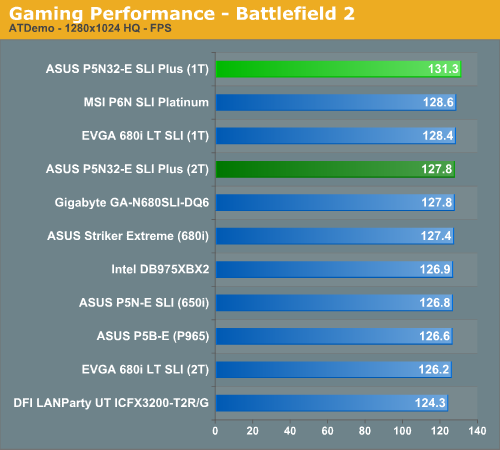
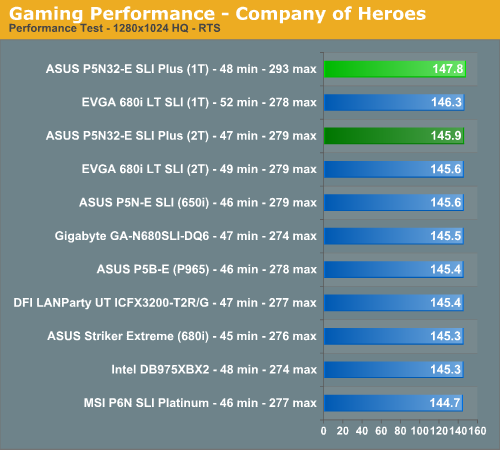
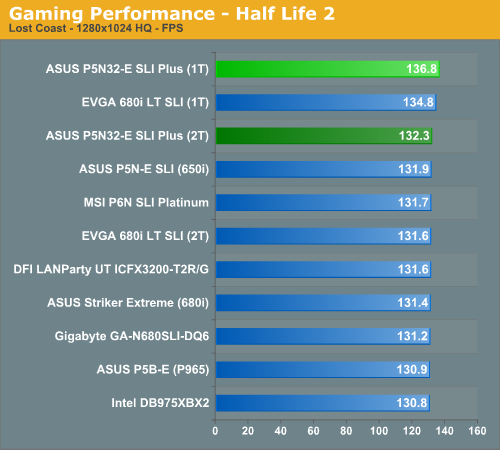
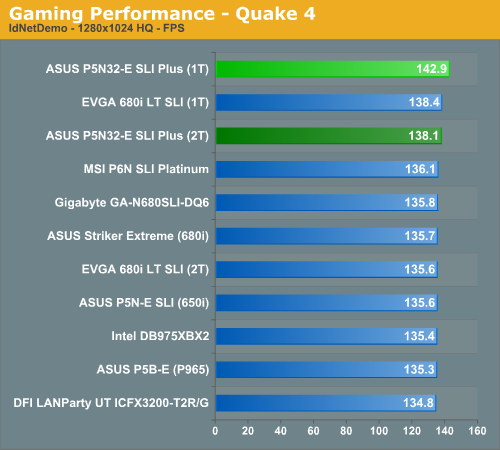
We still think it is basically a toss up as to which chipset you select for a gaming machine. All of the results are very close and during actual game play we could not tell any real differences between the boards. However, ASUS told us this board was optimized for game play and all indications from our test results agree with them. While the differences in overall scores are minimal to a degree, our subjective opinion after playing with the ASUS board for several weeks is that it's just a bit "snappier" than our other boards when it comes to game play. Our EVGA board also scored very well with 1T enabled but still could not keep pace with the ASUS board due to its extremely aggressive sub-timings.
We did not experience any issues during testing or during game play with the ASUS board at stock settings with our memory choice. We did encounter some issues with our budget memory modules due to the very tight memory sub-timings but once we relaxed tRC, tRFC, and tRRD timings the board was very stable. We generally play over a dozen different games for at least a couple of hours on each board to ensure there are no issues such as overheating, stuttering, or network issues when playing online with a various combination of components.
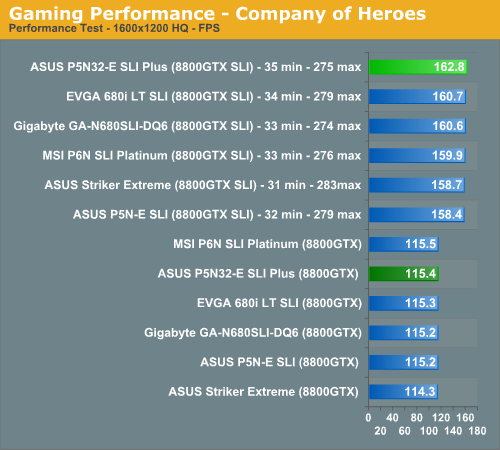
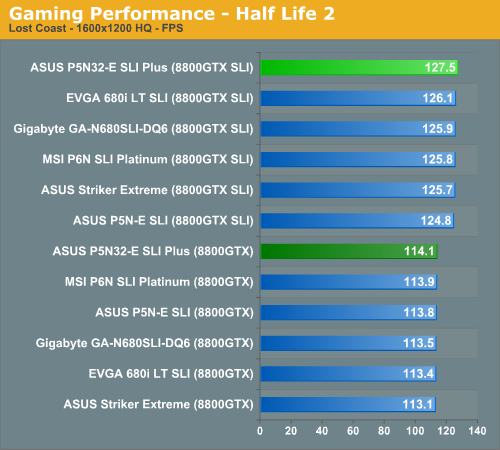
In our limited SLI testing, we once again find our ASUS P5N32-E SLI Plus taking top honors in our test results due to superior memory performance. We still have not seen any noticeable differences in 8800GTX SLI performance between the 680i, 650i hybrid, and 650i chipsets up to 1920x1200 resolutions in games. Any test result differences can be attributed to the performance of the board/BIOS itself and not the PCI Express design. It is only when you crank up the resolution to 2560x1600 or increase AA/AF settings that the dual x16 PCI Express capability on the 680i performs better than the dual x8 PCI Express setup on 650i setups. We will have additional game and resolution results in our roundup article.
As usual, gaming performance was tested with a variety of current games. We ran benchmarks with our standard 1280x1024 resolution without antialiasing enabled (and generally without anisotropic filtering, though that varies by game). Given the number of users that run 19" LCDs these days, 1280x1024 represents one of the most commonly used resolutions. We could certainly increase the amount of eye candy being displayed in most of the games, but as this is a motherboard benchmark we aren't particularly interested in maxing out the graphics cards in our tests.
We still think it is basically a toss up as to which chipset you select for a gaming machine. All of the results are very close and during actual game play we could not tell any real differences between the boards. However, ASUS told us this board was optimized for game play and all indications from our test results agree with them. While the differences in overall scores are minimal to a degree, our subjective opinion after playing with the ASUS board for several weeks is that it's just a bit "snappier" than our other boards when it comes to game play. Our EVGA board also scored very well with 1T enabled but still could not keep pace with the ASUS board due to its extremely aggressive sub-timings.
We did not experience any issues during testing or during game play with the ASUS board at stock settings with our memory choice. We did encounter some issues with our budget memory modules due to the very tight memory sub-timings but once we relaxed tRC, tRFC, and tRRD timings the board was very stable. We generally play over a dozen different games for at least a couple of hours on each board to ensure there are no issues such as overheating, stuttering, or network issues when playing online with a various combination of components.
In our limited SLI testing, we once again find our ASUS P5N32-E SLI Plus taking top honors in our test results due to superior memory performance. We still have not seen any noticeable differences in 8800GTX SLI performance between the 680i, 650i hybrid, and 650i chipsets up to 1920x1200 resolutions in games. Any test result differences can be attributed to the performance of the board/BIOS itself and not the PCI Express design. It is only when you crank up the resolution to 2560x1600 or increase AA/AF settings that the dual x16 PCI Express capability on the 680i performs better than the dual x8 PCI Express setup on 650i setups. We will have additional game and resolution results in our roundup article.
Originally published at https://www.anandtech.com/show/2202 (Wayback Machine).