
ASUS P5N32-E SLI Plus: NVIDIA's 650i goes Dual x16
- Posted in
- Motherboards
Specifications and Basic Features
The latest ASUS BIOS offers a very good level of options that are available for tweaking the board with specific emphasis placed on the available memory settings. We found in memory testing that switching to manual settings and changing the tCAS, tRCD, tRP, and tRAS was required to ensure optimum performance.
Compared to the 680i LT board, the number of voltage options and range of changes are extensive but the lack of GTL Ref voltage settings limited our quad core overclocking results to 360 FSB but the board was able to reach benchmark stable FSB speeds of 495 with our dual core processors.
One other issue we have with the 0402 and 0602 BIOS releases is that memory sub timings are very tight, especially tRC rates which ended up causing stability issues with some of our lower cost memory modules with ProMOS or Elpida ICs. While the aggressive memory timings allow for optimum performance, we generally had to hand tweak them to ensure stability across a wide range of memory modules.
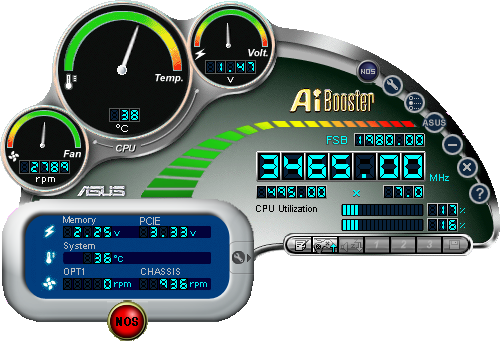
ASUS offers minimum support for NVIDIA's nTune system utility but includes several proprietary programs for tweaking and monitoring the board. The AiBooster utility offers the ability to tweak FSB speeds and certain voltages along with monitoring basic temperatures, fan speeds, and voltages. This utility allows the user to fine tune the AI NOS program that detects system load and dynamically increases system performance up to 10%. We were able to set NOS at 10% and complete our benchmark suite without issues. However, when using the AI Overclock option in the BIOS, we were unable to get the fixed 20% setting stable during benchmarking and had to back off to 15%.
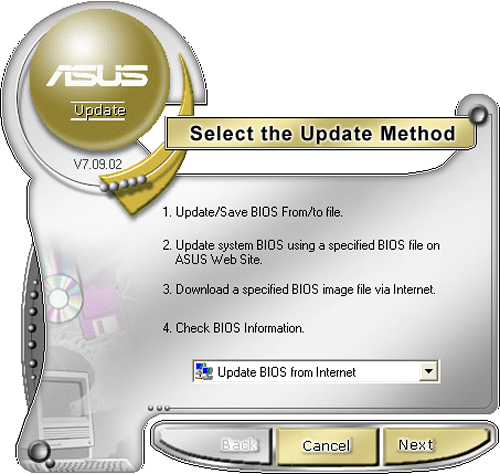
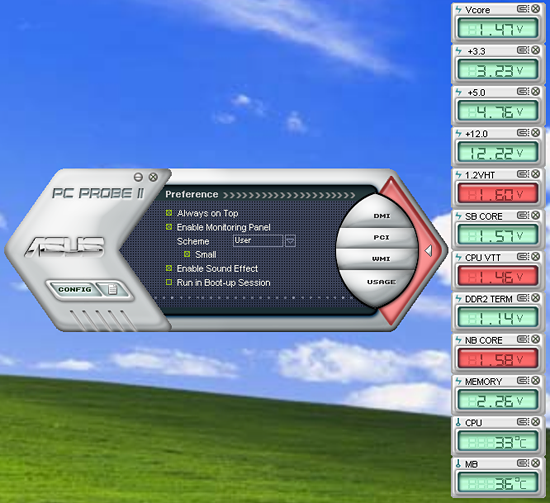
Also included is the ASUS Update program that allows for BIOS updates within Windows from the ASUS FTP site (or from your hard disk if the BIOS was already downloaded). We have not had any issues recently when updating our BIOS with the ASUS Update program, but we still prefer the DOS floppy method. The ASUS PC Probe II utility is one of the better manufacturer supplied programs for tracking voltage settings, fan speeds, and basic temperatures. We still believe abit's µGuru technology offers the best combination of tweaking and monitoring capabilities in a supplier provided program, but ASUS's AiSuite is certainly capable enough for most users.
| ASUS P5N32-E SLI Plus | |
| Market Segment: | High-End Performance - $185 |
| CPU Interface: | Socket T (Socket 775) |
| CPU Support: | LGA775-based Pentium 4, Celeron D, Pentium D, Pentium EE, Core 2 Duo, Core 2 Extreme |
| Chipset: | NVIDIA 650i SPP (C55) + 570 SLI MCP (MCP55P) |
| Bus Speeds: | Auto, 533 to 3000 QDR (133~750) in 1MHz increments |
| Memory Ratios: | Auto, Sync., 1:1, 5:4, 3:2 |
| Memory Speed: | 400MHz~2600MHz in various increments |
| PCIe 1-2-3 Speeds: | 100MHz~200MHz in 1MHz Increments |
| LDT Frequency: | 1x, 2x, 3x, 4x, 5x, 6x, 7x, 8x |
| Core Voltage: | Auto, 0.83125V to 1.90000 in 0.00625V increments |
| FSB Options: | Optimal, Linked, Unlinked |
| CPU Clock Multiplier: | Auto, 6x-11x in 1X increments - Core 2 Duo, downwards unlocked, Core 2 Extreme 6x-50X |
| DRAM Voltage: | Auto, 1.8500V to 3.4250 in .025V increments |
| DRAM Timing Control: | Optimal, Manual - 13 DRAM Timing Options |
| NB Voltage: | Auto, 1.20V to 2.75V in .05V increments |
| 1.2V HT Voltage: | Auto, 1.20V to 1.95V in .05V increments |
| SB Voltage: | Auto, 1.50V to 1.85V in .05V increments |
| CPU VTT: | Auto, 1.20V to 1.55V in .05V increments |
| Memory Slots: | Four 240-pin DDR2 DIMM Slots Dual-Channel Configuration, DDR2-400, 533, 667, 800 Regular Unbuffered Memory to 8GB Total |
| Expansion Slots: | 2 - PCIe X16 (2-x16 electrical for SLI or Multi-GPU) 1 - PCIe X16 (x8 electrical) 1 - PCIe x1 2 - PCI Slot 2.2 |
| Onboard SATA/RAID: | 6 SATA 3Gbps Ports - 570 SLI MCP (RAID 0, 1, 0+1, 5, JBOD) |
| Onboard IDE: | 1 ATA133/100/66 Port (2 drives) - 570 SLI MCP |
| Onboard USB 2.0/IEEE-1394: | 10 USB 2.0 Ports - 4 I/O Panel - 6 via Headers 2 Firewire 400 Ports by VIA 6309P - 1 I/O Panel, 1 via Header |
| Onboard LAN: | NVIDIA Gigabit Ethernet - PCIe - 2 x Marvell 88E1116 PHY - 2 ports via 570 SLI MCP |
| Onboard Audio: | ADI 1988B - 8-channel HD audio codec, Supreme FX audio card |
| Power Connectors: | ATX 24-pin, 8-pin EATX 12V |
| I/O Panel: | 1 x PS/2 Keyboard 1 x PS/2 Mouse 1 x S/PDIF Optical - Out 1 x S/PDIF Coaxial - Out 1 x IEEE 1394a 2 x RJ45 4 x USB 2.0/1.1 |
| Auto Overclocking: | AI Overclock - 5%10%, 15%, 20% Fixed; N.O.S. - 3%, 5%, 8%, 10% Variable |
| BIOS Revision: | Award 0602 |
| Board Revision: | v1.0 |
The latest ASUS BIOS offers a very good level of options that are available for tweaking the board with specific emphasis placed on the available memory settings. We found in memory testing that switching to manual settings and changing the tCAS, tRCD, tRP, and tRAS was required to ensure optimum performance.
Compared to the 680i LT board, the number of voltage options and range of changes are extensive but the lack of GTL Ref voltage settings limited our quad core overclocking results to 360 FSB but the board was able to reach benchmark stable FSB speeds of 495 with our dual core processors.
One other issue we have with the 0402 and 0602 BIOS releases is that memory sub timings are very tight, especially tRC rates which ended up causing stability issues with some of our lower cost memory modules with ProMOS or Elpida ICs. While the aggressive memory timings allow for optimum performance, we generally had to hand tweak them to ensure stability across a wide range of memory modules.
ASUS offers minimum support for NVIDIA's nTune system utility but includes several proprietary programs for tweaking and monitoring the board. The AiBooster utility offers the ability to tweak FSB speeds and certain voltages along with monitoring basic temperatures, fan speeds, and voltages. This utility allows the user to fine tune the AI NOS program that detects system load and dynamically increases system performance up to 10%. We were able to set NOS at 10% and complete our benchmark suite without issues. However, when using the AI Overclock option in the BIOS, we were unable to get the fixed 20% setting stable during benchmarking and had to back off to 15%.
Also included is the ASUS Update program that allows for BIOS updates within Windows from the ASUS FTP site (or from your hard disk if the BIOS was already downloaded). We have not had any issues recently when updating our BIOS with the ASUS Update program, but we still prefer the DOS floppy method. The ASUS PC Probe II utility is one of the better manufacturer supplied programs for tracking voltage settings, fan speeds, and basic temperatures. We still believe abit's µGuru technology offers the best combination of tweaking and monitoring capabilities in a supplier provided program, but ASUS's AiSuite is certainly capable enough for most users.
Originally published at https://www.anandtech.com/show/2202 (Wayback Machine).