
GeForce 8800 GTS 320MB Roundup
- Posted in
- GPUs
Battlefield 2 Performance
It is worth mentioning again that gameplay on BF2 is locked to 100fps, so any higher result is only going to net you at maximum 100 fps. Of course, with averages higher than 100, the framerate is also dropping below 100 fps less frequently meaning that high framerates aren't totally useless. If you can stay above 60 FPS minimum frame rates and you have an LCD, you might also just turn on VSYNC to improve the overall image quality by avoiding sheering.
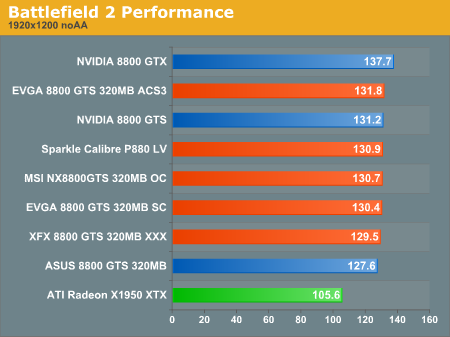
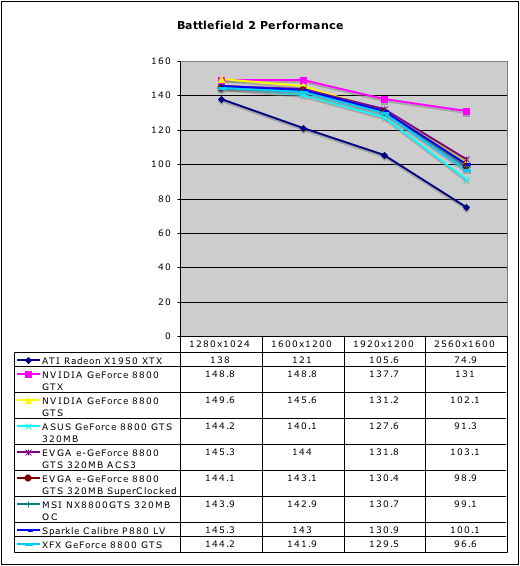
Without AA, the 320MB 8800 cards are able to significantly lead the X1950 XTX in performance. Even up to 2560x1600 without AA, all of our tests show huge framerates with very little variance between our overclocked hardware. The stock clocked ASUS card does lag the rest of the pack, but the performance difference under BF2 without AA would not be noticeable.
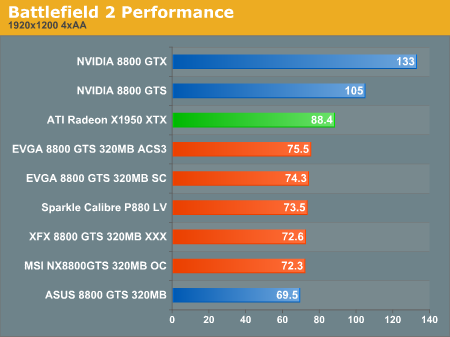
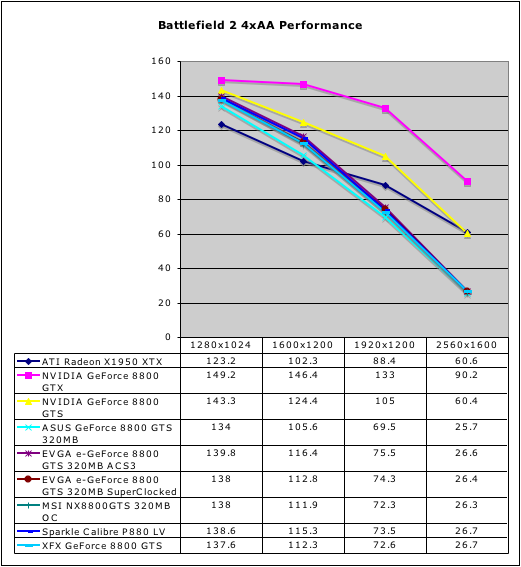
With AA enabled, the lower memory GTS takes a very significant performance hit, especially at 2560x1600. There still isn't much differentiation between the cards here either. It is important to note that the AMD X1950 XTX does perform much better than all the 8800 GTS 320MB hardware we tested when 4xAA is enabled under BF2. While the 8800 GTS 320MB cards are all able to handle resolutions up to 1920x1200, the AMD X1950 XTX is able to play the game very well at 30" panel resolutions.
This is also the only test we will see today where the 320MB hardware performs significantly worse than the 640MB version of the GTS. While many of our tests do show the 640MB and 320MB hardware producing similar results, it is worth noting that there are cases where memory size will have a major impact on performance. Whether this will be more or less of a factor in the future is not certain, but people with huge resolution displays who want to enable AA would probably be better off with the higher memory part.
It is worth mentioning again that gameplay on BF2 is locked to 100fps, so any higher result is only going to net you at maximum 100 fps. Of course, with averages higher than 100, the framerate is also dropping below 100 fps less frequently meaning that high framerates aren't totally useless. If you can stay above 60 FPS minimum frame rates and you have an LCD, you might also just turn on VSYNC to improve the overall image quality by avoiding sheering.
Without AA, the 320MB 8800 cards are able to significantly lead the X1950 XTX in performance. Even up to 2560x1600 without AA, all of our tests show huge framerates with very little variance between our overclocked hardware. The stock clocked ASUS card does lag the rest of the pack, but the performance difference under BF2 without AA would not be noticeable.
With AA enabled, the lower memory GTS takes a very significant performance hit, especially at 2560x1600. There still isn't much differentiation between the cards here either. It is important to note that the AMD X1950 XTX does perform much better than all the 8800 GTS 320MB hardware we tested when 4xAA is enabled under BF2. While the 8800 GTS 320MB cards are all able to handle resolutions up to 1920x1200, the AMD X1950 XTX is able to play the game very well at 30" panel resolutions.
This is also the only test we will see today where the 320MB hardware performs significantly worse than the 640MB version of the GTS. While many of our tests do show the 640MB and 320MB hardware producing similar results, it is worth noting that there are cases where memory size will have a major impact on performance. Whether this will be more or less of a factor in the future is not certain, but people with huge resolution displays who want to enable AA would probably be better off with the higher memory part.
Originally published at https://www.anandtech.com/show/2197 (Wayback Machine).