
Gateway FX530: Mad Cows and Quad Core Overclocking
- Posted in
- Systems
Power Consumption
Getting this much performance usually comes at a cost, not just in the initial expenditure but also in power bills over time. Intel's Kentsfield processor really isn't all that bad when it comes to power requirements, but Gateway had to jack up the CPU voltage in order to get the overclock to be stable, and combined with the higher clock speed we expect to see higher power draw. We don't have identical configurations, but let's see how the Gateway FX530 stacks up against our own Kentsfield testbed as well as AMD's Quad FX. CPU load was achieved by running the Windows Media Encoder benchmark.
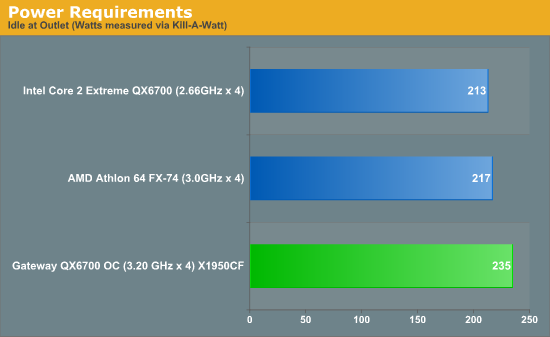
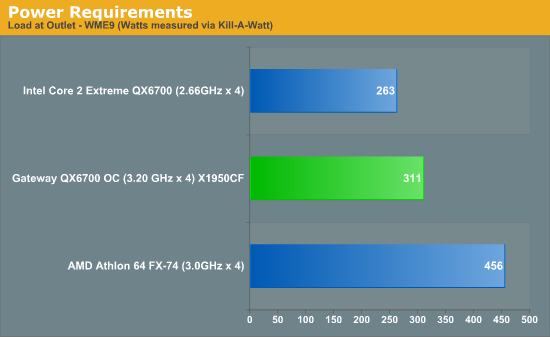
The Gateway FX530 consumes quite a bit more power than our stock Kentsfield configuration, but keep in mind that it has two X1950 XTX graphics cards compared to a single 8800 GTX. Considering the 20% overclock, the power draw a really isn't all that much higher. In comparison to the Quad FX-74 configuration, even an overclocked Kentsfield appears positively thrifty with power use, other than at idle. To make matters worse for Quad FX, the overclocked Gateway system not only uses less power at load, but it also offers significantly better performance. But we already knew that the Quad FX was a difficult platform to justify, so none of this comes as a surprise.
Noise Levels
Given all of the performance being offered, you might expect the Gateway FX530 to be a somewhat noisy computer. While it is by no means silent - particularly when running a CPU intensive task - it's quieter than you might expect. Once again, we tested at idle and load conditions using an SPL meter at a distance of 36".
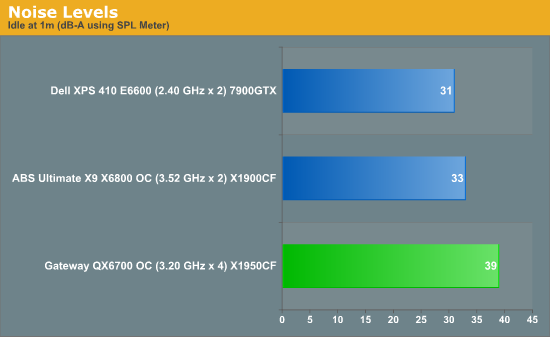
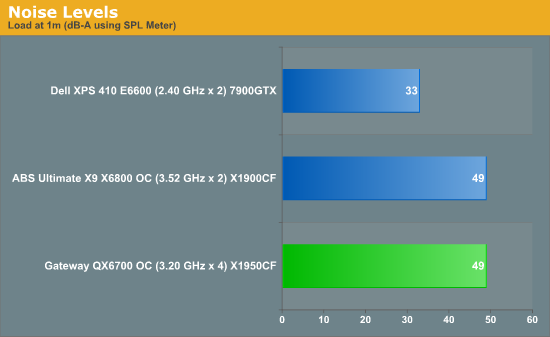
Compared to several of the other systems that we have reviewed, the Gateway is one of the louder offerings. However, there are some other factors at play. First, even under ideal conditions, the Raptor hard drives kept making periodic clicks that noticeably increased the ambient noise level. As we were testing with the system as configured by Gateway, we expect this sort of behavior to be present for end users. Most likely, one of the various included applications is generating periodic hard drive accesses, and while the Raptor drives are very fast they also tend to be quite a bit more audible than other hard drive solutions. Once we begin to place a load on the CPU, the system fans begin to generate a lot more noise. Even a moderate load on one CPU core immediately increases the fan speeds and noise levels, and as loads are placed on more CPU cores the noise increases until the maximum level of 49 dB is reached.
In general, we would rate the noise levels as being tolerable, and considering the performance offered the noise levels are more than acceptable. This isn't the type of system that would be ideal for use as an HTPC, and we wouldn't recommend having it on in the living room or bedroom if you like to have quiet surroundings in those locales. Depending on how frequently the CPU is fully utilized, the noise levels may be more or less noticeable. More often than not, we would expect a high-end system like this to be stressed by CPU intensive applications, which means the typical noise levels are going to hover at around 44 dB. Trying to keep a system like this quiet is very difficult, however, and we are really quite impressed that Gateway managed to keep noise levels as low as they have.
Getting this much performance usually comes at a cost, not just in the initial expenditure but also in power bills over time. Intel's Kentsfield processor really isn't all that bad when it comes to power requirements, but Gateway had to jack up the CPU voltage in order to get the overclock to be stable, and combined with the higher clock speed we expect to see higher power draw. We don't have identical configurations, but let's see how the Gateway FX530 stacks up against our own Kentsfield testbed as well as AMD's Quad FX. CPU load was achieved by running the Windows Media Encoder benchmark.
The Gateway FX530 consumes quite a bit more power than our stock Kentsfield configuration, but keep in mind that it has two X1950 XTX graphics cards compared to a single 8800 GTX. Considering the 20% overclock, the power draw a really isn't all that much higher. In comparison to the Quad FX-74 configuration, even an overclocked Kentsfield appears positively thrifty with power use, other than at idle. To make matters worse for Quad FX, the overclocked Gateway system not only uses less power at load, but it also offers significantly better performance. But we already knew that the Quad FX was a difficult platform to justify, so none of this comes as a surprise.
Noise Levels
Given all of the performance being offered, you might expect the Gateway FX530 to be a somewhat noisy computer. While it is by no means silent - particularly when running a CPU intensive task - it's quieter than you might expect. Once again, we tested at idle and load conditions using an SPL meter at a distance of 36".
Compared to several of the other systems that we have reviewed, the Gateway is one of the louder offerings. However, there are some other factors at play. First, even under ideal conditions, the Raptor hard drives kept making periodic clicks that noticeably increased the ambient noise level. As we were testing with the system as configured by Gateway, we expect this sort of behavior to be present for end users. Most likely, one of the various included applications is generating periodic hard drive accesses, and while the Raptor drives are very fast they also tend to be quite a bit more audible than other hard drive solutions. Once we begin to place a load on the CPU, the system fans begin to generate a lot more noise. Even a moderate load on one CPU core immediately increases the fan speeds and noise levels, and as loads are placed on more CPU cores the noise increases until the maximum level of 49 dB is reached.
In general, we would rate the noise levels as being tolerable, and considering the performance offered the noise levels are more than acceptable. This isn't the type of system that would be ideal for use as an HTPC, and we wouldn't recommend having it on in the living room or bedroom if you like to have quiet surroundings in those locales. Depending on how frequently the CPU is fully utilized, the noise levels may be more or less noticeable. More often than not, we would expect a high-end system like this to be stressed by CPU intensive applications, which means the typical noise levels are going to hover at around 44 dB. Trying to keep a system like this quiet is very difficult, however, and we are really quite impressed that Gateway managed to keep noise levels as low as they have.
Originally published at https://www.anandtech.com/show/2169 (Wayback Machine).