
Western Digital WD1600AAJS: 160GB Served on Single Platter
- Posted in
- Storage
Hard Disk Performance: iPeak Business Application Tests
Our iPeak Winstone benchmarks offer a glimpse into how well our hard disk drives will handle general office applications, media encoding, and graphics manipulation. While the business applications that are being tested tend to be more CPU bound at times, the performance of the hard drive can and will make a difference in the more disk intensive video and graphics applications where large media files are typically being edited.
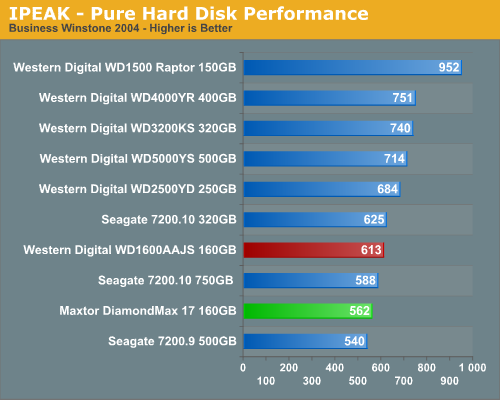
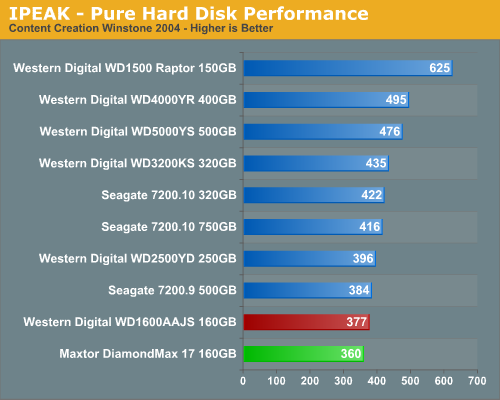
As expected the WD Raptor places first as its 10k RPM spindle speed and optimized cache play an important role in its ability to sustain high transfer rates, especially in the Content Creation benchmark where transfer block sizes are significantly larger than in the Business application benchmark.
Our two 160GB drives make a respectable showing in these benchmarks with the WD drive placing 9% ahead of the Maxtor in the Business Winstones and 5% in the Content Creation test. This continues the trend we noticed in the PCMark05 tests as the WD drive was generally faster in the general usage and application benchmarks. Although both drives scored near the bottom in each test we did not expect them to perform much better due to the 8MB cache and firmware designed for general desktop usage with importance being placed on acoustics and power usage.
Hard Disk Performance: iPeak General Task Tests
The iPeak based General Task benchmarks are designed to replicate utility based application tasks that typically are disk intensive and represent common programs utilized on the majority of personal computers. While the WinRAR program is very CPU intensive it will typically stress the storage system in short bursts. Our antivirus benchmark will stress the storage system with continual reads and sporadic write requests while the defragmentation process is split between continual read and write requests.
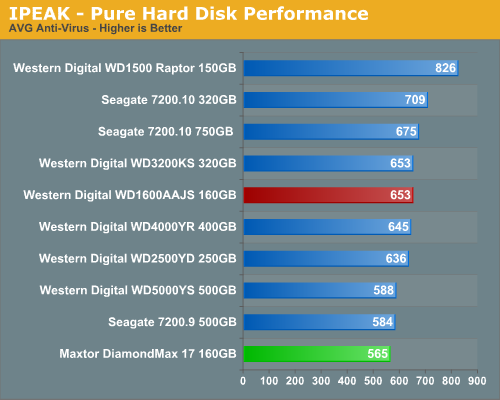
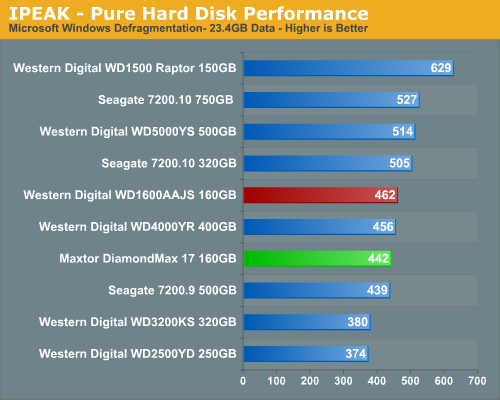
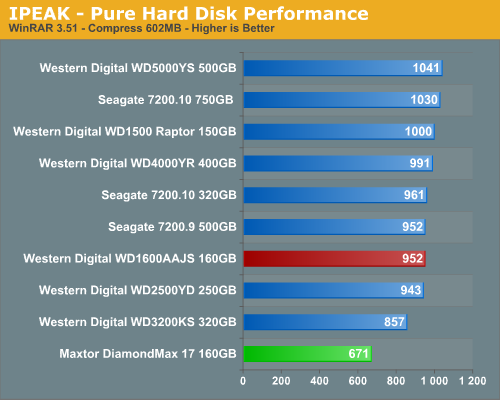
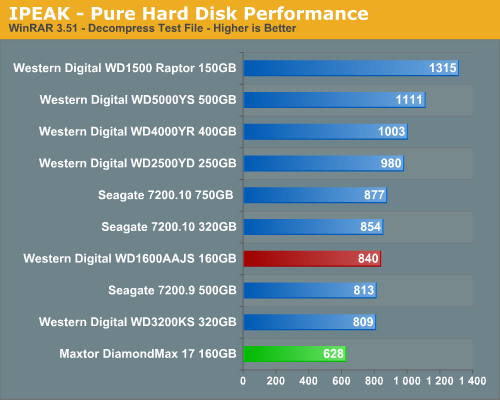
The Maxtor 160GB surprised us with terrible results in the compression and decompression tests with results that were up to 41% worse than the WD 160GB drive. We ran the tests several times with the same results and in our real world tests the differences were about the same. The Maxtor 160GB has issues working with large block sizes in a non-sequential order as our iPeak trace file results verified. We expected the same behavior with the WD drive since it is equipped with the same 8MB cache size but apparently Maxtor's firmware or caching scheme is not as efficient as Western Digital in this example. The WD 160GB drive scored decently in the Virus Scan and Defragmentation tests and placed ahead of the Maxtor drive which mirrors the PCMark 2005 results. Obviously, the slower-than-expected access times HDTach reported earlier are born out in actual testing; we can only hope that update firmware or some missed setting can improve the results, as right now the Maxtor is clearly inferior to the WD in a variety of applications.
Our iPeak Winstone benchmarks offer a glimpse into how well our hard disk drives will handle general office applications, media encoding, and graphics manipulation. While the business applications that are being tested tend to be more CPU bound at times, the performance of the hard drive can and will make a difference in the more disk intensive video and graphics applications where large media files are typically being edited.
As expected the WD Raptor places first as its 10k RPM spindle speed and optimized cache play an important role in its ability to sustain high transfer rates, especially in the Content Creation benchmark where transfer block sizes are significantly larger than in the Business application benchmark.
Our two 160GB drives make a respectable showing in these benchmarks with the WD drive placing 9% ahead of the Maxtor in the Business Winstones and 5% in the Content Creation test. This continues the trend we noticed in the PCMark05 tests as the WD drive was generally faster in the general usage and application benchmarks. Although both drives scored near the bottom in each test we did not expect them to perform much better due to the 8MB cache and firmware designed for general desktop usage with importance being placed on acoustics and power usage.
Hard Disk Performance: iPeak General Task Tests
The iPeak based General Task benchmarks are designed to replicate utility based application tasks that typically are disk intensive and represent common programs utilized on the majority of personal computers. While the WinRAR program is very CPU intensive it will typically stress the storage system in short bursts. Our antivirus benchmark will stress the storage system with continual reads and sporadic write requests while the defragmentation process is split between continual read and write requests.
The Maxtor 160GB surprised us with terrible results in the compression and decompression tests with results that were up to 41% worse than the WD 160GB drive. We ran the tests several times with the same results and in our real world tests the differences were about the same. The Maxtor 160GB has issues working with large block sizes in a non-sequential order as our iPeak trace file results verified. We expected the same behavior with the WD drive since it is equipped with the same 8MB cache size but apparently Maxtor's firmware or caching scheme is not as efficient as Western Digital in this example. The WD 160GB drive scored decently in the Virus Scan and Defragmentation tests and placed ahead of the Maxtor drive which mirrors the PCMark 2005 results. Obviously, the slower-than-expected access times HDTach reported earlier are born out in actual testing; we can only hope that update firmware or some missed setting can improve the results, as right now the Maxtor is clearly inferior to the WD in a variety of applications.
Originally published at https://www.anandtech.com/show/2165 (Wayback Machine).