
Value Cooling: Two Towers for under $30
- Posted in
- Cases/Cooling/PSUs
Scythe Katana
Scythe produces a wide range of air cooling solutions for the computer enthusiast. There are currently about a dozen air cooling solutions detailed on the company website. These range from entry level cooling solutions all the way to powerful cooling tower designs.
Scythe Co., Ltd is a Japanese company located in Tokyo. Beginning in 2002 Scythe started manufacturing and distributing products for the PC enthusiast, including CPU cooling solutions. Scythe's first product, the Scythe Samurai, developed quite a reputation among computer enthusiasts. Their current catalog includes the well-known full cooling tower solution, the Scythe Infinity.
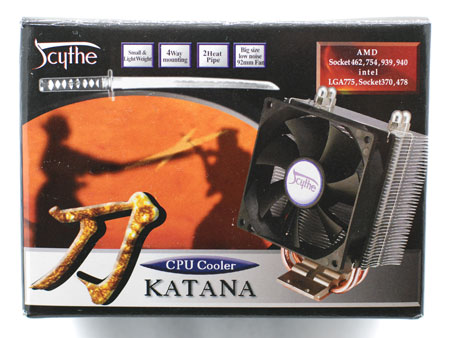
Scythe likes using full color graphics and Japanese fight themes in their packaging. The Katana is no exception.
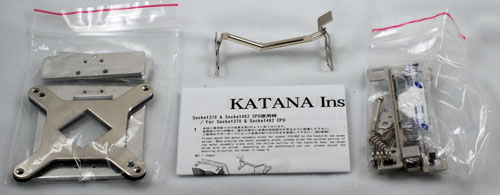
While the Thermalright MST-9775 is designed to support just the Socket 775, the Katana includes an incredible array of hardware to adapt it to AMD Socket A (462), 754/939/940, Intel 370, Intel 478, and Intel 775. It should also be mentioned that Katana is one of the few current coolers that actually meets AMD's recommendation of 300g maximum weight for Socket A coolers.
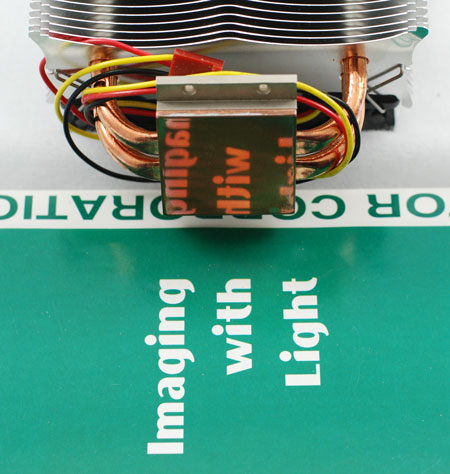
The mounting surface of Katana is highly polished. Many do not believe this matters much on processors with integral heatspreaders like Core 2 Duo, P4, Socket 478 and AM2. However, a smooth mating surface does matter a great deal on small surface area processors like Athlon XP and other Socket A designs.
With Katana supporting so many different sockets, it should be no surprise that some installations are easier than others. Installation on Socket A is a breeze, but Socket 775 installation is a nightmare. The motherboard has to be removed from the case to install the back plate and adapters which basically make 775 into a Socket 478 cage. Then you have to install flat "clips" with a set screw to create the pressure to hold the cooler in place - all while holding the cooler.
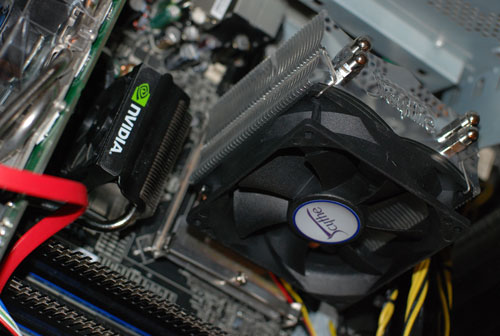
The point is the installation is possible, but we could find no way to do it in a case. Install the cooler before remounting the motherboard. The finished Core 2 Duo install took a while, but once it is done properly, the cooler works just fine on a Core 2 Duo processor.
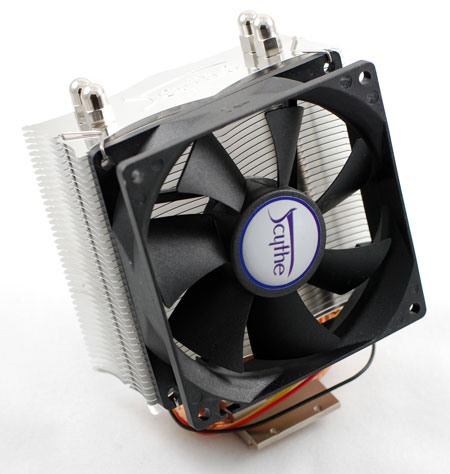
Scythe also suggests that the Katana be mounted so the fan, which blows through the fins/heatpipes, is aimed toward a rear exhaust. This works well in cases with a top-mounted power supply. In designs with the power supply at the bottom of the case a top exhaust should also work fine.
The Scythe Katana uses a large 92mm fan that runs at just one speed - 2000rpm. There are no provisions for variable fan speed, but you can add a fan controller like the Zalman if you want. There is also an upgraded Katana model - the Katana CU - which adds all copper construction and a fan controller to the base Katana for about $15 more (total $40).
Scythe produces a wide range of air cooling solutions for the computer enthusiast. There are currently about a dozen air cooling solutions detailed on the company website. These range from entry level cooling solutions all the way to powerful cooling tower designs.
Scythe Co., Ltd is a Japanese company located in Tokyo. Beginning in 2002 Scythe started manufacturing and distributing products for the PC enthusiast, including CPU cooling solutions. Scythe's first product, the Scythe Samurai, developed quite a reputation among computer enthusiasts. Their current catalog includes the well-known full cooling tower solution, the Scythe Infinity.
Scythe likes using full color graphics and Japanese fight themes in their packaging. The Katana is no exception.
While the Thermalright MST-9775 is designed to support just the Socket 775, the Katana includes an incredible array of hardware to adapt it to AMD Socket A (462), 754/939/940, Intel 370, Intel 478, and Intel 775. It should also be mentioned that Katana is one of the few current coolers that actually meets AMD's recommendation of 300g maximum weight for Socket A coolers.
The mounting surface of Katana is highly polished. Many do not believe this matters much on processors with integral heatspreaders like Core 2 Duo, P4, Socket 478 and AM2. However, a smooth mating surface does matter a great deal on small surface area processors like Athlon XP and other Socket A designs.
With Katana supporting so many different sockets, it should be no surprise that some installations are easier than others. Installation on Socket A is a breeze, but Socket 775 installation is a nightmare. The motherboard has to be removed from the case to install the back plate and adapters which basically make 775 into a Socket 478 cage. Then you have to install flat "clips" with a set screw to create the pressure to hold the cooler in place - all while holding the cooler.
The point is the installation is possible, but we could find no way to do it in a case. Install the cooler before remounting the motherboard. The finished Core 2 Duo install took a while, but once it is done properly, the cooler works just fine on a Core 2 Duo processor.
Scythe also suggests that the Katana be mounted so the fan, which blows through the fins/heatpipes, is aimed toward a rear exhaust. This works well in cases with a top-mounted power supply. In designs with the power supply at the bottom of the case a top exhaust should also work fine.
The Scythe Katana uses a large 92mm fan that runs at just one speed - 2000rpm. There are no provisions for variable fan speed, but you can add a fan controller like the Zalman if you want. There is also an upgraded Katana model - the Katana CU - which adds all copper construction and a fan controller to the base Katana for about $15 more (total $40).
Originally published at https://www.anandtech.com/show/2158 (Wayback Machine).