
ECS LIVA Z5 PLUS mini-PC Review: A Different Take on Raptor Lake
Power Consumption and Thermal Characteristics
The power consumption at the wall was measured with a 4K display being driven through the HDMI port of the system. In the graph below, we compare the idle and load power of the ECS LIVA Z5 PLUS with other systems evaluated before. For load power consumption, we ran the AIDA64 System Stability Test with various stress components, as well as our custom stress test with Prime95 / Furmark, and noted the peak as well as idling power consumption at the wall.
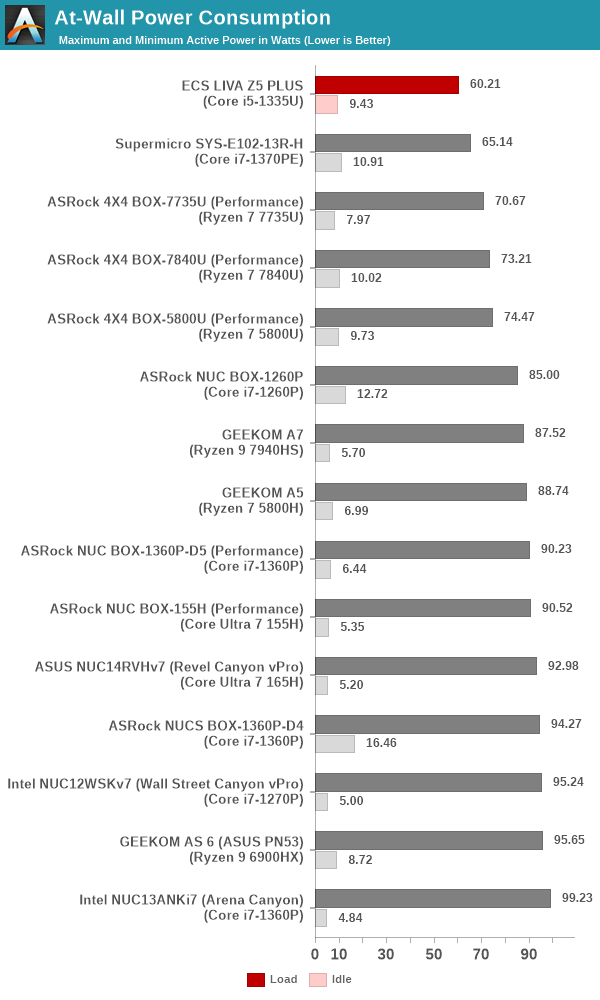
The numbers are consistent with the TDP and suggested PL1 / PL2 values for the processors in the systems, and do not come as any surprise. The ECS LIVA Z5 PLUS has the numbers configured as 20W and 39W, and the peak of around 60W at the wall is as expected. The idling power number is a bit disappointing, as we have seen the Intel NUCs with optimized BIOS configurations idle at around 5W (compared to the 9W+ number seen for the LIVA Z5 PLUS).
Stress Testing
Our thermal stress routine is a combination of Prime95, Furmark, and Finalwire's AIDA64 System Stability Test. The following 9-step sequence is followed, starting with the system at idle:
- Start with the Prime95 stress test configured for maximum power consumption
- After 30 minutes, add Furmark GPU stress workload
- After 30 minutes, terminate the Prime95 workload
- After 30 minutes, terminate the Furmark workload and let the system idle
- After 30 minutes of idling, start the AIDA64 System Stress Test (SST) with CPU, caches, and RAM activated
- After 30 minutes, terminate the previous AIDA64 SST and start a new one with the GPU, CPU, caches, and RAM activated
- After 30 minutes, terminate the previous AIDA64 SST and start a new one with only the GPU activated
- After 30 minutes, terminate the previous AIDA64 SST and start a new one with the CPU, GPU, caches, RAM, and SSD activated
- After 30 minutes, terminate the AIDA64 SST and let the system idle for 30 minutes
Traditionally, this test used to record the clock frequencies - however, with the increasing number of cores in modern processors and fine-grained clock control, frequency information makes the graphs cluttered and doesn't contribute much to understanding the thermal performance of the system. The focus is now on the power consumption and temperature profiles to determine if throttling is in play.


The thermal solution for the processor in the ECS LIVA Z5 PLUS is excellent - the package power doesn't dip below the PL1 value of 20W throughout the stress duration. The iGPU alone seems to have a peak power budget of around 12W. The PL2 value of 39W appears to be a bit conservative for the cooling solution, as the maximum temperature stays around 70C even after the PL2 duration is finished. However, the SSD temperatures are a cause for concern (and can be easily alleviated by the inclusion of a thermal pad). Given the appreciation for a long product life under 24x7 operation in industrial and business settings, a conservative approach to the PL1 and PL2 settings is acceptable.
Originally published at https://www.anandtech.com/show/21417/ecs-liva-z5-plus-minipc-review-a-different-take-on-raptor-lake (Wayback Machine).