
ECS LIVA Z5 PLUS mini-PC Review: A Different Take on Raptor Lake
System Performance: UL and BAPCo Benchmarks
Our 2022 Q4 update to the test suite for Windows 11-based systems carries over some of the standard benchmarks we have been using over the last several years. While UL's PCMark makes the list, we have opted to temporarily suspend reporting of BAPCo's SYSmark scores (pending fixture of the energy consumption aspect). Instead, BAPCo's CrossMark multi-platform benchmarking tool has been added to the set along with UL's Procyon suite. While CrossMark employs idle time compression and processes all workloads in an opaque manner, UL's Procyon processes real-world workloads with user interactions (like BAPCo's SYSmark). We have augmented the UL Procyon suite benchmark with our own custom energy measurement setup
UL PCMark 10
UL's PCMark 10 evaluates computing systems for various usage scenarios (generic / essential tasks such as web browsing and starting up applications, productivity tasks such as editing spreadsheets and documents, gaming, and digital content creation). We benchmarked select PCs with the PCMark 10 Extended profile and recorded the scores for various scenarios. These scores are heavily influenced by the CPU and GPU in the system, though the RAM and storage device also play a part. The power plan was set to Balanced for all the PCs while processing the PCMark 10 benchmark. The scores for each contributing component / use-case environment are also graphed below.
| UL PCMark 10 - Performance Scores | |||
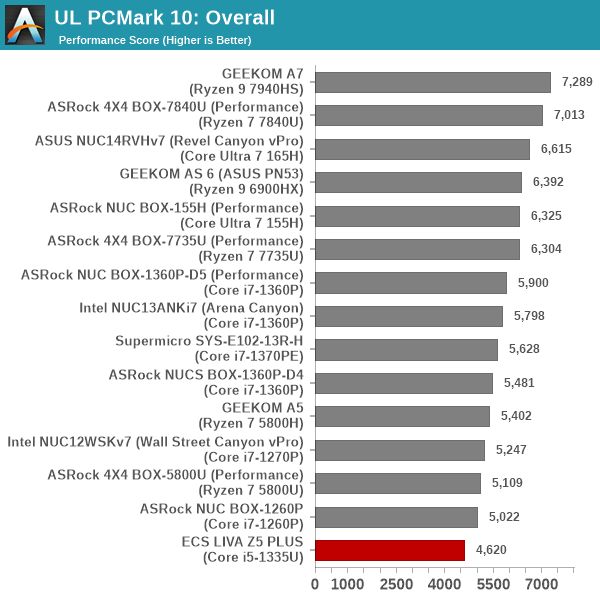
The ECS LIVA Z5 PLUS makes its entry in the bottom in all components of this benchmark suite. It is not surprising given that other systems use Core i7 processors (the LIVA Z5 PLUS is the only system equipped with a Core i5 SoC). Additionally, the newer systems all use faster DDR5 memory.
UL Procyon v2.1.544
PCMark 10 utilizes open-source software such as Libre Office and GIMP to evaluate system performance. However, many of their professional benchmark customers have been requesting evaluation with commonly-used commercial software such as Microsoft Office and Adobe applications. In order to serve their needs, UL introduced the Procyon benchmark in late 2020. There are five benchmark categories currently - Office Productivity, AI Inference, Battery Life, Photo Editing, and Video Editing. AI Inference benchmarks are available only for Android devices, while the battery life benchmark is applicable to Windows devices such as notebooks and tablets. We presents results from our processing of the other three benchmarks.
| UL Procyon - Office Productivity Scores | |||
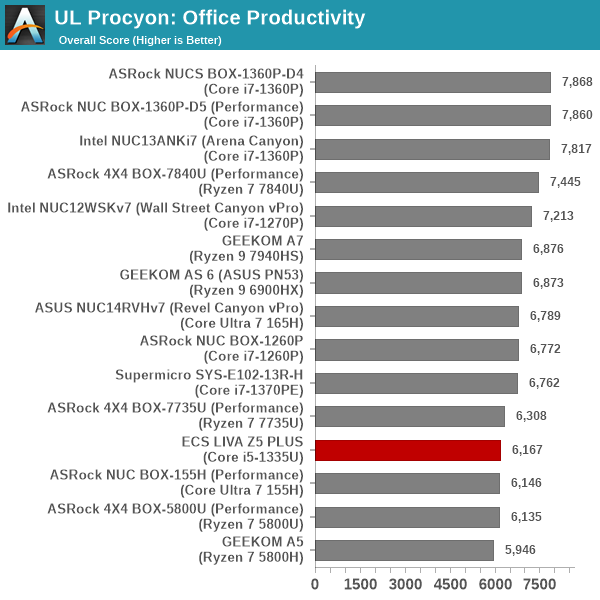
In the UL Procyon Office workload, the LIVA Z5 PLUS puts up a comparatively better performance, managing to surpass the Ryzen 7 5000 series across the board. However, the slower memory and lower TDP of 20W dampen the overall performance compared to the other systems.
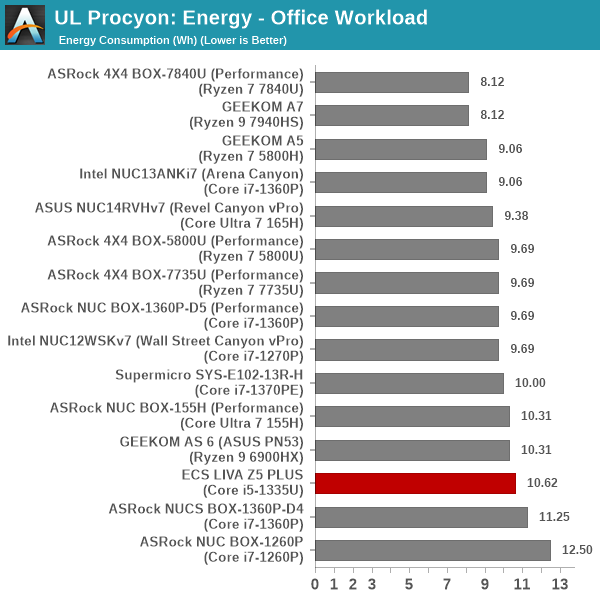
From an energy consumption viewpoint, the LIVA Z5 PLUS manages to outperform the only other RPL-based DDR4 system - the NUCS BOX-1360P-D4. Despite that, it does consume more energy compared to almost every other system in the comparison list. The time taken for benchmark completion is just way too much to compensate for the lowered TDP. Additionally, as we shall see later, the BIOS doesn't seem particularly optimized for low idle power consumption.
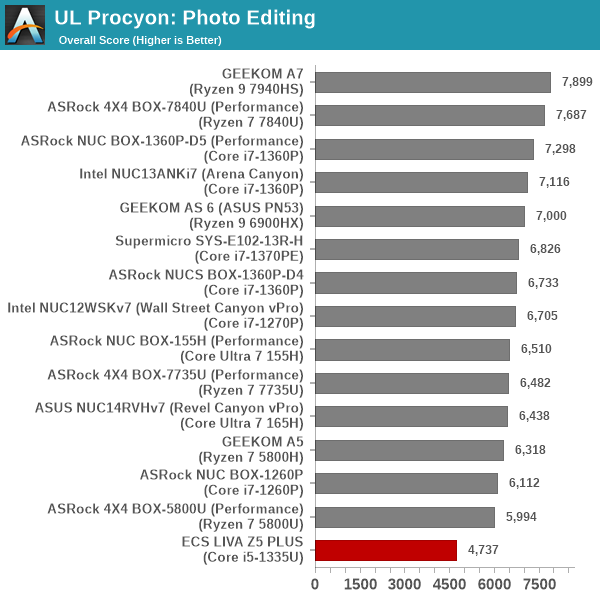
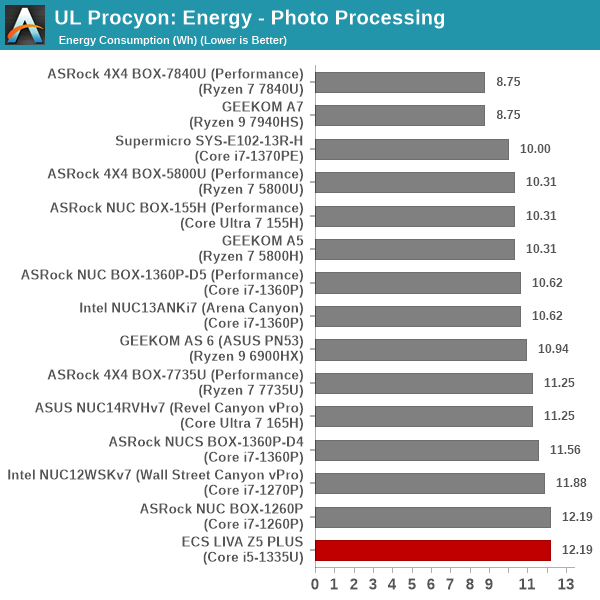
Moving on to the evaluation of Adobe Photoshop and Adobe Lightroom, we find the LIVA Z5 PLUS again at the bottom of the pack. The mid-range Core i5's lowered iGPU speeds and the overall lower power budget combine to create this scenario.
The longer time taken to complete the benchmark negatively affects the energy consumption numbers too, rendering the lower power budget useless.
UL Procyon evaluates performance for video editing using Adobe Premier Pro.
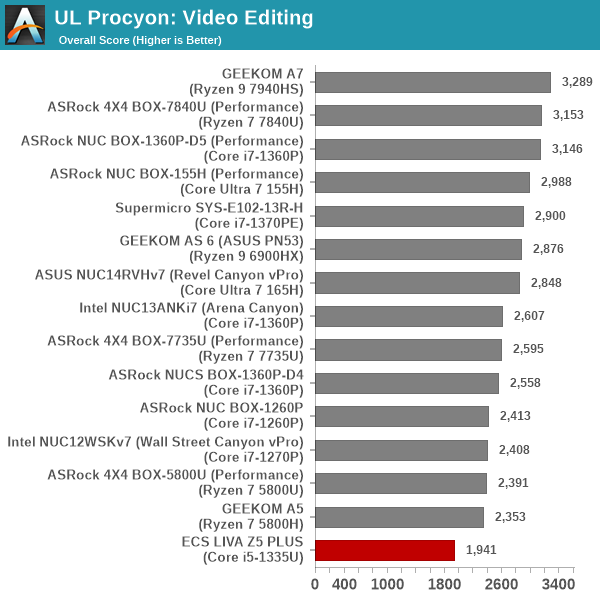
The results mirror the aspects seen in the photo workload, largely for the same reasons - lower power budget and iGPU clocked at lower speeds compared to the other systems.
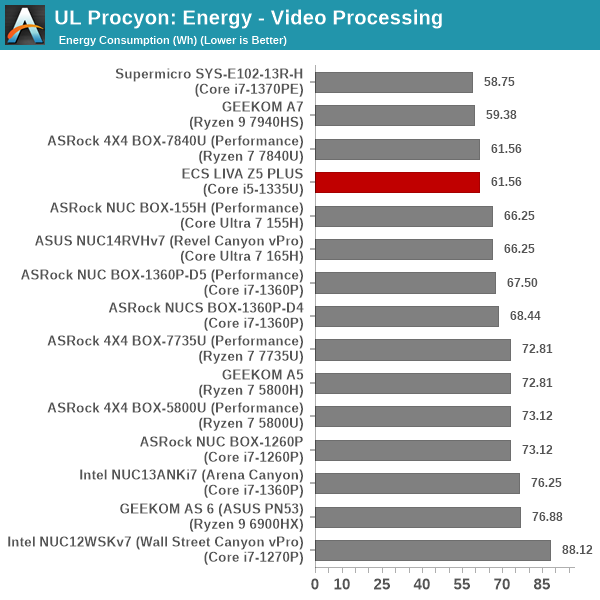
Interestingly, the energy numbers are much better with the LIVA Z5 PLUS moving up to the top half of the pack. The lower power budget for the processor helps offset the time taken for the benchmark completion.
BAPCo CrossMark 1.0.1.86
BAPCo's CrossMark aims to simplify benchmark processing while still delivering scores that roughly tally with SYSmark. The main advantage is the cross-platform nature of the tool - allowing it to be run on smartphones and tablets as well.
| BAPCo CrossMark 1.0.1.86 - Sub-Category Scores | |||
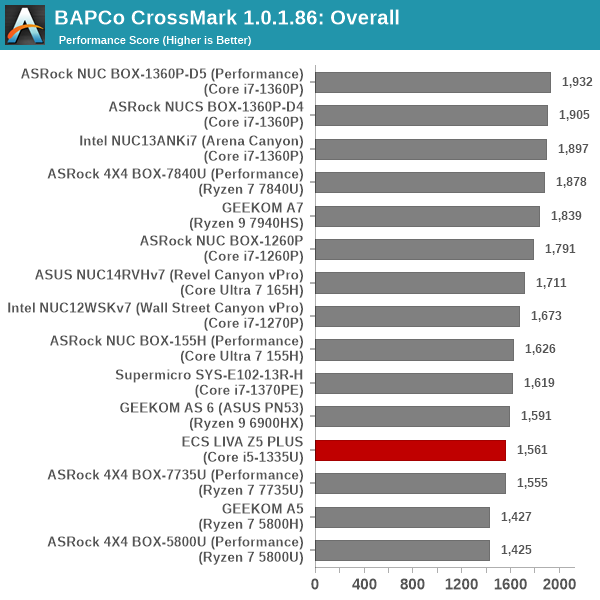
CrossMark workloads involve idle time compression. In tandem with the PL1 / PL2 boosts, these combine in Intel systems to give them a better overall score in this benchmark. We believe that idle time compression is not reflective of real-world usage and UL Procyon's real-time replay is a better candidate to determine the effectiveness and efficiency of a particular system. The benchmark is still included to provide a comparison point that could be relevant to specific workloads.
Originally published at https://www.anandtech.com/show/21417/ecs-liva-z5-plus-minipc-review-a-different-take-on-raptor-lake (Wayback Machine).