
ACEMAGIC F2A 125H SFF PC Review: Mid-Range Meteor Lake at 65W
Setup Notes and Platform Analysis
Our review sample of the ACEMAGIC F2A 125H came with all the necessary components pre-installed, along with the OS. We opted to wipe the drive and load up our own copy of Windows 11 to start our evaluation process. Prior to that, we took some time to look into the BIOS interface. ACEMAGIC ships the system with plenty of BIOS options left in a configurable state for the end user., as shown in the video below.
The diagram below presents the overall high-speed I/O distribution.
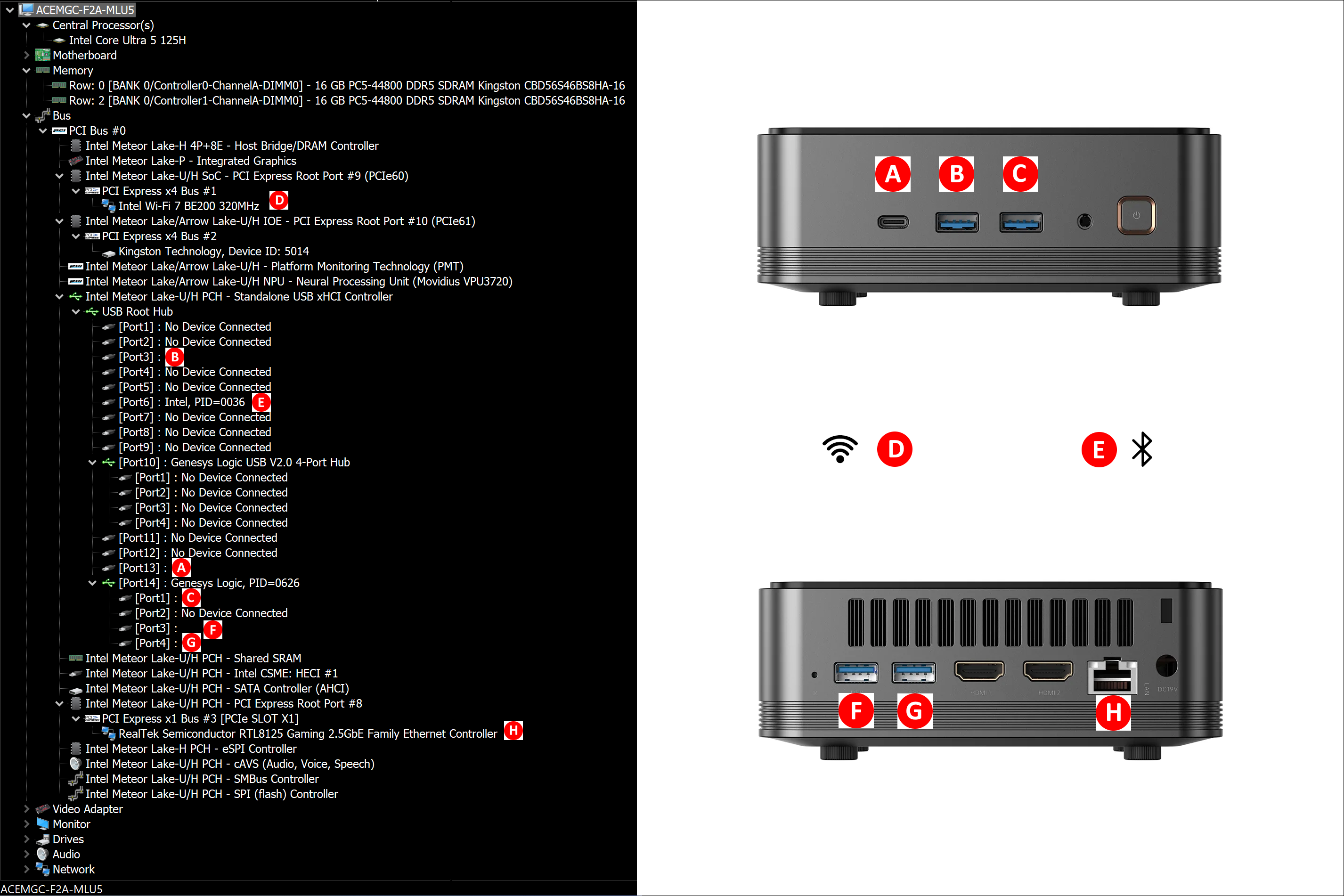
This brings us to one of the biggest weaknesses of the F2A - the number of ports and their variety is abysmal. We get four 5 Gbps Type-A ports (two in the front and two in the rear), and a 10 Gbps Type-C port in the front. While the networking side is commendable - a 2.5 Gbps RJ45 port and a Wi-Fi 7 (802.11be) WLAN card with Bluetooth 5.4 support - the absence of Thunderbolt / USB4 in a $500+ system is inexcusable.
Other than the USB ports, the high-speed I/O lanes are distributed as below:
- PCIe 4.0 x1 #8: Realtek RTL8125 Gaming 2.5GbE Family Ethernet Controller
- PCIe 4.0 x4 #9: Intel Wi-Fi 7 BE200 320MHz #4 Wireless Network Adapter
- PCIe 4.0 x4 #10: Kingston NVMe SSD Controller
One of the interesting things to note here is that the audio jack is enabled by a Conexant SN6140 audio codec, and not the usual Realtek ALC ones.
In today's review, we compare the ACEMAGIC F2A 125H with a host of other systems based on processors with TDPs ranging from 20W to 65W. The systems do not target the same market segments, but a few key aspects lie in common, making the comparisons relevant.
| Comparative PC Configurations | ||
| Aspect | ACEMAGIC F2A 125H | |
| CPU | Intel Core Ultra 5 125H Meteor Lake-H 4P + 8E + 2LPE / 18T, up to 4.5 GHz (P) up to 3.6 GHz (E) up to 2.5 GHz (LPE) Intel 4 (CPU) / TSMC N5 (iGPU), 18MB L2, Min / Max / Base TDP: 20W / 115W / 28W PL1 = 65W, PL2 = 90W |
Intel Core Ultra 5 125H Meteor Lake-H 4P + 8E + 2LPE / 18T, up to 4.5 GHz (P) up to 3.6 GHz (E) up to 2.5 GHz (LPE) Intel 4 (CPU) / TSMC N5 (iGPU), 18MB L2, Min / Max / Base TDP: 20W / 115W / 28W PL1 = 65W, PL2 = 90W |
| GPU | Intel Arc Graphics (7 Xe-cores @ up to 2.2 GHz) |
Intel Arc Graphics (7 Xe-cores @ up to 2.2 GHz) |
| RAM | Kingston CBD56S46BS8HA-16 DDR5-5600 SODIMMs 46-45-45-90 @ 5600 MHz 2x16 GB |
Kingston CBD56S46BS8HA-16 DDR5-5600 SODIMMs 46-45-45-90 @ 5600 MHz 2x16 GB |
| Storage | Kingston Design-In SSD OM8SEP41024Q-A0 (1 TB; M.2 2280 PCIe 4.0 x4 NVMe;) (Kioxia BiCS5 (112L) 3D TLC; Silicon Motion SM2267XT DRAM-less SSD Controller) |
Kingston Design-In SSD OM8SEP41024Q-A0 (1 TB; M.2 2280 PCIe 4.0 x4 NVMe;) (Kioxia BiCS5 (112L) 3D TLC; Silicon Motion SM2267XT DRAM-less SSD Controller) |
| Wi-Fi | 1x 2.5 GbE RJ-45 (Realtek RTL8125) Intel Wi-Fi 7 BE200 (2x2 802.11be - 5.8 Gbps) |
1x 2.5 GbE RJ-45 (Realtek RTL8125) Intel Wi-Fi 7 BE200 (2x2 802.11be - 5.8 Gbps) |
| Price (in USD, when built) | $699 (Amazon) $569 (ACEMAGIC Storefront) (as configured, with Win 11 Home) |
$699 (Amazon) $569 (ACEMAGIC Storefront) (as configured, with Win 11 Home) |
The next few sections will deal with comparative benchmarks for the above systems.
Originally published at https://www.anandtech.com/show/21416/acemagic-f2a-meteor-lakeh-sff-pc-review (Wayback Machine).