
ASUS P5N-E SLI: NVIDIA's 650i enters with a Bang
- Posted in
- Motherboards
ASUS P5N-E SLI Basic Features
ASUS follows a trend they started in the P5N series of boards by offering a moderate level of BIOS options for tweaking the board, with significant emphasis placed on the available memory settings. We found in memory testing that switching to manual settings and changing the tCAS, tRCD, tRP, tRAS, and command timing rate was required in order to maintain stability as our overclocking tests will show shortly. The board also features ASUS' AI overclocking system that will intelligently overclock the system based upon CPU load or off predetermined settings. This system generally overclocked the board between 7%-11% and is designed for users who want a little extra performance without worrying about adjusting multiple BIOS settings in order to tune the board.
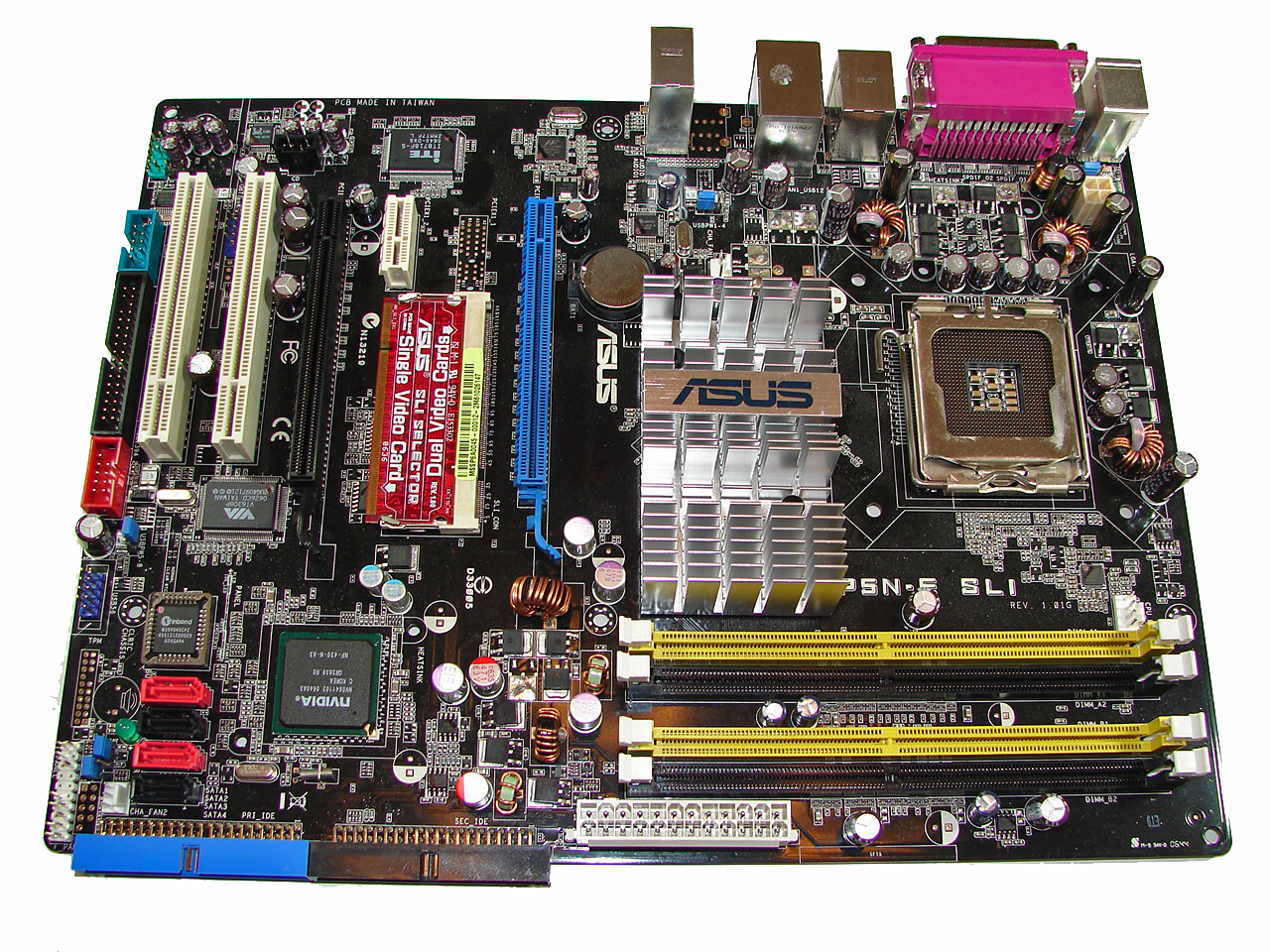
The board layout that ASUS devised for this chipset is actually quite good and we are glad to see the standard mustard color ASUS uses on their base boards has been banished from this design. The board features a very good three-phase power design and high quality capacitors. There are three fan headers located in easy to reach positions on the board, and they are easily controlled through ASUS' AI Suite or Speedfan. The board installed without issues into several cases and cable management was very good for both power and the optical/hard drives. The floppy drive connector is located at the bottom of the board and could present an issue for larger cases where the enclosed cable is not able to reach the floppy drive. The area around the CPU is slightly cluttered but we had no issues fitting our larger air coolers on this board. However, installation was slightly difficult due to the two large capacitors located in the upper right hand corner of the CPU mounting points.
The PCI Express and PCI slot arrangements are designed with multiple graphics card operation in mind, but this layout will mean the loss of a PCI slot if dual slot video cards are utilized. Like the original nForce4 SLI boards, this board requires the use of a paddle card to enable dual video cards. The C55 SPP is cooled by a large passive heatsink that worked fine up until we started overclocking above the 450FSB range, at which point it required an increase in voltage to 1.393V. We suggest a case with good airflow in it for this reason and the fact that the nF430 MCP is not cooled. We do not understand ASUS' decision to not cool the MCP unit with at least a small passive heatsink as this chipset tends to run hot during overclocking. Speaking of the nF430 MCP, it features four SATA 3Gb/s ports and two UltraATA 133 IDE ports that support up to four drives. This board offers a very good balance of SATA and PATA drive capability, and many users will welcome the return of dual IDE ports.
The audio subsystem is based on the Realtek ALC883 and offers 6-channel output. Realtek has had troubles recently with EAX 2.0 support but we did notice a slight improvement in the 1.51 driver set. However, the ADI 1988B HD audio codec that ASUS utilizes in their upper level boards still offers significantly better EAX audio quality in games than the Realtek HD codecs. ASUS includes the excellent VIA VT6308 IEEE 1394 controller along with the Marvell 88E1116 PHY for Gigabit Ethernet capability.
| ASUS P5N-E SLI | |
| Market Segment: | Mid-Range Performance - $129.99~$149.99 |
| CPU Interface: | Socket T (Socket 775) |
| CPU Support: | LGA775-based Pentium 4, Celeron D, Pentium D, Pentium EE, Core 2 Duo, Core 2 Extreme |
| Chipset: | NVIDIA 650i SPP (C55) + 650i MCP (nF430) |
| Bus Speeds: | Auto, 533 to 3000 QDR in 1MHz increments |
| Memory Ratios: | Auto, Sync, 1:1, 5:4, 3:2 |
| Memory Speed: | 400MHz~2600MHz in various increments |
| PCIe Speeds: | 100MHz~131MHz in 1MHz Increments |
| Core Voltage: | Auto, .83125V to 1.60000V in 0.00625V increments |
| Core Voltage Offset: | Disable, +100mV |
| CPU Clock Multiplier: | Auto, 6x-11x in 1X increments if CPU is unlocked, downwards unlocked, Core 2 Duo |
| DRAM Voltage: | Auto, 1.920V ~ 2.517V in various increments |
| DRAM Timing Control: | Auto, 13 DRAM Timing Options |
| NB Voltage: | Auto, 1.208V, 1.393V, 1.563V, 1.748V |
| Memory Slots: | Four 240-pin DDR2 DIMM Slots Dual-Channel Configuration Regular Unbuffered Memory to 8GB Total |
| Expansion Slots: | 2 - PCIe X16 (2 - x8 electrical for SLI or Multi-GPU) 1 - PCIe x1 2 - PCI Slot 2.2 |
| Onboard SATA/RAID: | 4 SATA 3Gbps Ports - 650i MCP (RAID 0,1, 0+1, 5, JBOD) 1 e-SATA 3Gbps Port - JMicron JMB361 |
| Onboard IDE: | 2 ATA133/100/66 Port (4 drives) - 650i MCP |
| Onboard USB 2.0/IEEE-1394: | 8 USB 2.0 Ports - 4 I/O Panel - 4 via Headers 2 Firewire 400 Ports by VIA VT6308 - 1 I/O Panel, 1 via Header |
| Onboard LAN: | Marvell Gigabit Ethernet - PCI Express - 88E1116 PHY |
| Onboard Audio: | Realtek ALC883 - 6-channel HD audio codec |
| Power Connectors: | ATX 24-pin, 4-pin EATX 12V |
| I/O Panel: | 1 x PS/2 Keyboard 1 x PS/2 Mouse 1 x Parallel Port 1 x e-SATA 1 x S/PDIF Coaxial - Out 1 x IEEE 1394a 1 x Audio Panel 1 x RJ45 4 x USB 2.0/1.1 |
| BIOS Revision: | Award 0101 |
| Board Revision: | 1.01G |
ASUS follows a trend they started in the P5N series of boards by offering a moderate level of BIOS options for tweaking the board, with significant emphasis placed on the available memory settings. We found in memory testing that switching to manual settings and changing the tCAS, tRCD, tRP, tRAS, and command timing rate was required in order to maintain stability as our overclocking tests will show shortly. The board also features ASUS' AI overclocking system that will intelligently overclock the system based upon CPU load or off predetermined settings. This system generally overclocked the board between 7%-11% and is designed for users who want a little extra performance without worrying about adjusting multiple BIOS settings in order to tune the board.
 |
| Click to enlarge |
The board layout that ASUS devised for this chipset is actually quite good and we are glad to see the standard mustard color ASUS uses on their base boards has been banished from this design. The board features a very good three-phase power design and high quality capacitors. There are three fan headers located in easy to reach positions on the board, and they are easily controlled through ASUS' AI Suite or Speedfan. The board installed without issues into several cases and cable management was very good for both power and the optical/hard drives. The floppy drive connector is located at the bottom of the board and could present an issue for larger cases where the enclosed cable is not able to reach the floppy drive. The area around the CPU is slightly cluttered but we had no issues fitting our larger air coolers on this board. However, installation was slightly difficult due to the two large capacitors located in the upper right hand corner of the CPU mounting points.
The PCI Express and PCI slot arrangements are designed with multiple graphics card operation in mind, but this layout will mean the loss of a PCI slot if dual slot video cards are utilized. Like the original nForce4 SLI boards, this board requires the use of a paddle card to enable dual video cards. The C55 SPP is cooled by a large passive heatsink that worked fine up until we started overclocking above the 450FSB range, at which point it required an increase in voltage to 1.393V. We suggest a case with good airflow in it for this reason and the fact that the nF430 MCP is not cooled. We do not understand ASUS' decision to not cool the MCP unit with at least a small passive heatsink as this chipset tends to run hot during overclocking. Speaking of the nF430 MCP, it features four SATA 3Gb/s ports and two UltraATA 133 IDE ports that support up to four drives. This board offers a very good balance of SATA and PATA drive capability, and many users will welcome the return of dual IDE ports.
The audio subsystem is based on the Realtek ALC883 and offers 6-channel output. Realtek has had troubles recently with EAX 2.0 support but we did notice a slight improvement in the 1.51 driver set. However, the ADI 1988B HD audio codec that ASUS utilizes in their upper level boards still offers significantly better EAX audio quality in games than the Realtek HD codecs. ASUS includes the excellent VIA VT6308 IEEE 1394 controller along with the Marvell 88E1116 PHY for Gigabit Ethernet capability.
Originally published at https://www.anandtech.com/show/2140 (Wayback Machine).