
ASUS NUC14RVHv7 and ASRock Industrial NUC BOX-155H Review: Meteor Lake Brings Accelerated AI to UCFF PCs
Setup Notes and Platform Analysis
Prior to setting up the OS on the ASRock Industrial NUC BOX-155H, we took some time to look into the BIOS interface. As is typical for systems targeting the industrial market, the main BIOS interface isa vanilla one, but does provide plenty of knobs for the end user to tweak. The video below presents the entire gamut of configuration options.
On the other hand, the BIOS of the ASUS NUC14RVHv7 is much more consumer-friendly with mouse support, and a decently fancy GUI. There are a lot more tweaks available in this BIOS, including the ability to set up different display emulation schemes for headless operation, and the Absolute Persistence Module in the Add-in Config to allow extensive remote management using software from Absolute (BIOS needs to support this software, and it is possible for the end user to allow its activation, or even permanently remove support for it).
The videos above do not go into the ME / AMT login screens, even though it is available in the BIOS. It should be noted that the vPro Enterprise capabilities of the ASUS NUC14RVHv7 allow for better manageability compared to the vPro Essentials in the Core Ultra 7 155H of the ASRock Industrial NUC BOX-155H.
The BIOS in the NUC systems have always had plenty of interesting features (including fine-grained fan control). The ASUS NUC14RVHv7 carries over these features. In addition, ASUS is also pushing the MyASUS application to provide such control at the OS level (for fan speeds as well as diagnostics and other device settings). This is for the average consumer who doesn't want to fiddle with BIOS settings, but power users may also find some interesting features in the application. For some use-cases / users, these are value-additions that may sway the purchase decision towards the ASUS models. This feature has been available in the ExpertCenter line-up for a few generations now. ASUS is also enabling support for this application in the NUC 14 Pro SKUs.
The block diagram below presents the overall high-speed I/O distribution from the NUC BOX-155H's user manual.
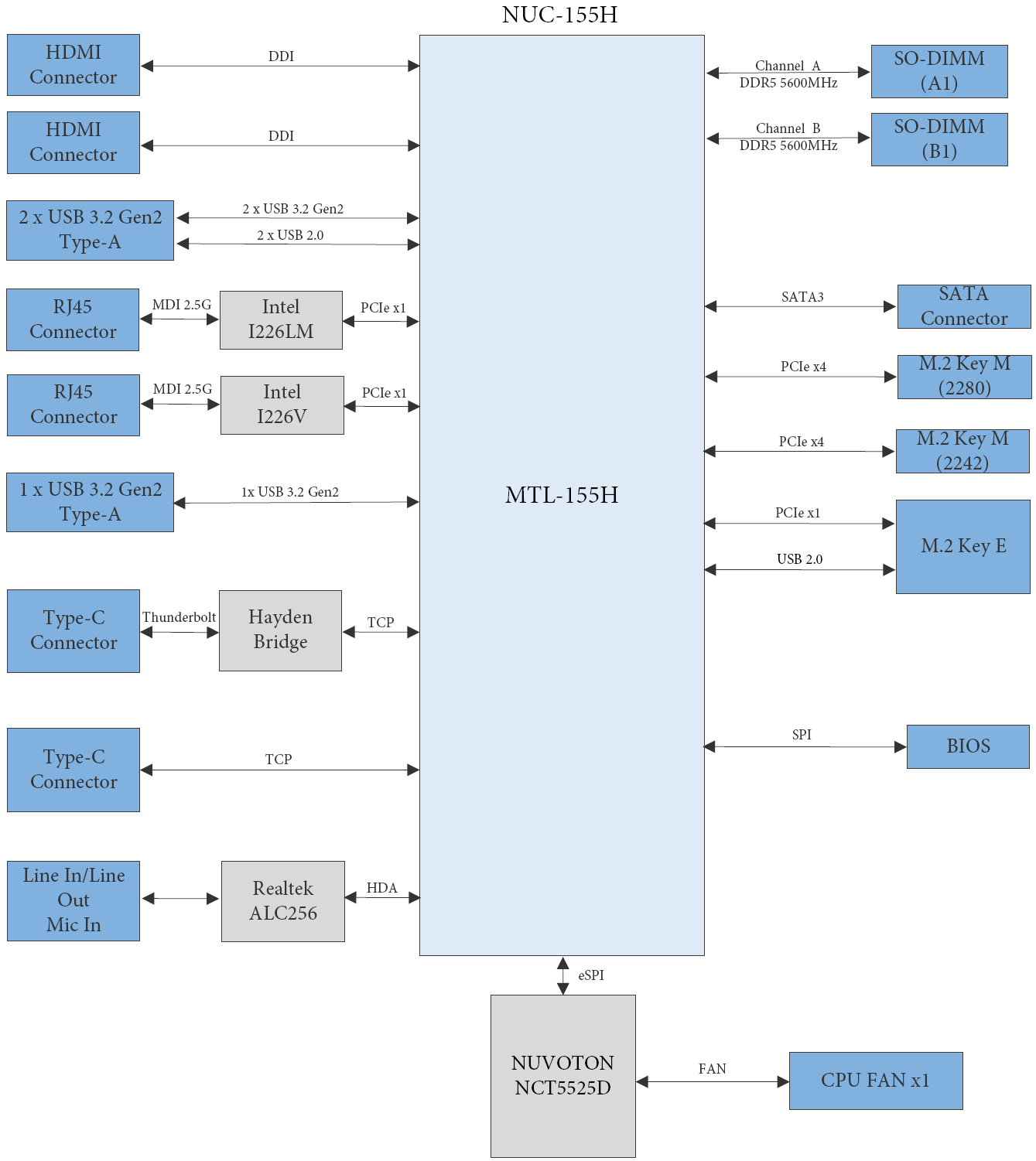
ASRock Industrial NUC BOX-155H Block Diagram
ASRock Industrial uses the Hayden Bridge retimer for the Thunderbolt port, allowing for USB 3.2 Gen 2x2 support on it. In terms of external I/O, the following bus layout diagram provides further insights.
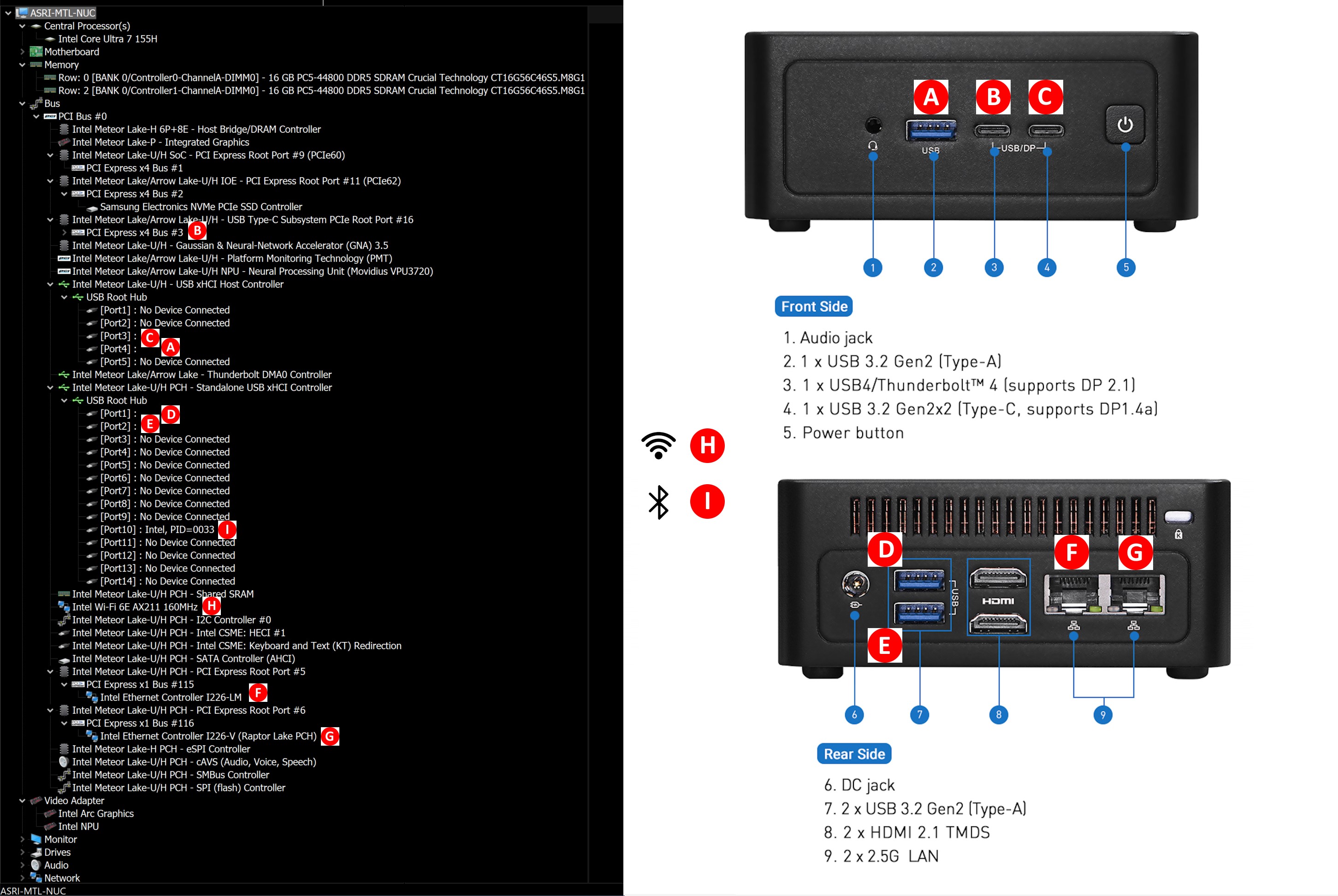
ASRock Industrial NUC BOX-155H Bus Layout
The block diagram below presents the overall high-speed I/O distribution from the NUC 14 Pro technical product manual.
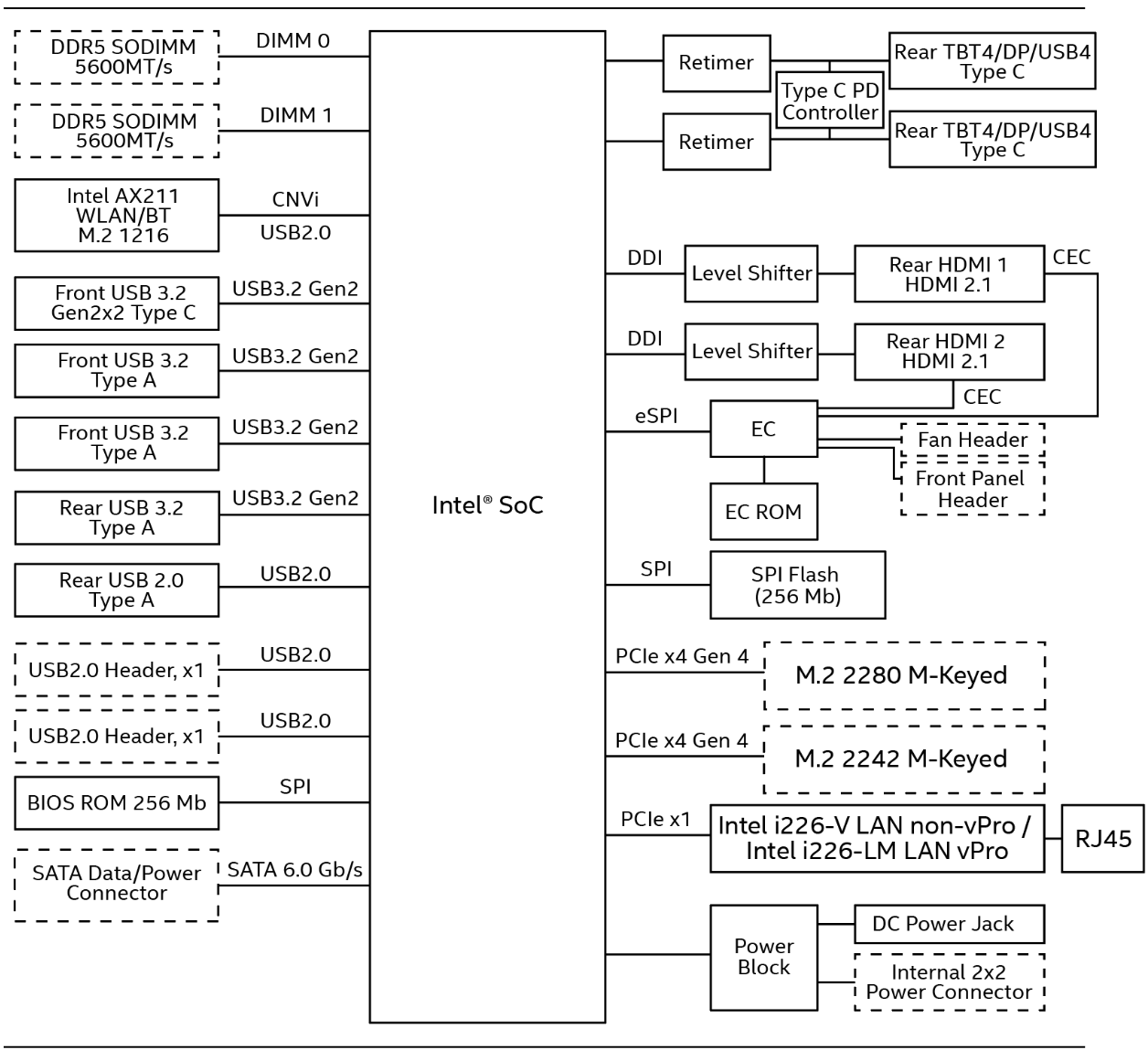
ASUS NUC14RVHv7 Block Diagram
Even though it is not specifically mentioned, the retimers used for both USB4 ports are Hayden Bridge, allowing for USB 3.2 Gen 2x2 support on it. In terms of external I/O, the following bus layout diagram provides further insights.
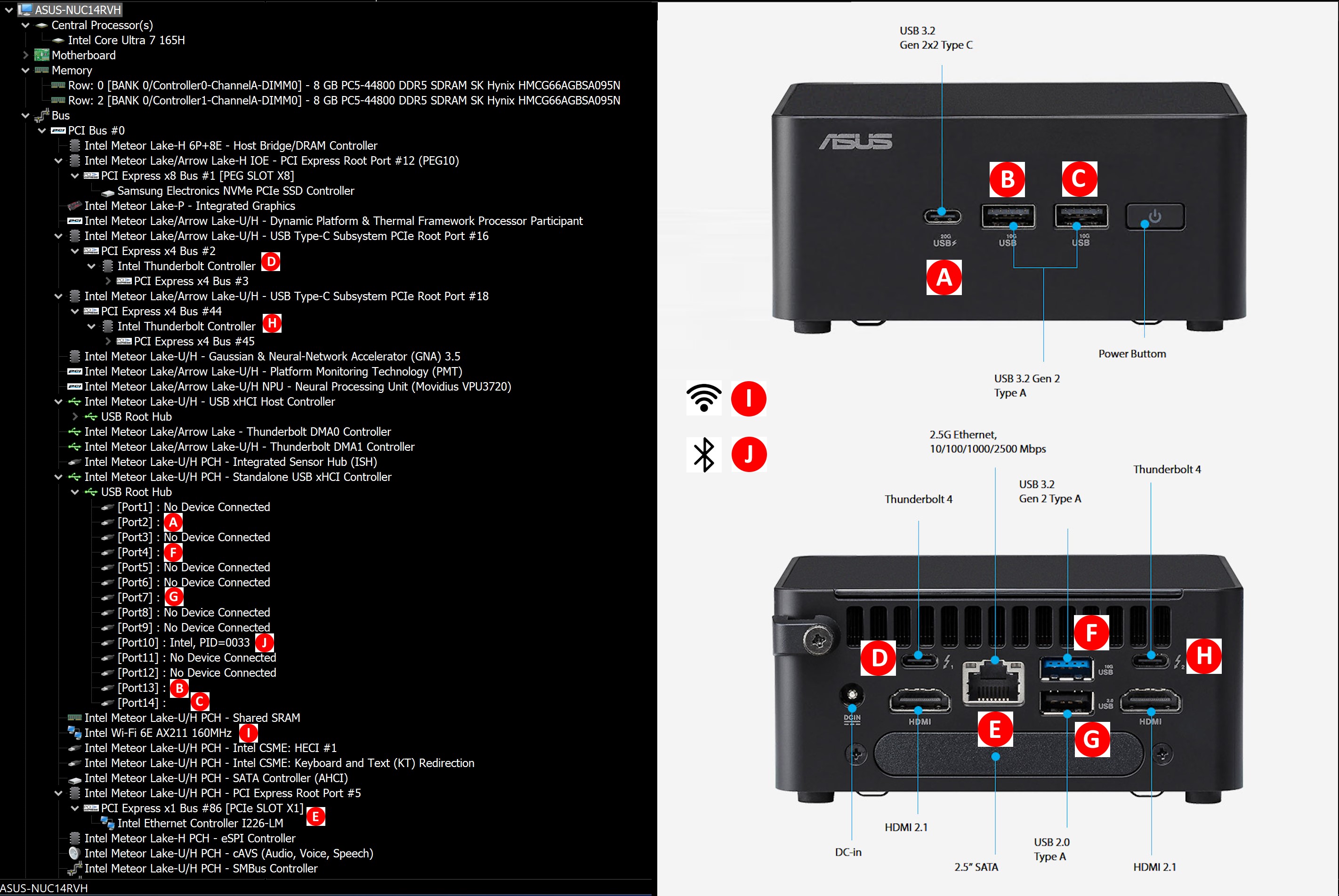
ASUS NUC14RVHv7 Bus Layout
In today's review, we compare the ASRock Industrial NUC BOX-155H and the ASUS NUC14RVHv7 with a host of other systems in a similar form-factor. TDPs for the processors range from 15W right up to 65W.
| Comparative PC Configurations | ||
| Aspect | ASUS NUC14RVHv7 (Revel Canyon vPro) | |
| CPU | Intel Core Ultra 7 165H Meteor Lake-H 6P + 8E + 2LPE / 22T, up to 5.0 GHz (P) up to 3.8 GHz (E) up to 2.5 GHz (LPE) Intel 4 (CPU) / TSMC N5 (iGPU), 24MB L2, Min / Max / Base TDP: 20W / 115W / 28W PL1 = 64W, PL2 = 64W |
Intel Core Ultra 7 165H Meteor Lake-H 6P + 8E + 2LPE / 22T, up to 5.0 GHz (P) up to 3.8 GHz (E) up to 2.5 GHz (LPE) Intel 4 (CPU) / TSMC N5 (iGPU), 24MB L2, Min / Max / Base TDP: 20W / 115W / 28W PL1 = 64W, PL2 = 64W |
| GPU | Intel Arc Graphics (8 Xe-cores @ up to 2.3 GHz) |
Intel Arc Graphics (8 Xe-cores @ up to 2.3 GHz) |
| RAM | SK hynix HMCG66AGBSA095N DDR5-5600 SODIMM 46-45-45-90 @ 5600 MHz 2x8 GB |
SK hynix HMCG66AGBSA095N DDR5-5600 SODIMM 46-45-45-90 @ 5600 MHz 2x8 GB |
| Storage | Samsung PM9A1a MZVL2512HDJD (512 GB; M.2 2280 PCIe 4.0 x4 NVMe;) (Samsung 7th Gen. V-NAND 176L (136T) 3D TLC; Samsung Pascal S4LV008 Controller) |
Samsung PM9A1a MZVL2512HDJD (512 GB; M.2 2280 PCIe 4.0 x4 NVMe;) (Samsung 7th Gen. V-NAND 176L (136T) 3D TLC; Samsung Pascal S4LV008 Controller) |
| Wi-Fi | 1x 2.5 GbE RJ-45 (Intel I226-LM) Intel Wi-Fi 6E AX211 (2x2 802.11ax - 2.4 Gbps) |
1x 2.5 GbE RJ-45 (Intel I226-LM) Intel Wi-Fi 6E AX211 (2x2 802.11ax - 2.4 Gbps) |
| Price (in USD, when built) | US $700 (barebones) US $816 (as configured, no OS) |
US $700 (barebones) US $816 (as configured, no OS) |
The next few sections will deal with comparative benchmarks for the above systems.
Originally published at https://www.anandtech.com/show/21398/asrock-industrial-nuc-box155h-and-asus-nuc-14-pro-review-meteor-lake-ucff-pcs-bring-accelerated-ai (Wayback Machine).