
HD Video Playback: H.264 Blu-ray on the PC
- Posted in
- GPUs
X-Men: The Last Stand CPU Overhead
The first benchmark we will see compares the CPU utilization of our X6800 when paired with each one of our graphics cards. While we didn't test multiple variations of each card this time, we did test the reference clock speeds for each type. Based on our initial HDCP roundup, we can say that overclocked versions of these NVIDIA cards will see better CPU utilization. ATI hardware doesn't seem to benefit from higher clock speeds. We have also included CPU utilization for the X6800 without any help from the GPU for reference.
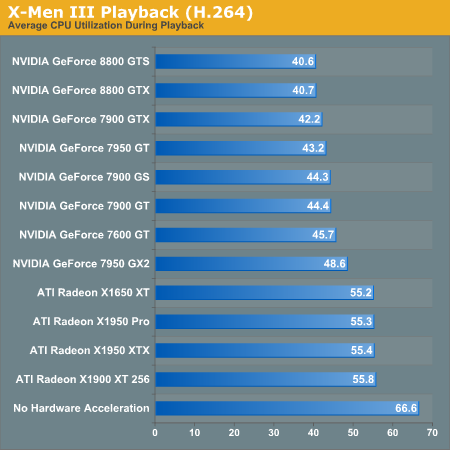
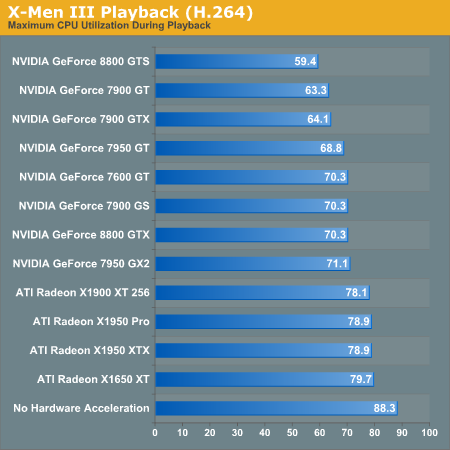
The leaders of the pack are the NVIDIA GeForce 8800 series cards. While the 7 Series hardware doesn't do as well, we can see that clock speed does affect video decode acceleration with these cards. It is unclear whether this will continue to be a factor with the 8 Series, as the results for the 8800 GTX and GTS don't show a difference.
ATI hardware is very consistent, but just doesn't improve performance as much as NVIDIA hardware. This is different than what our MPEG-2 tests indicated. We do still see a marked improvement over our unassisted decode performance test, which is good news for ATI hardware owners.
The second test we ran explores different CPUs performance with X-Men 3 decoding. We used NVIDIA's 8800 GTX and ATI's X1950 XTX in order to determine a best and worse case scenario for each processor. The following data isn't based on average CPU utilization, but on maximum CPU utilization. This will give us an indication of whether or not any frames have been dropped. If CPU utilization never hits 100%, we should always have smooth video. The analog to max CPU utilization in game testing is minimum framerate: both tell us the worst case scenario.
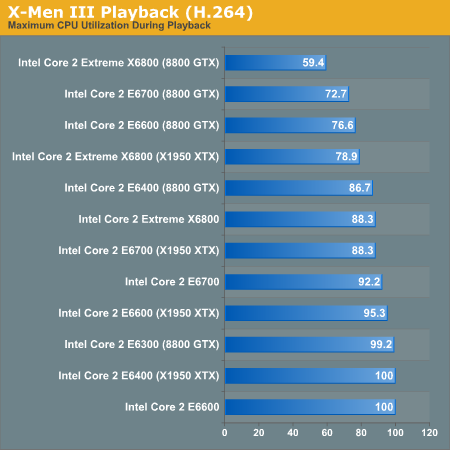
While only the E6700 and X6800 are capable of decoding our H.264 movie without help, we can confirm that GPU decode acceleration will allow us to use a slower CPU in order to watch HD content on our PC. The X1950 XTX clearly doesn't help as much as the 8800 GTX, but both make a big difference.
The first benchmark we will see compares the CPU utilization of our X6800 when paired with each one of our graphics cards. While we didn't test multiple variations of each card this time, we did test the reference clock speeds for each type. Based on our initial HDCP roundup, we can say that overclocked versions of these NVIDIA cards will see better CPU utilization. ATI hardware doesn't seem to benefit from higher clock speeds. We have also included CPU utilization for the X6800 without any help from the GPU for reference.
The leaders of the pack are the NVIDIA GeForce 8800 series cards. While the 7 Series hardware doesn't do as well, we can see that clock speed does affect video decode acceleration with these cards. It is unclear whether this will continue to be a factor with the 8 Series, as the results for the 8800 GTX and GTS don't show a difference.
ATI hardware is very consistent, but just doesn't improve performance as much as NVIDIA hardware. This is different than what our MPEG-2 tests indicated. We do still see a marked improvement over our unassisted decode performance test, which is good news for ATI hardware owners.
The second test we ran explores different CPUs performance with X-Men 3 decoding. We used NVIDIA's 8800 GTX and ATI's X1950 XTX in order to determine a best and worse case scenario for each processor. The following data isn't based on average CPU utilization, but on maximum CPU utilization. This will give us an indication of whether or not any frames have been dropped. If CPU utilization never hits 100%, we should always have smooth video. The analog to max CPU utilization in game testing is minimum framerate: both tell us the worst case scenario.
While only the E6700 and X6800 are capable of decoding our H.264 movie without help, we can confirm that GPU decode acceleration will allow us to use a slower CPU in order to watch HD content on our PC. The X1950 XTX clearly doesn't help as much as the 8800 GTX, but both make a big difference.
Originally published at https://www.anandtech.com/show/2132 (Wayback Machine).