
Intel P965: MSI P965 Platinum and ECS PX1 Extreme
- Posted in
- Motherboards
ECS PX1 Extreme: Board Layout and Features
ECS has come a long way in their layout and color combinations. The layout of this board is really good and for once we do not have a rainbow of colors that detracts the eye, although there is still plenty of marketing information on the board to let you know what options are important to ECS. The color combination could stand to be a little more coordinated but overall ECS is improving with each release. The board was simple to install into our case and all connections were easily reached. The board features a four-phase voltage regulator system that provided excellent stability throughout our testing along with ECS's first true heatpipe system. The board looks like it is performance oriented and fooled us into thinking so until we met the BIOS. The board also includes four fan headers and a nice Smart Fan control system.
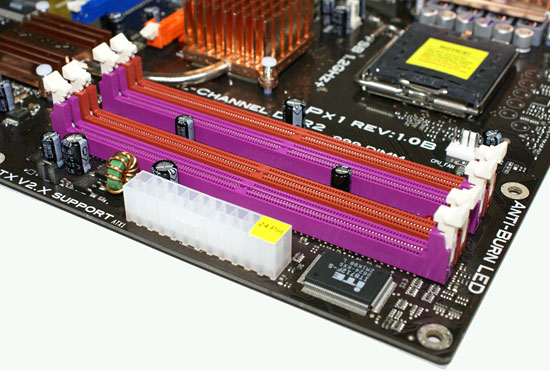
The DIMM module slots' color coordination is correct for dual-channel setup based upon the premise of installing DIMMs in the same colored slots for dual-channel operation. The memory modules are slightly difficult to install with a full size video card placed in the PCI Express x16 slot. The 24-pin ATX power connector is located behind the DIMM slots.
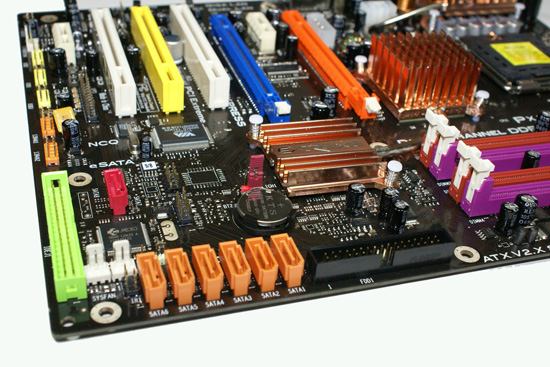
The six Intel ICH8R SATA ports are color coded orange, while the JMicron JMB363 SATA port is red and located next to the green IDE connector. We found the positioning of the SATA ports to be excellent when utilizing any of the PCI slots although we still prefer the floppy drive connector to be near the memory slots to facilitate better cable management.
The ICH8DH is passively cooled with a low-rise heatsink connected to the heatpipe system and remained fairly cool to the touch throughout testing. The chassis panel is located to the left of the battery. The clear CMOS jumper is located above the battery. This is a three pin configuration and is partially blocked if a dual slot graphics card is installed in the first PCI Express x16 slot.
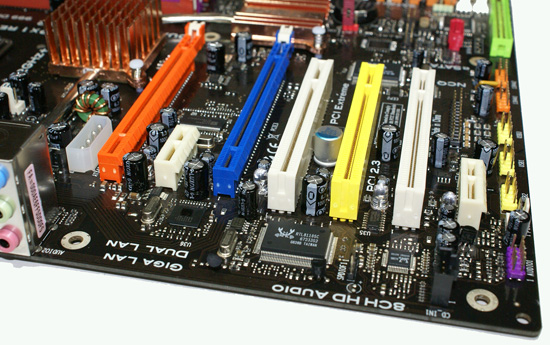
The board comes with two physical PCI Express x16 connectors (x16 and x4 electrical), two PCI Express x1 connectors, and three PCI 2.3 connectors. The layout of this design offers a very good balance of expansion slots for a mainstream board while providing very good clearance space for graphics card utilization. The first PCI Express x1 and PCI slots will be blocked by a dual slot graphics card but considering the dearth of PCI Express peripherals this is fully acceptable while leaving two PCI slots open if you run a CrossFire combination.
Returning to the CPU socket area, we find an ample amount of room for the majority of cooling solutions. We utilized the stock heatsink/fan in our base testing but also verified most of the larger Socket 775 cooling solutions would fit in this area during our overclocking tests. The 8-pin ATX power connector is placed on the far left side of the CPU area and did not interfere with our various cooling units although we once again recommend installing the power cable before any large HSF is utilized. The 4-pin Molex connector is required for dual graphics card installations.
The Intel P965 MCH chipset and PVM components are passively cooled with mid-rise heatsink units that did not interfere with any installed peripherals. Unfortunately, this nicely arranged heatpipe system goes to waste considering the limited overclocking capabilities, but as the board is intended for use in a media center configuration we will say it assists in cooling and keeping the system quiet.
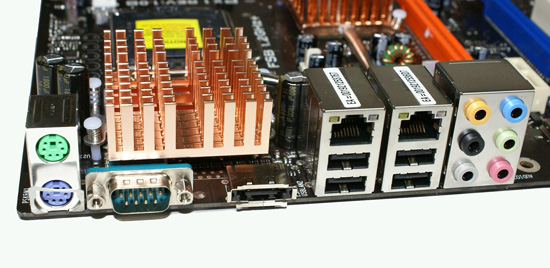
The rear panel contains the standard PS/2 mouse and keyboard ports along with a serial port for those who still require certain legacy peripherals. The panel also includes two LAN ports, four USB ports, and an e-SATA port. The LAN (RJ-45) ports have two LED indicators representing Activity and Speed of the connection through the Intel and Realtek Gigabit controllers. The audio panel consists of six ports that can be configured for 2, 4, 6, and 8-channel audio connections for the Realtek ALC 885 HD codec. The only items missing from our wish list would be a Firewire port and S/PDIF audio connections - both of which can be pretty important for any system destined for HTPC use.
 |
| Click to enlarge |
ECS has come a long way in their layout and color combinations. The layout of this board is really good and for once we do not have a rainbow of colors that detracts the eye, although there is still plenty of marketing information on the board to let you know what options are important to ECS. The color combination could stand to be a little more coordinated but overall ECS is improving with each release. The board was simple to install into our case and all connections were easily reached. The board features a four-phase voltage regulator system that provided excellent stability throughout our testing along with ECS's first true heatpipe system. The board looks like it is performance oriented and fooled us into thinking so until we met the BIOS. The board also includes four fan headers and a nice Smart Fan control system.
The DIMM module slots' color coordination is correct for dual-channel setup based upon the premise of installing DIMMs in the same colored slots for dual-channel operation. The memory modules are slightly difficult to install with a full size video card placed in the PCI Express x16 slot. The 24-pin ATX power connector is located behind the DIMM slots.
The six Intel ICH8R SATA ports are color coded orange, while the JMicron JMB363 SATA port is red and located next to the green IDE connector. We found the positioning of the SATA ports to be excellent when utilizing any of the PCI slots although we still prefer the floppy drive connector to be near the memory slots to facilitate better cable management.
The ICH8DH is passively cooled with a low-rise heatsink connected to the heatpipe system and remained fairly cool to the touch throughout testing. The chassis panel is located to the left of the battery. The clear CMOS jumper is located above the battery. This is a three pin configuration and is partially blocked if a dual slot graphics card is installed in the first PCI Express x16 slot.
The board comes with two physical PCI Express x16 connectors (x16 and x4 electrical), two PCI Express x1 connectors, and three PCI 2.3 connectors. The layout of this design offers a very good balance of expansion slots for a mainstream board while providing very good clearance space for graphics card utilization. The first PCI Express x1 and PCI slots will be blocked by a dual slot graphics card but considering the dearth of PCI Express peripherals this is fully acceptable while leaving two PCI slots open if you run a CrossFire combination.
 |
| Click to enlarge |
Returning to the CPU socket area, we find an ample amount of room for the majority of cooling solutions. We utilized the stock heatsink/fan in our base testing but also verified most of the larger Socket 775 cooling solutions would fit in this area during our overclocking tests. The 8-pin ATX power connector is placed on the far left side of the CPU area and did not interfere with our various cooling units although we once again recommend installing the power cable before any large HSF is utilized. The 4-pin Molex connector is required for dual graphics card installations.
The Intel P965 MCH chipset and PVM components are passively cooled with mid-rise heatsink units that did not interfere with any installed peripherals. Unfortunately, this nicely arranged heatpipe system goes to waste considering the limited overclocking capabilities, but as the board is intended for use in a media center configuration we will say it assists in cooling and keeping the system quiet.
The rear panel contains the standard PS/2 mouse and keyboard ports along with a serial port for those who still require certain legacy peripherals. The panel also includes two LAN ports, four USB ports, and an e-SATA port. The LAN (RJ-45) ports have two LED indicators representing Activity and Speed of the connection through the Intel and Realtek Gigabit controllers. The audio panel consists of six ports that can be configured for 2, 4, 6, and 8-channel audio connections for the Realtek ALC 885 HD codec. The only items missing from our wish list would be a Firewire port and S/PDIF audio connections - both of which can be pretty important for any system destined for HTPC use.
Originally published at https://www.anandtech.com/show/2128 (Wayback Machine).