
NVIDIA and ATI HDCP Compatible Graphics Cards Roundup
- Posted in
- GPUs
The Elder Scrolls IV: Oblivion Performance
We've talked a lot about The Elder Scrolls IV: Oblivion, and how it's one of the most graphics intensive games available right now. Games are always coming out that set new standards for graphics hardware, but for now, Oblivion remains one of the most taxing games for graphics cards to date. Thankfully though, Oblivion has a very large selection of quality settings that can be tweaked in order to allow users to optimize the game for their particular card. With Oblivion, it's very important in our opinion to get the highest quality possible out of the game graphics in order to fully enjoy the game. That is why we would suggest putting off playing this game if you have a lower-end graphics card until you can get an upgrade that can run the game at higher quality settings. These are the settings we used when testing Oblivion:
For our Oblivion benchmark we use FRAPS to record the average frame rate of a walkthrough of a specific section of the game world. Because there are no console commands for recording or playing back demos, this is one of our more difficult games to benchmark. The benchmark takes place in the wilderness at night, walking towards an imposing Oblivion gate, which is a gate surrounded by flames. There are several low-level enemies nearby who notice and attack the player as the benchmark runs, and the AI tends to vary in their actions a little - sometimes hitting the player with a fireball, and sometimes missing. This is something that adds a bit of variance to our tests, but the enemy AI is fairly consistent, and in order to get more accurate results, multiple tests are run at each resolution and an average is taken. This allows us to be fairly confident that our results are accurate and consistent.
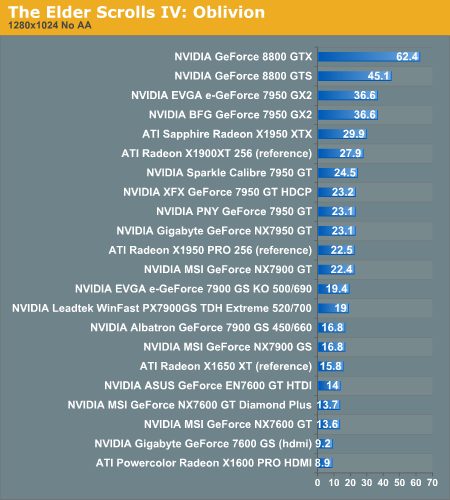
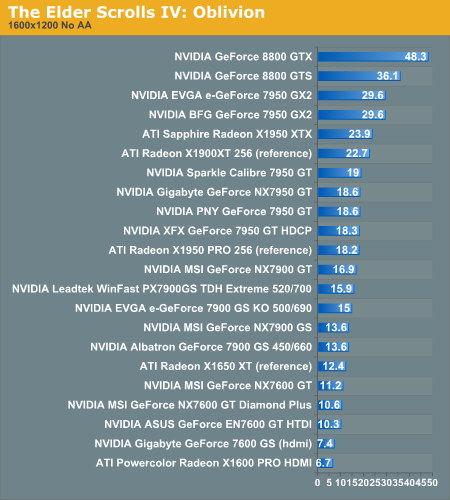
In Oblivion, we see lower frame rates than in Battlefield 2, which is because Oblivion is a much more demanding game graphically. With lower quality settings, we would see more playable frame rates for these cards (a playable frame rate for this game would be around 25 fps in this particular benchmark), but we test at higher quality settings because we feel they are important to fully enjoying this game.
In this game, we can really see a difference in performance the 8800 makes over all the other cards. Even though this game tends to favor ATI hardware, the 8800 GTX blows away ATI's top card in this game, getting a 102% increase in performance over the Sapphire X1950 XTX at 1600x1200 resolution. The EVGA and BFG 7950 GX2s also do better than the ATI X1950 XTX in both resolutions because of their dual gpu advantage. We've found that ATI hardware generally does a little better with Oblivion than NVIDIA, and this is evident when we compare the reference X1650 XT with the 7600 GT, which are direct competitors to each other. As we saw in Battlefield 2, the 7600 GT generally did better than the X1650 XT, but here in Oblivion the X1650 XT is the better performer of the two. The worst performers again are the Gigabyte 7600 GS and the Powercolor X1600 PRO, but a number of these cards here have a hard time running this game well. If Oblivion is your game of choice, you will probably need to upgrade to at least a 7900 GS or better.
We've talked a lot about The Elder Scrolls IV: Oblivion, and how it's one of the most graphics intensive games available right now. Games are always coming out that set new standards for graphics hardware, but for now, Oblivion remains one of the most taxing games for graphics cards to date. Thankfully though, Oblivion has a very large selection of quality settings that can be tweaked in order to allow users to optimize the game for their particular card. With Oblivion, it's very important in our opinion to get the highest quality possible out of the game graphics in order to fully enjoy the game. That is why we would suggest putting off playing this game if you have a lower-end graphics card until you can get an upgrade that can run the game at higher quality settings. These are the settings we used when testing Oblivion:
| Oblivion Performance Settings | |
| Texture Size | Large |
| Tree Fade | 100% |
| Actor Fade | 100% |
| Item Fade | 66% |
| Object Fade | 90% |
| Grass Distance | 50% |
| View Distance | 100% |
| Distant Land | On |
| Distant Buildings | On |
| Distant Trees | On |
| Interior Shadows | 95% |
| Exterior Shadows | 85% |
| Self Shadows | On |
| Shadows on Grass | On |
| Tree Canopy Shadows | On |
| Shadow Filtering | High |
| Specular Distance | 100% |
| HDR Lighting | On |
| Bloom Lighting | Off |
| Water Detail | High |
| Water Reflections | On |
| Water Ripples | On |
| Window Reflections | On |
| Blood Decals | High |
| Anti-aliasing | Off |
For our Oblivion benchmark we use FRAPS to record the average frame rate of a walkthrough of a specific section of the game world. Because there are no console commands for recording or playing back demos, this is one of our more difficult games to benchmark. The benchmark takes place in the wilderness at night, walking towards an imposing Oblivion gate, which is a gate surrounded by flames. There are several low-level enemies nearby who notice and attack the player as the benchmark runs, and the AI tends to vary in their actions a little - sometimes hitting the player with a fireball, and sometimes missing. This is something that adds a bit of variance to our tests, but the enemy AI is fairly consistent, and in order to get more accurate results, multiple tests are run at each resolution and an average is taken. This allows us to be fairly confident that our results are accurate and consistent.
In Oblivion, we see lower frame rates than in Battlefield 2, which is because Oblivion is a much more demanding game graphically. With lower quality settings, we would see more playable frame rates for these cards (a playable frame rate for this game would be around 25 fps in this particular benchmark), but we test at higher quality settings because we feel they are important to fully enjoying this game.
In this game, we can really see a difference in performance the 8800 makes over all the other cards. Even though this game tends to favor ATI hardware, the 8800 GTX blows away ATI's top card in this game, getting a 102% increase in performance over the Sapphire X1950 XTX at 1600x1200 resolution. The EVGA and BFG 7950 GX2s also do better than the ATI X1950 XTX in both resolutions because of their dual gpu advantage. We've found that ATI hardware generally does a little better with Oblivion than NVIDIA, and this is evident when we compare the reference X1650 XT with the 7600 GT, which are direct competitors to each other. As we saw in Battlefield 2, the 7600 GT generally did better than the X1650 XT, but here in Oblivion the X1650 XT is the better performer of the two. The worst performers again are the Gigabyte 7600 GS and the Powercolor X1600 PRO, but a number of these cards here have a hard time running this game well. If Oblivion is your game of choice, you will probably need to upgrade to at least a 7900 GS or better.
Originally published at https://www.anandtech.com/show/2120 (Wayback Machine).