
BigFoot Networks Killer NIC: Killer Marketing or Killer Product?
- Posted in
- Networking
Killer NIC Marketing Materials
Instead of rewriting the BigFoot Networks marketing materials we will just present it as is in abbreviated form. There are five features that are prominently featured on the Killer NIC website and the descriptions listed below are a quick recap of these items. We have already implied the marketing utilized by BigFoot Networks is very aggressive, and while understandable to those with a marketing background (no offense to the suits) we believe the website information and advertisements set the expectations of this card too high. A little more education about the background of the technology utilized and how it really works would have been better than in your face statements about gaming domination and free T-Shirt giveaways.
In fact, the description of MaxFPS technology along with the associated graphs in the reviewers guide we received does more to explain how the card works and why than the entire website at this time. Our suggestion to BigFoot Networks is to openly provide the technical information and remember that not everyone is a thirteen year old (not that there is anything wrong with them) gamer with $279 in hand and wanting to pimp out their rig because a Killer NIC advertisement with a limping sword makes them feel inferior in some way. All this is academic anyway; if the hardware does not work then who really cares about the marketing, right? So here's the marketing spiel:
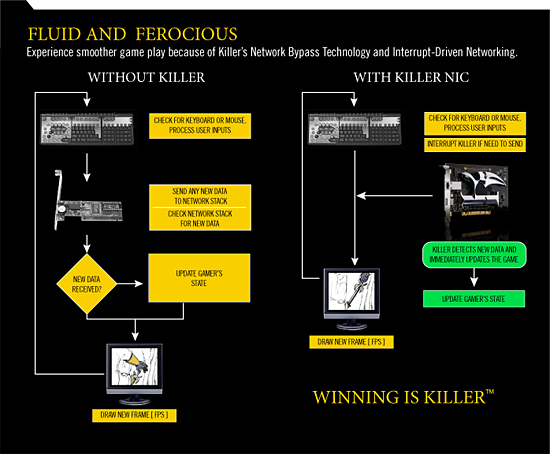
MaxFPS - MaxFPS will increase the frames per second (FPS) in most gaming systems. It does this by reducing the CPU utilization due to networking, and speeding up the main game loops of the game. For gaming systems that have older graphics cards, the additional performance in CPU, cache, and main system memory will improve the efficiency of the card. This allows it to run at more FPS or at higher resolutions and settings. For gaming systems that have new graphics cards, the FPS performance is usually limited by the performance of the main gaming loop or the CPU's ability to get data to the card. MaxFPS will improve the speed of the main gaming loop and reduce the CPU utilization and main system memory thrashing thus improving FPS. Depending upon the situation MaxFPS will use its direct transfer of data to host application memory. Latency is further reduced by eliminating the time to write in and out of the system memory.
UltimatePing - UltimatePing will reduce the effective UDP-internal ping time (ping using UDP sockets). A UDP-internal ping is very different than a standard ICMP ping such as one might get when calling "ping" from the command line. UDP-internal ping runs over a UDP socket and includes such overhead as UDP checksum, buffer copy, real data transfer, and stack efficiency. UltimatePing is based on two technologies. First it ensures that neither your operating system nor your network card is introducing unnecessary latency into your game by ensuring interrupts from the NIC and OS are efficient. Secondarily, UltimatePing uses a side effect of MaxFPS to improve the response time in the main game loop or threads.
PingThrottle - PingThrottle is a user controlled setting that literally adds latency to any outbound network traffic, effectively increasing ping a gamer has to the server. The max latency you can add is 20ms and the latency is real as it is processed by the NPU. (The basic premise is that this will allow you to placate anyone complaining about LPBs (Low Ping B...s), although the real application of the technology can be somewhat less desirable depending on your viewpoint.)
GameFirst - GameFirst basically prioritizes your inbound and outbound network traffic so that your gaming packets are delivered or received first. This feature is very useful if you are running other applications that are uploading or downloading data while gaming.
FNA - FNA stands for Flexible Network Architecture. It is in effect the infinite flexibility of the Killer NIC. FNapps are designed to allow a user to run an application with a minimal or reduced impact on the main system's CPU, memory subsystem, or hard disk. FNapps can be anything from simple packet monitoring utilities like firewalls to full blown VoIP programs or file sharing programs like BitTorrent. FNapps can be designed to utilize the dedicated USB port as well as the Gigabit port. FNapps are designed with the included open-source Linux compiler and source code. The card includes a Linux console, 64MB of RAM, and an embedded Linux build.
The single most touted feature on the Killer NIC is the MaxFPS system that includes the LLR technology. Please note these comments as we will find out shortly if they work or not. The second most hyped feature is FNA. We believe this feature can really set this card apart from others and has the potential to be the most useful feature. Unfortunately, there are no FNapps available to test at this time. Considering the time that has passed since the card was introduced and the press material describing how easy it is to make an FNapp we would have expected something to test by now. FNapps are still MIA at this time, though we understand there might be some released over the course of the next few weeks.
UltimatePing actually worked in a few of our benchmarks. PingThrottle worked as advertised and by using it continuously during a heated Quake 4 match we were able to get kicked off the server and brandished cheaters for life. (It was fun while it lasted.) GameFirst worked but the outgoing packet prioritization worked about the same as our NVIDIA nForce 590 NIC and D-Link Gamer Lounge DGL-4100 router. The inbound capability is what makes the difference although we typically would not be caught downloading or uploading files while gaming online.
Instead of rewriting the BigFoot Networks marketing materials we will just present it as is in abbreviated form. There are five features that are prominently featured on the Killer NIC website and the descriptions listed below are a quick recap of these items. We have already implied the marketing utilized by BigFoot Networks is very aggressive, and while understandable to those with a marketing background (no offense to the suits) we believe the website information and advertisements set the expectations of this card too high. A little more education about the background of the technology utilized and how it really works would have been better than in your face statements about gaming domination and free T-Shirt giveaways.
In fact, the description of MaxFPS technology along with the associated graphs in the reviewers guide we received does more to explain how the card works and why than the entire website at this time. Our suggestion to BigFoot Networks is to openly provide the technical information and remember that not everyone is a thirteen year old (not that there is anything wrong with them) gamer with $279 in hand and wanting to pimp out their rig because a Killer NIC advertisement with a limping sword makes them feel inferior in some way. All this is academic anyway; if the hardware does not work then who really cares about the marketing, right? So here's the marketing spiel:
MaxFPS - MaxFPS will increase the frames per second (FPS) in most gaming systems. It does this by reducing the CPU utilization due to networking, and speeding up the main game loops of the game. For gaming systems that have older graphics cards, the additional performance in CPU, cache, and main system memory will improve the efficiency of the card. This allows it to run at more FPS or at higher resolutions and settings. For gaming systems that have new graphics cards, the FPS performance is usually limited by the performance of the main gaming loop or the CPU's ability to get data to the card. MaxFPS will improve the speed of the main gaming loop and reduce the CPU utilization and main system memory thrashing thus improving FPS. Depending upon the situation MaxFPS will use its direct transfer of data to host application memory. Latency is further reduced by eliminating the time to write in and out of the system memory.
UltimatePing - UltimatePing will reduce the effective UDP-internal ping time (ping using UDP sockets). A UDP-internal ping is very different than a standard ICMP ping such as one might get when calling "ping" from the command line. UDP-internal ping runs over a UDP socket and includes such overhead as UDP checksum, buffer copy, real data transfer, and stack efficiency. UltimatePing is based on two technologies. First it ensures that neither your operating system nor your network card is introducing unnecessary latency into your game by ensuring interrupts from the NIC and OS are efficient. Secondarily, UltimatePing uses a side effect of MaxFPS to improve the response time in the main game loop or threads.
PingThrottle - PingThrottle is a user controlled setting that literally adds latency to any outbound network traffic, effectively increasing ping a gamer has to the server. The max latency you can add is 20ms and the latency is real as it is processed by the NPU. (The basic premise is that this will allow you to placate anyone complaining about LPBs (Low Ping B...s), although the real application of the technology can be somewhat less desirable depending on your viewpoint.)
GameFirst - GameFirst basically prioritizes your inbound and outbound network traffic so that your gaming packets are delivered or received first. This feature is very useful if you are running other applications that are uploading or downloading data while gaming.
FNA - FNA stands for Flexible Network Architecture. It is in effect the infinite flexibility of the Killer NIC. FNapps are designed to allow a user to run an application with a minimal or reduced impact on the main system's CPU, memory subsystem, or hard disk. FNapps can be anything from simple packet monitoring utilities like firewalls to full blown VoIP programs or file sharing programs like BitTorrent. FNapps can be designed to utilize the dedicated USB port as well as the Gigabit port. FNapps are designed with the included open-source Linux compiler and source code. The card includes a Linux console, 64MB of RAM, and an embedded Linux build.
The single most touted feature on the Killer NIC is the MaxFPS system that includes the LLR technology. Please note these comments as we will find out shortly if they work or not. The second most hyped feature is FNA. We believe this feature can really set this card apart from others and has the potential to be the most useful feature. Unfortunately, there are no FNapps available to test at this time. Considering the time that has passed since the card was introduced and the press material describing how easy it is to make an FNapp we would have expected something to test by now. FNapps are still MIA at this time, though we understand there might be some released over the course of the next few weeks.
UltimatePing actually worked in a few of our benchmarks. PingThrottle worked as advertised and by using it continuously during a heated Quake 4 match we were able to get kicked off the server and brandished cheaters for life. (It was fun while it lasted.) GameFirst worked but the outgoing packet prioritization worked about the same as our NVIDIA nForce 590 NIC and D-Link Gamer Lounge DGL-4100 router. The inbound capability is what makes the difference although we typically would not be caught downloading or uploading files while gaming online.
Originally published at https://www.anandtech.com/show/2111 (Wayback Machine).