
Intel P965: Mid-Range Performance Sector Roundup
- Posted in
- Motherboards
Gigabyte GA-965P-DS3: Overclocking
FSB Overclocking Results
We were able to reach a final setting of 7x455FSB resulting in a clock speed of 3185MHz. This board is fully capable of 500FSB rates with the correct memory installed. We still have an issue with the D9 Micron based 1GB modules not wanting to go above the 460FSB range in a stable manner. This issue will be fixed in an upcoming BIOS release and we will retest at that time. We did not have any issues reaching 510FSB with a set of D9 based 512MB modules in testing.
Our CPU voltages were set higher than normal but this is due to the VDroop on the board being around .02~.04V during testing. Also, the voltage was increased slightly to compensate for being on the edge with our memory at the 7x450FSB or higher settings. At 7x440FSB we had the CPU set at 1.4250V without issue. Although we are limited at this time in FSB rates we feel like this board offers one of the better overclocking experiences for the money.
Memory Stress Testing
Memory Tests
We take a look now at seeing how well our GEIL PC2-6400 memory operates in this board in both two and four DIMM testing. The screenshot above shows the actual memory settings used in our benchmark tests of the board. We do not modify the memory timings beyond the four major settings in our charts. The balance of the settings is implemented automatically via the BIOS. Gigabyte is fairly aggressive with their internal memory and MCH timings as our testing will reveal today.
We were able to set our timings to 3-3-3-9 by increasing the memory voltage to 2.20V with our GEIL memory. We were able to hold these timings up to DDR2-830 on this board and held timings of 3-4-3-9 up to DDR2-860. The board ran at 4-4-3-10 up to DDR2-880 before switching to the final overlclock settings of 5-5-5-15. We noticed that any memory timings above DDR2-880 required the use of auto settings to ensure a stable system. This goes back to our issue with the 1GB D9 Micron modules that will be resolved shortly.
Our settings of 3-4-4-9 at 2.20V were not quite as good as the Asus 1.02G settings of 3-4-3-10 but the Gigabyte board runs tighter overall memory latencies. We were able to keep this setting up to DDR2-840 before switching over to 4-4-3-10 settings that held stable until we reached DDR2-860. We then kept a setting of 4-4-4-12 at 2.30V up to our final overclock setting of 7x438, 3066MHz DDR2-876, with four dimms installed. This board will overclock higher with four DIMMs once the D9 Micron issue is solved.
FSB Overclocking Results
| Gigabyte GA-965P-DS3 Overclocking Testbed |
|
| Processor: | Intel Core 2 Duo E6300 Dual Core, 1.86GHz, 2MB Unified Cache 1066FSB, 7x Multiplier |
| CPU Voltage: | 1.4750V (default 1.3250V) |
| Cooling: | Scythe Infinity Air Cooling |
| Power Supply: | OCZ GameXStream 700W |
| Memory: | Geil PC2-6400 800MHz Plus (2x1GB- GX22GB6400PDC), (Micron Memory Chips) |
| Video Cards: | 1 x MSI X1950XTX |
| Hard Drive: | Seagate 320GB 7200RPM SATA2 16MB Buffer |
| Case: | Cooler Master CM Stacker 830 |
| Maximum CPU OC: (Standard Ratio) |
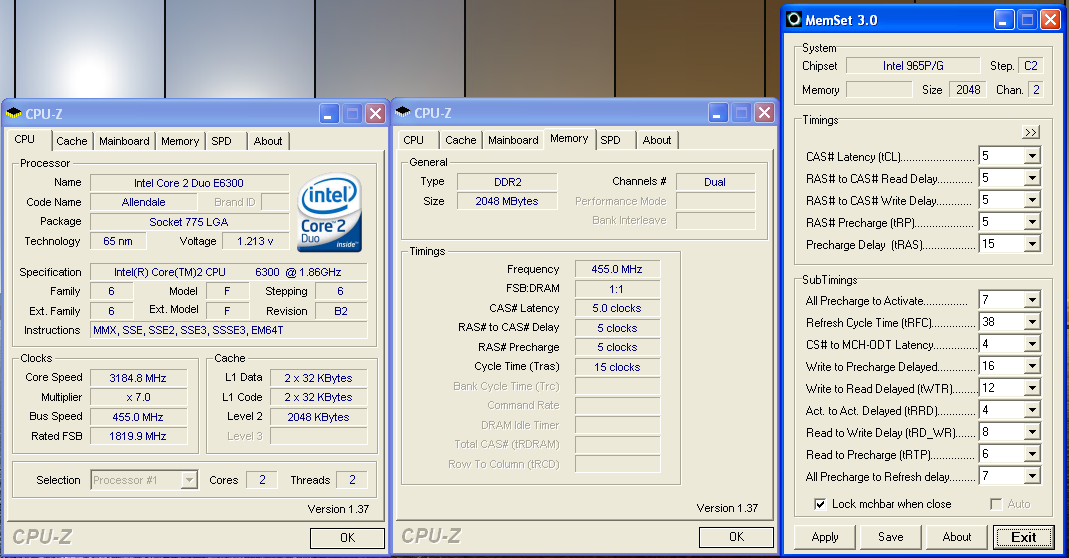
455x7 (5-5-5-15, 1:1, 2.2V), CPU 1.4750V, C2 Stepping 3185MHz (+71%) |
| . | |
 |
| Click to enlarge |
We were able to reach a final setting of 7x455FSB resulting in a clock speed of 3185MHz. This board is fully capable of 500FSB rates with the correct memory installed. We still have an issue with the D9 Micron based 1GB modules not wanting to go above the 460FSB range in a stable manner. This issue will be fixed in an upcoming BIOS release and we will retest at that time. We did not have any issues reaching 510FSB with a set of D9 based 512MB modules in testing.
Our CPU voltages were set higher than normal but this is due to the VDroop on the board being around .02~.04V during testing. Also, the voltage was increased slightly to compensate for being on the edge with our memory at the 7x450FSB or higher settings. At 7x440FSB we had the CPU set at 1.4250V without issue. Although we are limited at this time in FSB rates we feel like this board offers one of the better overclocking experiences for the money.
Memory Stress Testing
Memory Tests
 |
| Click to enlarge |
We take a look now at seeing how well our GEIL PC2-6400 memory operates in this board in both two and four DIMM testing. The screenshot above shows the actual memory settings used in our benchmark tests of the board. We do not modify the memory timings beyond the four major settings in our charts. The balance of the settings is implemented automatically via the BIOS. Gigabyte is fairly aggressive with their internal memory and MCH timings as our testing will reveal today.
| Gigabyte GA-965P-DS3 Stable DDR2-800 Timings - 2 DIMMs (2/4 slots populated - 1 Dual-Channel Bank) |
|
| Clock Speed: | 800MHz |
| CAS Latency: | 3 |
| RAS to CAS Delay: | 3 |
| RAS Precharge: | 3 |
| RAS Cycle Time: | 9 |
| Voltage: | 2.20V |
We were able to set our timings to 3-3-3-9 by increasing the memory voltage to 2.20V with our GEIL memory. We were able to hold these timings up to DDR2-830 on this board and held timings of 3-4-3-9 up to DDR2-860. The board ran at 4-4-3-10 up to DDR2-880 before switching to the final overlclock settings of 5-5-5-15. We noticed that any memory timings above DDR2-880 required the use of auto settings to ensure a stable system. This goes back to our issue with the 1GB D9 Micron modules that will be resolved shortly.
| Gigabyte GA-965P-DS3 Stable DDR2-800 Timings - 4 DIMMs (4/4 slots populated - 2 Dual-Channel Bank) |
|
| Clock Speed: | 800MHz |
| CAS Latency: | 3 |
| RAS to CAS Delay: | 4 |
| RAS Precharge: | 4 |
| RAS Cycle Time: | 9 |
| Voltage: | 2.20V |
Our settings of 3-4-4-9 at 2.20V were not quite as good as the Asus 1.02G settings of 3-4-3-10 but the Gigabyte board runs tighter overall memory latencies. We were able to keep this setting up to DDR2-840 before switching over to 4-4-3-10 settings that held stable until we reached DDR2-860. We then kept a setting of 4-4-4-12 at 2.30V up to our final overclock setting of 7x438, 3066MHz DDR2-876, with four dimms installed. This board will overclock higher with four DIMMs once the D9 Micron issue is solved.
Originally published at https://www.anandtech.com/show/2106 (Wayback Machine).