
Dell XPS 410: Core 2 Duo for the Masses
- Posted in
- Systems
Features and Price
Prices on the XPS 410 start at around $800 (not including a monitor) and go up to over $5000 once you add in a 24" monitor, high-quality speakers, printers, etc. There are numerous ways that you can choose to configure your system, focusing on increasing storage capacity, faster or slower graphics, more memory, and various other options. Here are the specifications of the XPS 410 we received for review:
Unlike many other prebuilt systems, the Dell XPS 410 features a P965-based motherboard that is a Dell design. It is undoubtedly manufactured by one of the tier 1 motherboard companies, but it is definitely an original design and layout and not a toned down version of one of the public products. Depending on your perspective, this can be good or bad. For Dell, it means they can strip out all of the stuff that they don't want you to have, like overclocking features and advanced BIOS options. (Overclocking is supported on the Dell XPS 700, we understand, but not on other models.) For the computer enthusiasts, such omissions would be the death knell, but most other people will be more than happy with what they receive.
As we like to do with our system reviews, we priced out a similar home built system for reference to see how Dell's assembly and test costs compare to a DIY setup. Some areas are not directly comparable, but we're looking at ballpark estimates.
We were given a higher-end configuration that costs about $2900 with the standard 1-year warranty. The base model comes with a Radeon X1300 Pro 256MB, and the upgrade to a GeForce 7900 GS costs another $150. That's a reasonable price, and the 7900 GS is probably the best balance of price and performance. The top-end GPU offered is the GeForce 7900 GTX, which is priced at $500 over the X1300 Pro, or $350 more than the 7900 GS. If you have Dell install a GTX, you'll be paying full MSRP for the product, and that's assuming the X1300 base offering is "free". The 7900 GTX that Dell includes is slightly different from your garden-variety GTX card, however, as it includes an extension at the end of the PCB that helps hold the card in place.
Given that you can find GTX cards for closer to $400, that's more than we would recommend paying, and in fact a much better use of nearly $500 would be to opt for a 7950 GX2. Dell has confirmed that the XPS 410 properly supports the GX2, and it should become available as a purchase option in the near future. Some might be concerned that the 375W PSU may prove insufficient for driving a GX2. NVIDIA recommends 425-450W for the GX2, but depending on PSU quality you may be able to get by with less. Our power draw results indicate that there should be more than enough power available for a GX2, as previous testing has shown that a GX2 card doesn't consume substantially more power than a 7900 GTX due to the difference in clock speeds.
Moving on to the CPU, we don't have the base cost Dell uses for the E6300 as that's included in the total price of the system, but the upgrade prices to the other Core 2 Duo processors are all competitive with market prices, with the exception of the top-end E6700. Dell charges $250 more than the E6600 for that upgrade compared to a market price difference of $200, so the E6600 is definitely a better value than the E6700. E6400 is probably the best balance of price and performance if you're willing to go with a smaller L2 cache and lower clock speed, but keep in mind that there are no options to overclock for better performance with Dell.
All of the prices Dell charges in their engine tend to be slightly higher than what you would pay online, but taking into account you're getting a decent preassembled PC and improved support and service, the total cost of around $200 in order to assemble and test the system isn't bad. It's not great either, considering many of the configuration choices are limited. If you're after enthusiast-level performance from Dell, you will need to move up to the XPS 700. For roughly equivalent components, that adds about $400, but you do get SLI support, overclocking support, a larger/better PSU, and a vastly different case design.
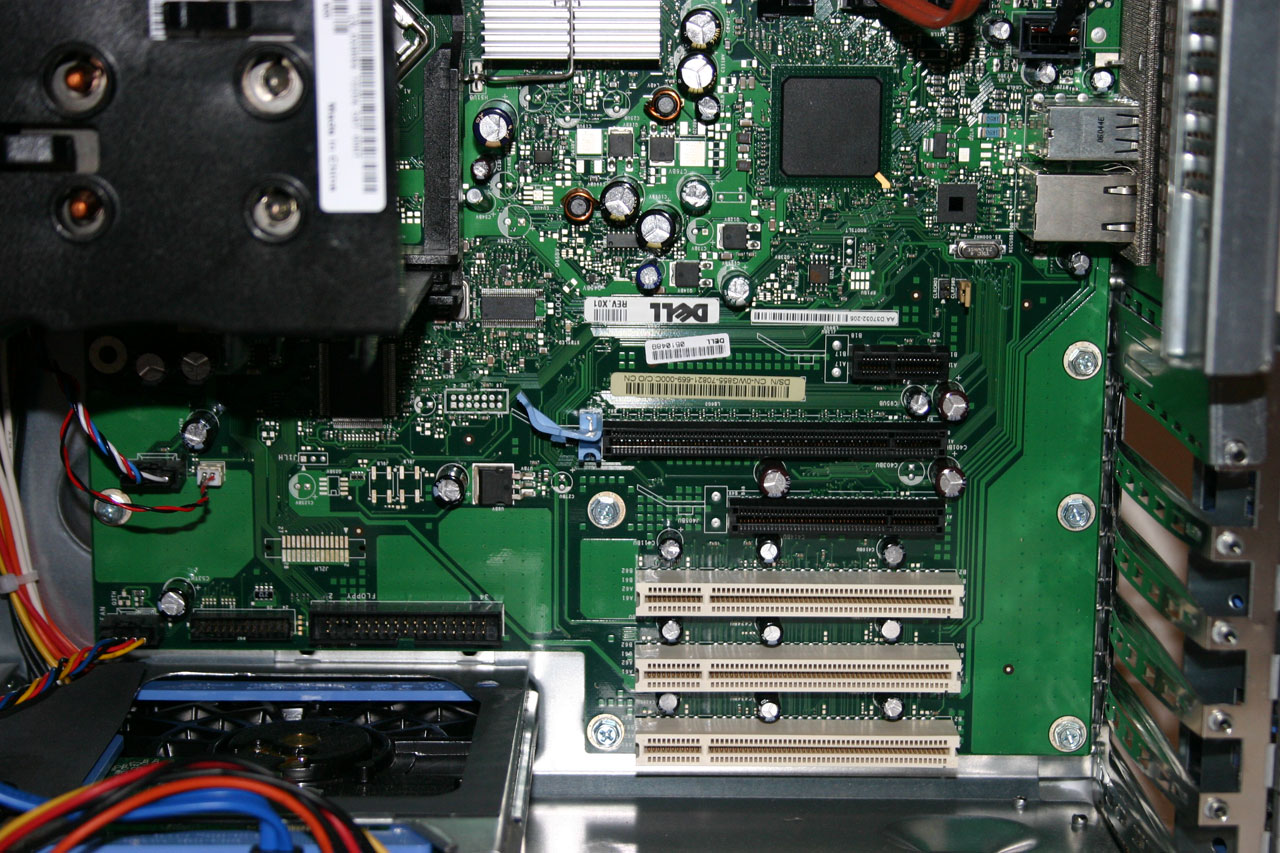
We have a few other gripes with the component selection and overall system design. First, expansion options are somewhat limited. While you do get three usable PCI slots, the X1 PCI-E slot can be blocked if you opt for the highest end GPUs. That leaves you with the single X4 PCI-E slot just below the GPU, which might be a tight fit for any expansion cards destined for the X4 slot. FireWire should be pretty much standard on a system of this level, and while Dell does provide the option it comes via a $30 PCI expansion card upgrade, which uses up one of the PCI slots. Higher-quality audio consumes another PCI slot, and a TV tuner uses up the last slot. If you need a modem, you'll have to give up one of the above three devices as there are simply no more PCI slots available. As we will see in a moment, Dell seems to have limited expansion options in favor of the chassis design, which is a reasonable decision.
There are still other concerns. You can't for example select DDR2-800 memory, which would improve performance a bit. Some OEMs seem to feel high-end RAM is "less stable", which is one reasong they often omit such offerings; however, our testing has not shown this to be the case as BIOS support is usually the key for memory compatibility. Using cheaper/slower RAM is a compromise most large OEMs prefer, but it seems out of place on an XPS system. The motherboard is supposed to support DDR2-800 RAM, so it would be nice to see DDR2-800 added as an upgrade option to the online configurator. You will still only get conservative timings, however, regardless of which type of RAM you use.
If there's one overwhelming bright spot with the XPS 410 configuration, it would have to be the 24" 2407WFP LCD monitor. Simply put, the display is beautiful and works great, although in some areas we still prefer the older 2405FPW. We'll discuss the display more in a separate review. However, the LCD can easily be purchased from Dell separately, and at times (Dell LCD special offers occur frequently) it is actually cheaper to do so. You can currently purchase the 2407WFP for $799 from Dell, while it is an $810 upgrade over no monitor for the XPS 410.
Besides everything else, you of course get the standard Dell keyboard and mouse, along with a nice XPS mousepad. We also received a set of 2.1 speakers, though these are no longer listed in the configurator and you will need to go with either 5.1 speakers, cheap monitor speakers, or just leave the speakers out and buy something on your own. The keyboard and mouse are both USB devices, and the keyboard has two USB ports on the back and can serve as a mini USB hub.
If we've given the impression that the XPS 410 is a bad computer, it's not; we merely feel that it is not perfect and that the price/performance offered is more expensive than some people will be willing to pay. There are other good points about the system design, which we will cover throughout the rest of this review. The bottom line is that the price is okay, but don't expect to walk away with an amazing bargain. A large portion of the price goes towards providing improved customer service, however, and we will provide an evaluation of the XPS support shortly.
Prices on the XPS 410 start at around $800 (not including a monitor) and go up to over $5000 once you add in a 24" monitor, high-quality speakers, printers, etc. There are numerous ways that you can choose to configure your system, focusing on increasing storage capacity, faster or slower graphics, more memory, and various other options. Here are the specifications of the XPS 410 we received for review:
| Dell XPS 410 Specifications | |
| Case: | Dell custom BTX case with 375W PSU |
| Motherboard: | Dell P965 BTX motherboard |
| Processor: | Core 2 Duo E6600 (2.40 GHz 4MB shared L2 cache) |
| Heatsink/Cooling: | Custom BTX CPU HSF with 120mm fan 80mm bottom fan near HDDs |
| RAM: | 2x1024MB Nanya PC-5300 5-5-5-15 4x1GB Max supported RAM Note: A 32-bit OS will only show 3GB; a 64-bit OS is required to properly address the full 4GB. |
| Graphics: | Dell GeForce 7900 GTX (extra long PCB) |
| Hard Drives: | 2x320GB Western Digital 16MB 7200 RPM |
| Optical Drives: | Toshiba TS-H553 16X DVD+RW SATA Philips 16X DVD-ROM SATA |
| Expansion Slots: | 1 x PCIe X16 1 x PCIe X4 1 x PCIe X1 3 x PCI |
| Expansion Bays: | 2 x 3.5" internal bays 2 x 3.5" external 2 x 5.25" external |
| Audio: | Creative Sound Blaster X-Fi XtremeMusic |
| TV Tuner: | Lumanate Angel II MPEG Dual-TV Tuner |
| Power Suply: | Dell 375W 1 x 24-pin ATX; 1 x ATX12V 1 x 4-pin mini Molex 6 x SATA |
| Operating System: | Windows Media Center Edition 2005 SP2 |
| Front Ports: | 2 X USB2.0 2 X 3.5mm Audio (Headphone and Microphone) 1 x 6-pin Firewire (optional - requires expansion card) |
| Rear Ports: | 1 x Audio I/O Panel (six jacks) 1 x Optical S/PDIF Out Port 1 x RJ45 GbE 6 x USB2.0 2 x 6-pin Firewire (via optional expansion card) |
| Speakers: | 2.1 Dell (no longer an option) |
| Monitor: | Dell 24" 2407WFP Widescreen LCD Monitor |
Unlike many other prebuilt systems, the Dell XPS 410 features a P965-based motherboard that is a Dell design. It is undoubtedly manufactured by one of the tier 1 motherboard companies, but it is definitely an original design and layout and not a toned down version of one of the public products. Depending on your perspective, this can be good or bad. For Dell, it means they can strip out all of the stuff that they don't want you to have, like overclocking features and advanced BIOS options. (Overclocking is supported on the Dell XPS 700, we understand, but not on other models.) For the computer enthusiasts, such omissions would be the death knell, but most other people will be more than happy with what they receive.
As we like to do with our system reviews, we priced out a similar home built system for reference to see how Dell's assembly and test costs compare to a DIY setup. Some areas are not directly comparable, but we're looking at ballpark estimates.
| Comparative Price List | ||
| Case: | INWIN IW-BC583.Q460L Micro-BTX Mini-Tower with 460W PSU | 74 |
| Motherboard: | Gigabyte GA-965P-DS3 (Note: Not a BTX board!) | 144 |
| Processor: | Core 2 Duo E6600 (2.40 GHz 4MB shared L2 cache) | 332 |
| Heatsink/Cooling: | Stock Intel CPU HSF | 0 |
| RAM: | Mushkin PC-5300 2x1024MB HP2-5300 | 200 |
| Graphics: | eVGA GeForce 7900GTX 512MB RoHS HDCP | 400 |
| Hard Drives: | 2x320GB Western Digital 16MB 7200 RPM | 196 |
| Optical Drive: | Plextor PX-716SA/SW SATA LiteOn SHD-16S1S-05 SATA |
122 |
| Audio: | Creative Sound Blaster X-Fi XtremeMusic | 128 |
| TV Tuner: | Dual-TV Tuner (Estimated Cost) | 125 |
| Speakers: | Generic 2.1 Speakers | 20 |
| Monitor: | Dell 24" 2407WFP Widescreen LCD Monitor | 800 |
| Keyboard: | Microsoft PS/2 Multimedia Keyboard + Mouse | 31 |
| Operating System: | Windows XP Media Center Edition 2005 SP2B | 115 |
| Sub Total: | 2687 | |
We were given a higher-end configuration that costs about $2900 with the standard 1-year warranty. The base model comes with a Radeon X1300 Pro 256MB, and the upgrade to a GeForce 7900 GS costs another $150. That's a reasonable price, and the 7900 GS is probably the best balance of price and performance. The top-end GPU offered is the GeForce 7900 GTX, which is priced at $500 over the X1300 Pro, or $350 more than the 7900 GS. If you have Dell install a GTX, you'll be paying full MSRP for the product, and that's assuming the X1300 base offering is "free". The 7900 GTX that Dell includes is slightly different from your garden-variety GTX card, however, as it includes an extension at the end of the PCB that helps hold the card in place.
 |
| Click to enlarge |
Given that you can find GTX cards for closer to $400, that's more than we would recommend paying, and in fact a much better use of nearly $500 would be to opt for a 7950 GX2. Dell has confirmed that the XPS 410 properly supports the GX2, and it should become available as a purchase option in the near future. Some might be concerned that the 375W PSU may prove insufficient for driving a GX2. NVIDIA recommends 425-450W for the GX2, but depending on PSU quality you may be able to get by with less. Our power draw results indicate that there should be more than enough power available for a GX2, as previous testing has shown that a GX2 card doesn't consume substantially more power than a 7900 GTX due to the difference in clock speeds.
Moving on to the CPU, we don't have the base cost Dell uses for the E6300 as that's included in the total price of the system, but the upgrade prices to the other Core 2 Duo processors are all competitive with market prices, with the exception of the top-end E6700. Dell charges $250 more than the E6600 for that upgrade compared to a market price difference of $200, so the E6600 is definitely a better value than the E6700. E6400 is probably the best balance of price and performance if you're willing to go with a smaller L2 cache and lower clock speed, but keep in mind that there are no options to overclock for better performance with Dell.
All of the prices Dell charges in their engine tend to be slightly higher than what you would pay online, but taking into account you're getting a decent preassembled PC and improved support and service, the total cost of around $200 in order to assemble and test the system isn't bad. It's not great either, considering many of the configuration choices are limited. If you're after enthusiast-level performance from Dell, you will need to move up to the XPS 700. For roughly equivalent components, that adds about $400, but you do get SLI support, overclocking support, a larger/better PSU, and a vastly different case design.
 |
| Click to enlarge |
We have a few other gripes with the component selection and overall system design. First, expansion options are somewhat limited. While you do get three usable PCI slots, the X1 PCI-E slot can be blocked if you opt for the highest end GPUs. That leaves you with the single X4 PCI-E slot just below the GPU, which might be a tight fit for any expansion cards destined for the X4 slot. FireWire should be pretty much standard on a system of this level, and while Dell does provide the option it comes via a $30 PCI expansion card upgrade, which uses up one of the PCI slots. Higher-quality audio consumes another PCI slot, and a TV tuner uses up the last slot. If you need a modem, you'll have to give up one of the above three devices as there are simply no more PCI slots available. As we will see in a moment, Dell seems to have limited expansion options in favor of the chassis design, which is a reasonable decision.
There are still other concerns. You can't for example select DDR2-800 memory, which would improve performance a bit. Some OEMs seem to feel high-end RAM is "less stable", which is one reasong they often omit such offerings; however, our testing has not shown this to be the case as BIOS support is usually the key for memory compatibility. Using cheaper/slower RAM is a compromise most large OEMs prefer, but it seems out of place on an XPS system. The motherboard is supposed to support DDR2-800 RAM, so it would be nice to see DDR2-800 added as an upgrade option to the online configurator. You will still only get conservative timings, however, regardless of which type of RAM you use.
 |
| Click to enlarge |
If there's one overwhelming bright spot with the XPS 410 configuration, it would have to be the 24" 2407WFP LCD monitor. Simply put, the display is beautiful and works great, although in some areas we still prefer the older 2405FPW. We'll discuss the display more in a separate review. However, the LCD can easily be purchased from Dell separately, and at times (Dell LCD special offers occur frequently) it is actually cheaper to do so. You can currently purchase the 2407WFP for $799 from Dell, while it is an $810 upgrade over no monitor for the XPS 410.
 |
| Click to enlarge |
Besides everything else, you of course get the standard Dell keyboard and mouse, along with a nice XPS mousepad. We also received a set of 2.1 speakers, though these are no longer listed in the configurator and you will need to go with either 5.1 speakers, cheap monitor speakers, or just leave the speakers out and buy something on your own. The keyboard and mouse are both USB devices, and the keyboard has two USB ports on the back and can serve as a mini USB hub.
If we've given the impression that the XPS 410 is a bad computer, it's not; we merely feel that it is not perfect and that the price/performance offered is more expensive than some people will be willing to pay. There are other good points about the system design, which we will cover throughout the rest of this review. The bottom line is that the price is okay, but don't expect to walk away with an amazing bargain. A large portion of the price goes towards providing improved customer service, however, and we will provide an evaluation of the XPS support shortly.
Originally published at https://www.anandtech.com/show/2081 (Wayback Machine).