
Silence is Golden: Silent GPU Roundup
- Posted in
- GPUs
Power
A card's GPU, clock speeds, and overall design determine the kind of power draw it creates on your system. Moving parts on the heat sink sometimes require more power to run, which is what might give silent cards a slight advantage in this area. However, just because there are no moving parts on a card doesn't mean that it won't still draw large amounts of power. Only one of our cards required an external power connection from the power supply; the rest simply drew their power from the PCIe slot. The ASUS EN7800 GT Top Silent, our most powerful card, required a 6-pin PCI Express power connector, and it's no surprise that we saw the highest power draw from this card.
We tested power by measuring the total wattage of the system with each card installed in two different states. The first state is while the system is idle, without any programs running, and the second state is under load, by running a graphically intensive benchmark. The benchmark we used to stress the graphics cards was 3DMark06, specifically, the fill rate (single and multi-texturing) and the pixel shader tests.
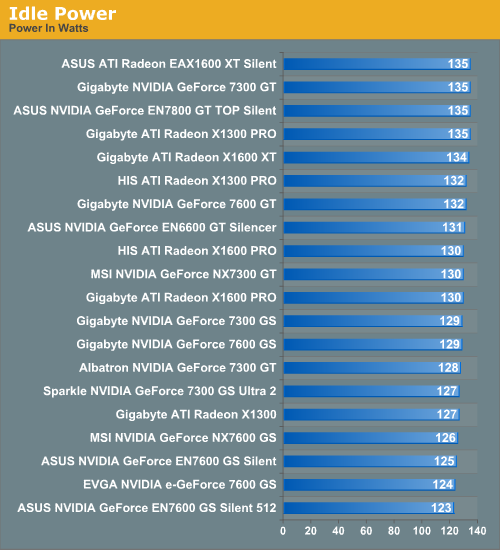
We see initially how while idle, the system draws less power than what you might expect to see for some of these graphics cards. The highest idle power level we see is 135 watts for the Asus 1600 XT and 7800 GT, as well as the Gigabyte 7300 GT and X1300 Pro. The ASUS 7600 GS 512 gets the lowest idle power wattage, which is somewhat interesting as it certainly isn't the least powerful card. With a total difference in idle power of only 10W, though, most of the cards are doing a good job under idle conditions. Let's see what happens when we actually put the cards to work.
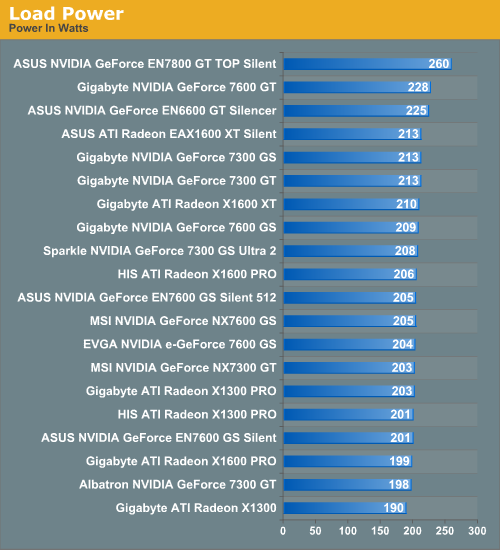
As expected, the ASUS 7800 GT gives the system a significantly higher power draw under load, followed by the Gigabyte 7600 GT, the second most powerful card. The fact that these two cards are the most power-hungry makes sense, as does the fact that the ASUS 6600 GT gets a similarly high load wattage, since this is an older, less efficient part. The Gigabyte X1300 draws the least amount of power under load; this isn't surprising given its low performance, though the Sparkle 7300 GS Ultra 2 is somewhat more power-hungry in spite of the fact that it performs about the same. The Gigabyte 7300 GS, another low-performance card, gets an even higher wattage due to its faster memory.
Aside from the few highest performance cards, all of these cards get very similar results in terms of power draw. This similarity and consistency in power draw among all of these cards seems to say something about the design of silent cards in general. While it is technically possible to cool more power hungry GPUs with a fanless solution, most manufacturers are targeting lower heat GPUs for their silent cards, as the cooling solutions do not need to be as extravagant (or costly).
Heat
As we touched on in the introduction, controlling heat levels is essential to the smooth operation of a graphics card. Because there are no moving parts in any of these cards, their heat sinks must be designed to provide adequate heat dissipation over long time periods, as most people don't sit down to play games for only a few minutes at a time. Whether or not these silent cards run cool or hot will depend not only on the card, but on things like your case ventilation and environment in general. Also, heat levels may vary even among different parts of the same model, but we can get a general idea of the heat that will be generated by these different cards while idle and under stress.
Similar to the way we tested power consumption, we measured the heat level of the card in two different states: idle and after five minutes of stress testing. In order to stress test the card, we would traditionally measure heat levels after a few looped game benchmarks but for this review, we made use of ATI Tool's "Scan for Artifacts" function on their "fuzzy cube" 3D view. This came in very handy for us, because it stresses both ATI and NVIDIA cards by basically drawing a 3D cube with some kind of fuzz map over and over. We found that about five minutes of "scanning" with this tool gave us the same level of stress as running our usual number of Splinter Cell: Chaos Theory benchmark loops, only it was much easier to accomplish the stress testing.
Unfortunately, we weren't able to include any ATI cards in our heat tests, because apparently none of these cards have on-die temperature sensors to give us heat level readings. We were able to use NVIDIA's built-in heat meter in the driver to get readings from the NVIDIA cards, however, so we will look at these numbers for now.
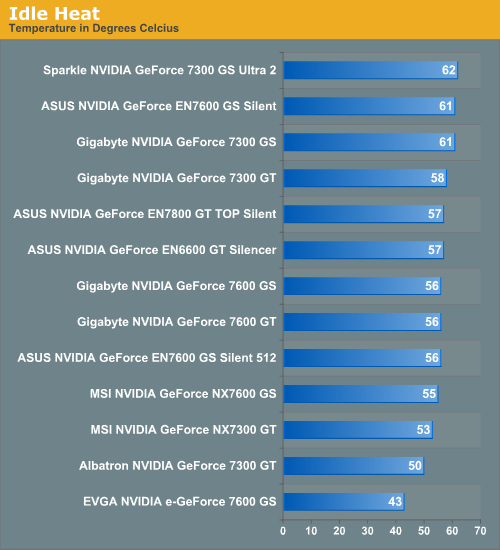
Something we see right away is that the EVGA 7600 GS has a much lower idle temperature than the other cards. The Albatron 7300 GT gets a fairly low temperature while idle, and interestingly the tiny Sparkle 7300 GS Ultra 2 gets the highest idle temperature of the group.
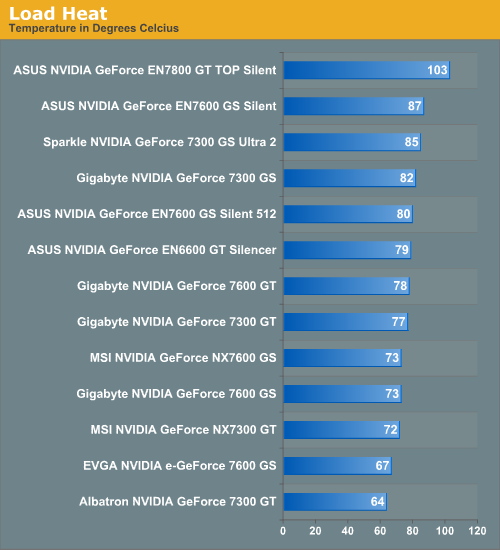
Unsurprisingly, the ASUS 7800 GT gets a dramatically higher temperature than the rest of the cards while under load -- high enough to perhaps warrant some concern. Generally, a core temperature this high is bad news, but it would seem the ASUS EN7800 GT Top Silent was designed to be able to handle temperatures this high. This might be an issue however for someone with poor case ventilation or those who live in a very hot climate without conventional cooling in their building.
The two coolest operating cards under load are the same ones that were the coolest while idle: the Albatron 7300 GT and EVGA 7600 GS, with the Albatron card running slightly cooler. Again we see that the Sparkle 7300 GS Ultra 2 generates quite a bit of heat considering its small size and low performance, though the small size is the likely culprit. The high heat and power load for this card are both negatives, and since it performs very poorly in most of the games the only plus the Sparkle 7300 GS Ultra 2 has going for it is it's small size. It will fit in just about any computer case, no matter how small or crowded it is. This isn't saying much for the card however, and unless you can find it for a ridiculously low price we don't recommend buying one.
A card's GPU, clock speeds, and overall design determine the kind of power draw it creates on your system. Moving parts on the heat sink sometimes require more power to run, which is what might give silent cards a slight advantage in this area. However, just because there are no moving parts on a card doesn't mean that it won't still draw large amounts of power. Only one of our cards required an external power connection from the power supply; the rest simply drew their power from the PCIe slot. The ASUS EN7800 GT Top Silent, our most powerful card, required a 6-pin PCI Express power connector, and it's no surprise that we saw the highest power draw from this card.
We tested power by measuring the total wattage of the system with each card installed in two different states. The first state is while the system is idle, without any programs running, and the second state is under load, by running a graphically intensive benchmark. The benchmark we used to stress the graphics cards was 3DMark06, specifically, the fill rate (single and multi-texturing) and the pixel shader tests.
We see initially how while idle, the system draws less power than what you might expect to see for some of these graphics cards. The highest idle power level we see is 135 watts for the Asus 1600 XT and 7800 GT, as well as the Gigabyte 7300 GT and X1300 Pro. The ASUS 7600 GS 512 gets the lowest idle power wattage, which is somewhat interesting as it certainly isn't the least powerful card. With a total difference in idle power of only 10W, though, most of the cards are doing a good job under idle conditions. Let's see what happens when we actually put the cards to work.
As expected, the ASUS 7800 GT gives the system a significantly higher power draw under load, followed by the Gigabyte 7600 GT, the second most powerful card. The fact that these two cards are the most power-hungry makes sense, as does the fact that the ASUS 6600 GT gets a similarly high load wattage, since this is an older, less efficient part. The Gigabyte X1300 draws the least amount of power under load; this isn't surprising given its low performance, though the Sparkle 7300 GS Ultra 2 is somewhat more power-hungry in spite of the fact that it performs about the same. The Gigabyte 7300 GS, another low-performance card, gets an even higher wattage due to its faster memory.
Aside from the few highest performance cards, all of these cards get very similar results in terms of power draw. This similarity and consistency in power draw among all of these cards seems to say something about the design of silent cards in general. While it is technically possible to cool more power hungry GPUs with a fanless solution, most manufacturers are targeting lower heat GPUs for their silent cards, as the cooling solutions do not need to be as extravagant (or costly).
Heat
As we touched on in the introduction, controlling heat levels is essential to the smooth operation of a graphics card. Because there are no moving parts in any of these cards, their heat sinks must be designed to provide adequate heat dissipation over long time periods, as most people don't sit down to play games for only a few minutes at a time. Whether or not these silent cards run cool or hot will depend not only on the card, but on things like your case ventilation and environment in general. Also, heat levels may vary even among different parts of the same model, but we can get a general idea of the heat that will be generated by these different cards while idle and under stress.
Similar to the way we tested power consumption, we measured the heat level of the card in two different states: idle and after five minutes of stress testing. In order to stress test the card, we would traditionally measure heat levels after a few looped game benchmarks but for this review, we made use of ATI Tool's "Scan for Artifacts" function on their "fuzzy cube" 3D view. This came in very handy for us, because it stresses both ATI and NVIDIA cards by basically drawing a 3D cube with some kind of fuzz map over and over. We found that about five minutes of "scanning" with this tool gave us the same level of stress as running our usual number of Splinter Cell: Chaos Theory benchmark loops, only it was much easier to accomplish the stress testing.
Unfortunately, we weren't able to include any ATI cards in our heat tests, because apparently none of these cards have on-die temperature sensors to give us heat level readings. We were able to use NVIDIA's built-in heat meter in the driver to get readings from the NVIDIA cards, however, so we will look at these numbers for now.
Something we see right away is that the EVGA 7600 GS has a much lower idle temperature than the other cards. The Albatron 7300 GT gets a fairly low temperature while idle, and interestingly the tiny Sparkle 7300 GS Ultra 2 gets the highest idle temperature of the group.
Unsurprisingly, the ASUS 7800 GT gets a dramatically higher temperature than the rest of the cards while under load -- high enough to perhaps warrant some concern. Generally, a core temperature this high is bad news, but it would seem the ASUS EN7800 GT Top Silent was designed to be able to handle temperatures this high. This might be an issue however for someone with poor case ventilation or those who live in a very hot climate without conventional cooling in their building.
The two coolest operating cards under load are the same ones that were the coolest while idle: the Albatron 7300 GT and EVGA 7600 GS, with the Albatron card running slightly cooler. Again we see that the Sparkle 7300 GS Ultra 2 generates quite a bit of heat considering its small size and low performance, though the small size is the likely culprit. The high heat and power load for this card are both negatives, and since it performs very poorly in most of the games the only plus the Sparkle 7300 GS Ultra 2 has going for it is it's small size. It will fit in just about any computer case, no matter how small or crowded it is. This isn't saying much for the card however, and unless you can find it for a ridiculously low price we don't recommend buying one.
Originally published at https://www.anandtech.com/show/2073 (Wayback Machine).