
PC Club Enpower Sabre Extreme: E6600 Made Easy
- Posted in
- Systems
Overclocking
We mentioned earlier that since a standard Gigabyte GA-965P-DS3 motherboard is used, end-user overclocking is entirely possible. (The same should hold true for versions shipping with the MSI P965 boards.) There is risk involved with overclocking, and individual results will vary. After updating to the latest F4 BIOS and finishing the initial benchmarks, we gave overclocking a shot. The installed memory is pretty generic and we didn't want to push things too far, so we set the memory to a 1:1 ratio and decided to see if the CPU and the rest of the system could handle running at 334 MHz front side bus. We did have to increase CPU voltage slightly: we used 1.3875V, and though the system did POST at lower voltages it was not fully stable during stress testing. Other than that the 25% overclock was extremely easy to achieve.
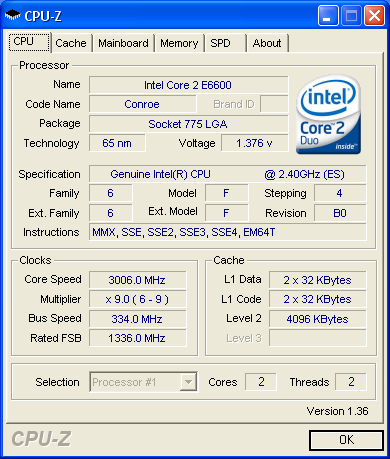
What more is there to say about a $370 CPU that can easily overclock to the performance level of a stock $1150 CPU? This is using the retail processor heatsink and fan, and even under extreme stress testing the system remained stable and the HSF stayed under 45°C. We could have certainly gone farther with the overclock (see below), but most people will be more than happy with a 3 GHz Core 2 Duo processor running inside their computer system.
We will include results from the overclocked system in our benchmarking results for reference. In some instances, the increased clock speed will have a dramatic impact on performance. In other areas, the system bottleneck is elsewhere and the added CPU performance does little to help. Depending on how you plan to use the system, it may not even be worthwhile to overclock it. Perhaps down the road once the warranty has already expired and after adding a faster graphics card, overclocking will become more beneficial.
After fully testing the 25% overclock, we decided to push things a bit further. With a bit more voltage to the CPU, memory, chipset, and FSB (+0.1V), we also managed to run our full set of benchmark tests at 9x350, and then we tried 9x366. The CPU fan was definitely working harder to keep the processor cool, and we don't actually recommend these higher settings unless you're okay with potentially frying a $300 processor. A better CPU heatsink would alleviate our concerns, and we will be sticking with the 9x333 results as a setting that we consider truly stable and attainable by most users. The 9x366 result was "mostly" stable - our gaming benchmarks completed without problems, but 3DMark06 and PCMark05 would periodically crash. Apparently, the limit of the RAM and/or CPU is somewhere between 9x350 and 9x366. We would say the RAM is the more likely culprit, given some voltage and stability issues encountered (see the Reliability, Warranty and Support page for details).
One final comment is that the system we have for testing uses a Core 2 Duo E6600 stepping 4 revision B0 CPU, which is generally not considered one of the best overclocking revisions. This is also an engineering sample (ES) CPU. Final retail systems will not come with anything other than full retail chips, but the lead times required to get system reviews done in a timely fashion account for the processor used. All of the other hardware is stock and retail units should perform at least as well as our test configuration.
We mentioned earlier that since a standard Gigabyte GA-965P-DS3 motherboard is used, end-user overclocking is entirely possible. (The same should hold true for versions shipping with the MSI P965 boards.) There is risk involved with overclocking, and individual results will vary. After updating to the latest F4 BIOS and finishing the initial benchmarks, we gave overclocking a shot. The installed memory is pretty generic and we didn't want to push things too far, so we set the memory to a 1:1 ratio and decided to see if the CPU and the rest of the system could handle running at 334 MHz front side bus. We did have to increase CPU voltage slightly: we used 1.3875V, and though the system did POST at lower voltages it was not fully stable during stress testing. Other than that the 25% overclock was extremely easy to achieve.
What more is there to say about a $370 CPU that can easily overclock to the performance level of a stock $1150 CPU? This is using the retail processor heatsink and fan, and even under extreme stress testing the system remained stable and the HSF stayed under 45°C. We could have certainly gone farther with the overclock (see below), but most people will be more than happy with a 3 GHz Core 2 Duo processor running inside their computer system.
We will include results from the overclocked system in our benchmarking results for reference. In some instances, the increased clock speed will have a dramatic impact on performance. In other areas, the system bottleneck is elsewhere and the added CPU performance does little to help. Depending on how you plan to use the system, it may not even be worthwhile to overclock it. Perhaps down the road once the warranty has already expired and after adding a faster graphics card, overclocking will become more beneficial.
After fully testing the 25% overclock, we decided to push things a bit further. With a bit more voltage to the CPU, memory, chipset, and FSB (+0.1V), we also managed to run our full set of benchmark tests at 9x350, and then we tried 9x366. The CPU fan was definitely working harder to keep the processor cool, and we don't actually recommend these higher settings unless you're okay with potentially frying a $300 processor. A better CPU heatsink would alleviate our concerns, and we will be sticking with the 9x333 results as a setting that we consider truly stable and attainable by most users. The 9x366 result was "mostly" stable - our gaming benchmarks completed without problems, but 3DMark06 and PCMark05 would periodically crash. Apparently, the limit of the RAM and/or CPU is somewhere between 9x350 and 9x366. We would say the RAM is the more likely culprit, given some voltage and stability issues encountered (see the Reliability, Warranty and Support page for details).
One final comment is that the system we have for testing uses a Core 2 Duo E6600 stepping 4 revision B0 CPU, which is generally not considered one of the best overclocking revisions. This is also an engineering sample (ES) CPU. Final retail systems will not come with anything other than full retail chips, but the lead times required to get system reviews done in a timely fashion account for the processor used. All of the other hardware is stock and retail units should perform at least as well as our test configuration.
Originally published at https://www.anandtech.com/show/2071 (Wayback Machine).