
ASUS P5NSLI: Core 2 Duo and SLI on a Budget
- Posted in
- Motherboards
Memory Performance
We are testing our motherboards at the fastest stable timings we can achieve and still pass our benchmark test suite. By increasing the memory voltage on the ASUS P5NSLI we were able to run our TwinMOS modules at 3-3-3-9 at DDR2-533. Using memory ratios our CPU speed remains the same at 1.86GHz in the test platform with memory speed being varied.
Our memory settings were derived from extensive stress testing with a variety of applications. While certain settings that allowed lower latencies worked well with certain applications, the final settings we arrived at had to work with all applications. All results on this page are generated with our E6300 and 7600GS component selection.
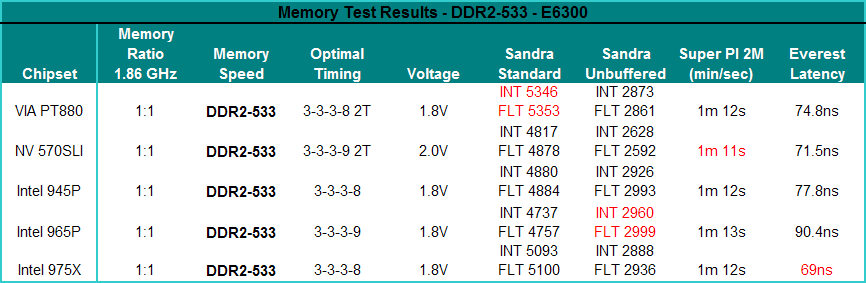
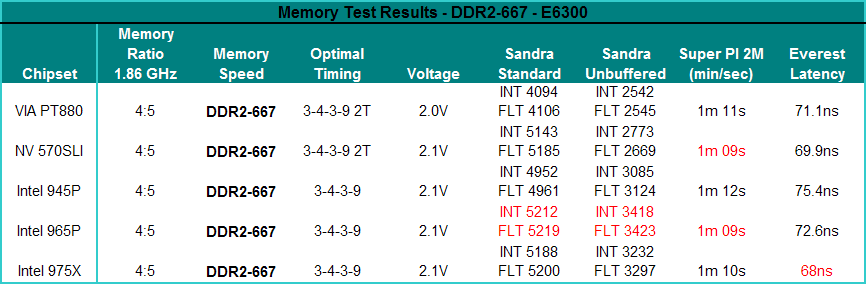
The Sandra bandwidth Unbuffered memory performance of the NVIDIA 570SLI chipset is the lowest of our group at DDR2-533 (1:1 ratio) and is second to last at DDR2-667 (4:5 ratio). The Unbuffered scores of the 570SLI chipset increase by 5% when going from DDR2-533 to DDR2-667 which equals the same increases as the 945P. However, both the P965 and 975X scale at a rate of approximately 15%. The buffered memory scores are very competitive with the other solutions but we usually find these scores do not correlate well with real performance in most applications. The 570SLI actually scores very well in our SuperPI 2M tests where it leads all solutions and places second in the latency tests.
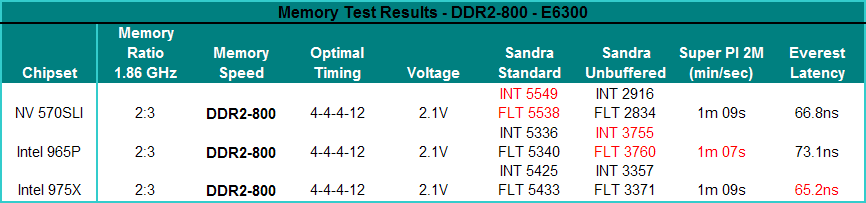
Our ASUS P5NSLI results are 28% lower in the Sandra Unbuffered test compared to the P965 chipset, although its buffered scores are higher than either Intel chipset. As we have been saying for years, however, the Buffered benchmark usually does indicate true performance capability in actual applications. The Unbuffered result turns off the buffering schemes, and we have found the results correlate well with real-world performance as we will see shortly. The huge difference in the Unbuffered scores could be generated by running the MCH at a much lower timing (overclocking the MCH) in the BIOS. We will investigate this further in an upcoming article. A very good guide to understanding how the chipset, memory, and CPU relate to each other on Intel chipsets is located here.
We are testing our motherboards at the fastest stable timings we can achieve and still pass our benchmark test suite. By increasing the memory voltage on the ASUS P5NSLI we were able to run our TwinMOS modules at 3-3-3-9 at DDR2-533. Using memory ratios our CPU speed remains the same at 1.86GHz in the test platform with memory speed being varied.
Our memory settings were derived from extensive stress testing with a variety of applications. While certain settings that allowed lower latencies worked well with certain applications, the final settings we arrived at had to work with all applications. All results on this page are generated with our E6300 and 7600GS component selection.
 |
 |
| Click to enlarge |
The Sandra bandwidth Unbuffered memory performance of the NVIDIA 570SLI chipset is the lowest of our group at DDR2-533 (1:1 ratio) and is second to last at DDR2-667 (4:5 ratio). The Unbuffered scores of the 570SLI chipset increase by 5% when going from DDR2-533 to DDR2-667 which equals the same increases as the 945P. However, both the P965 and 975X scale at a rate of approximately 15%. The buffered memory scores are very competitive with the other solutions but we usually find these scores do not correlate well with real performance in most applications. The 570SLI actually scores very well in our SuperPI 2M tests where it leads all solutions and places second in the latency tests.
 |
| Click to enlarge |
Our ASUS P5NSLI results are 28% lower in the Sandra Unbuffered test compared to the P965 chipset, although its buffered scores are higher than either Intel chipset. As we have been saying for years, however, the Buffered benchmark usually does indicate true performance capability in actual applications. The Unbuffered result turns off the buffering schemes, and we have found the results correlate well with real-world performance as we will see shortly. The huge difference in the Unbuffered scores could be generated by running the MCH at a much lower timing (overclocking the MCH) in the BIOS. We will investigate this further in an upcoming article. A very good guide to understanding how the chipset, memory, and CPU relate to each other on Intel chipsets is located here.
Originally published at https://www.anandtech.com/show/2068 (Wayback Machine).