
ABS Ultimate X9: Core 2 Extreme Hits a Speed Bump
- Posted in
- Systems
Noise and Power
We've looked at how the system performs, but another aspect of performance that needs to be addressed is the noise and power requirements. We tested the ABS system at stock, overclocked, and underclocked speeds in both idle and 100% load situations. We then measured power draw and noise levels created by the system. 100% CPU load was achieved by running two instances of Folding@Home along with the Splinter Cell: Chaos Theory benchmark. Performing video encoding or other CPU intensive tasks while playing a game will achieve a similar CPU load. We also provided a CPU-only stress test to show the difference between 100% CPU load and 100% CPU + GPU load. The CPU load was achieved by running the two Folding@Home instances without starting any games or other tasks.
Noise results basically showed no difference between any of the clock speeds, as all of the fans run at a constant RPM. However, the water cooling fan does come with the ability to control fan speed, so we set that to minimum for idle testing and maximum speed to show the difference in noise levels.
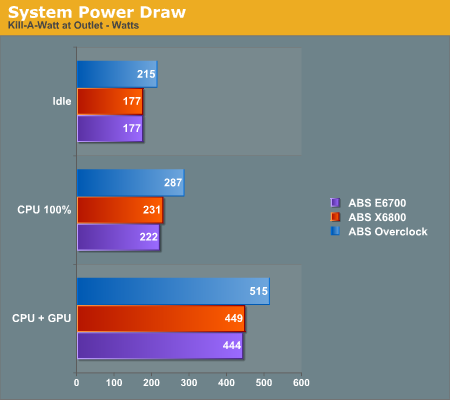
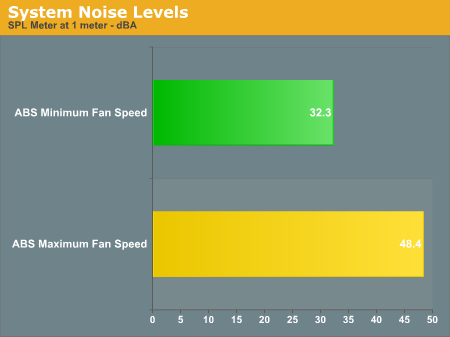
It should come as little surprise that increasing the CPU speed requires more power. However, the system is designed such that noise levels are relatively constant. This is certainly not a silent system, but neither is it terribly loud, even at maximum fan speed. At minimum fan speed, the system does become nearly silent, which is particularly impressive when you consider the amount of noise normally generated by two X1900 cards. If your typical use of the system will not place it under heavy stress, you can use the fan speed control to dramatically lower the noise levels. We would recommend cranking up the fan speed for gaming sessions, however, as the GPUs and CPU will definitely put out a lot of heat. Besides, with all the noise from your speakers, the importance of reducing fan noise is greatly diminished.
The power results are interesting, as they show both the efficiency of the Core 2 CPU as well as the inefficiency of the X1900 GPUs. Going from 100% CPU load to 100% CPU + GPU nearly doubles the total system power draw. In other words, the two GPUs consume as much power together as all the remaining components. Needless to say, even at the heavily overclocked setting, power requirements are still lower than your typical NetBurst system, but we're now waiting for energy efficient GPU designs to go along with the lower power Core architecture.
Another interesting aspect of the power requirements for the Core 2 Extreme is that EIST (Enhanced Intel SpeedStep Technology) was able to function even at overclocked settings. The default CPU speed is 11 x 266, or 2.93 GHz. EIST allows the CPU to run at a 6X multiplier, resulting in a clock speed of 1.6 GHz. At the overclocked settings, the CPU runs at 3.5 to GHz under load, but drops to 1.92 GHz when idle. Now even overclockers can take advantage of energy-saving technologies. In case you were wondering, the idle power results for the "E6700" and X6800 are identical because the CPU throttled down to 1.60 GHz in both cases.
We've looked at how the system performs, but another aspect of performance that needs to be addressed is the noise and power requirements. We tested the ABS system at stock, overclocked, and underclocked speeds in both idle and 100% load situations. We then measured power draw and noise levels created by the system. 100% CPU load was achieved by running two instances of Folding@Home along with the Splinter Cell: Chaos Theory benchmark. Performing video encoding or other CPU intensive tasks while playing a game will achieve a similar CPU load. We also provided a CPU-only stress test to show the difference between 100% CPU load and 100% CPU + GPU load. The CPU load was achieved by running the two Folding@Home instances without starting any games or other tasks.
Noise results basically showed no difference between any of the clock speeds, as all of the fans run at a constant RPM. However, the water cooling fan does come with the ability to control fan speed, so we set that to minimum for idle testing and maximum speed to show the difference in noise levels.
The power results are interesting, as they show both the efficiency of the Core 2 CPU as well as the inefficiency of the X1900 GPUs. Going from 100% CPU load to 100% CPU + GPU nearly doubles the total system power draw. In other words, the two GPUs consume as much power together as all the remaining components. Needless to say, even at the heavily overclocked setting, power requirements are still lower than your typical NetBurst system, but we're now waiting for energy efficient GPU designs to go along with the lower power Core architecture.
Another interesting aspect of the power requirements for the Core 2 Extreme is that EIST (Enhanced Intel SpeedStep Technology) was able to function even at overclocked settings. The default CPU speed is 11 x 266, or 2.93 GHz. EIST allows the CPU to run at a 6X multiplier, resulting in a clock speed of 1.6 GHz. At the overclocked settings, the CPU runs at 3.5 to GHz under load, but drops to 1.92 GHz when idle. Now even overclockers can take advantage of energy-saving technologies. In case you were wondering, the idle power results for the "E6700" and X6800 are identical because the CPU throttled down to 1.60 GHz in both cases.
Originally published at https://www.anandtech.com/show/2066 (Wayback Machine).